
Choose Skill Types and Creation Methods
Skill types
The Enterprise Skill Center in the Admin Console centrally maintains the organization's Skills. Each Skill card is labeled:
- Official Built-in: General Skills provided by WinNexo, such as Word Documents, Meeting Summaries, and Lead Discovery.
- Custom: Skills created by the enterprise, with configurable publication scope and usage authorization.
- Draft: Unpublished Skills being edited, hidden from end users.
Cards also display cumulative invocation counts for both built-in and custom Skills, helping identify which Skills are being used.
Two creation methods
Click New Skill and choose one of the following methods:
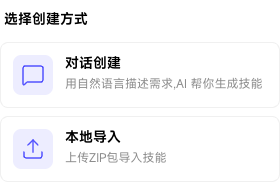
Create through Chat (recommended)
Describe your requirements in natural language and let AI generate the Skill. For example: “I need a Skill that takes a customer name, finds visit records, recent orders, and sales from Analysis Views, and produces a customer summary.” AI generates a runnable workflow draft for you to refine manually.
Import Locally
Upload a ZIP package to import a Skill. This suits migrations from other environments or teams and packages delivered by external vendors. If a Skill with the same name exists, follow the page instructions to overwrite and update it.
Preview and confirm an import
After uploading a ZIP package, the system parses it and shows a preview with the Skill name, description, parameters, and other information. Check the details, then click Confirm Import.
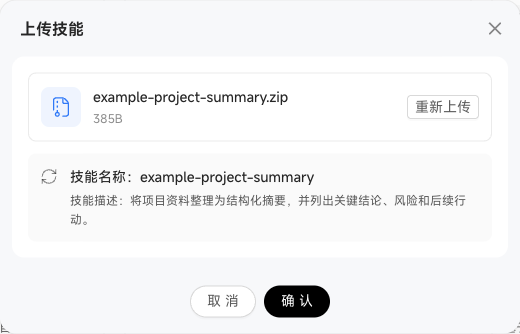
If a Skill with the same name exists, the preview reports the conflict and offers Overwrite and Update. Overwriting preserves historical versions and replaces the currently active version with the new one.