
Changelog
Highlights
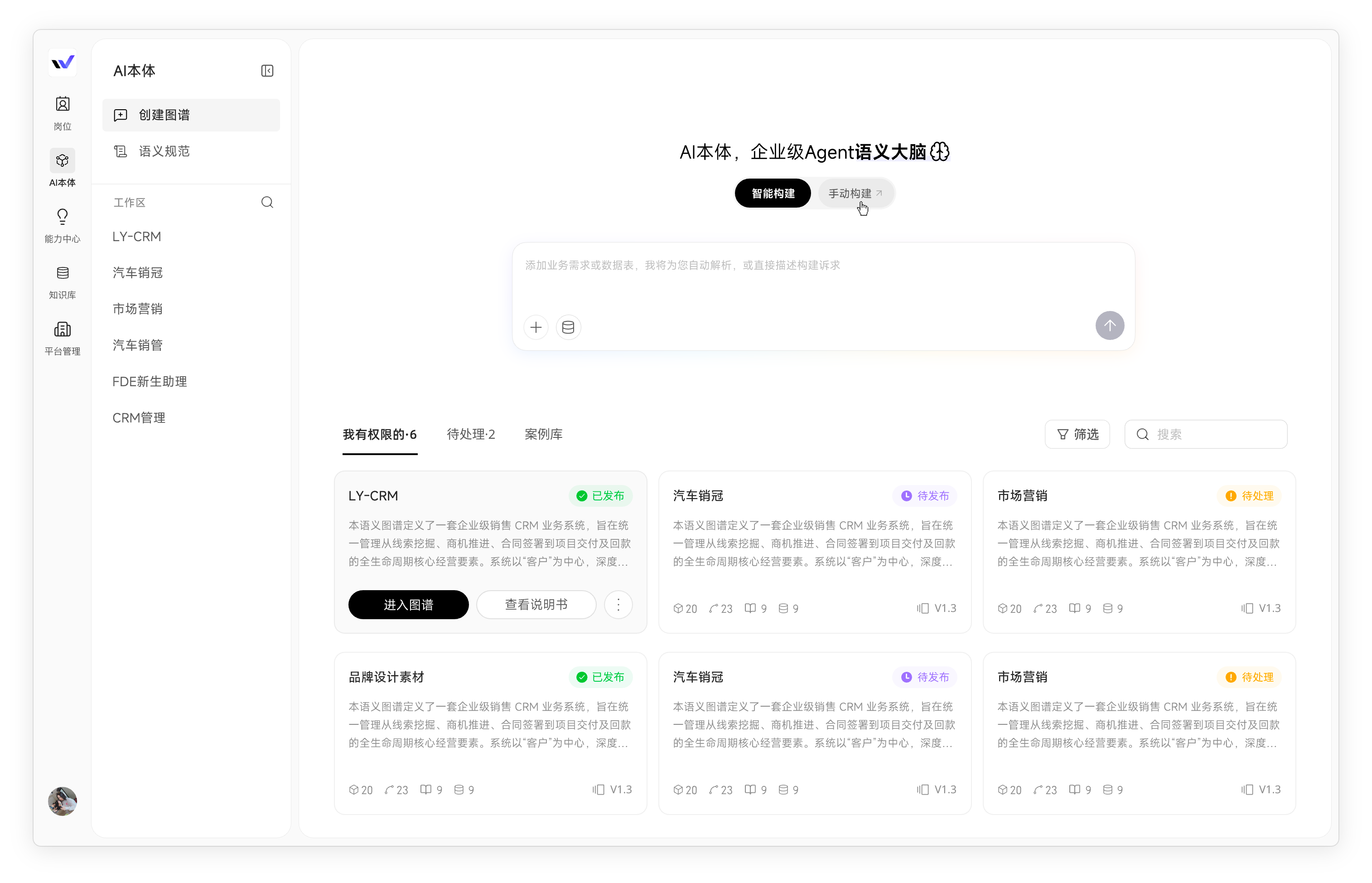
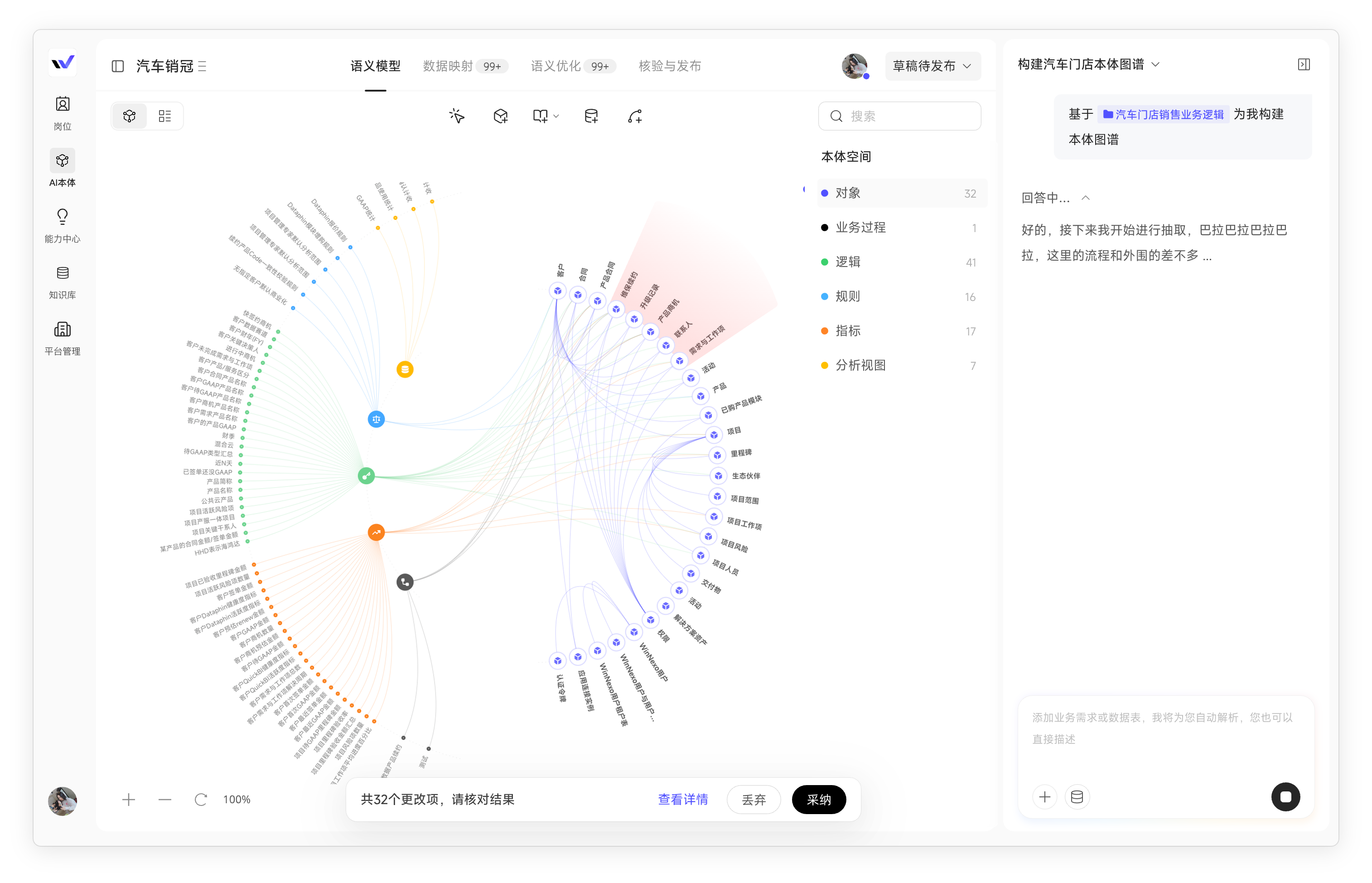
- The Semantic Center becomes Ontology: Describe business relationships in natural language to generate an ontology. Maintain logical definitions and physical mappings separately, so changes to business definitions do not require data configuration changes, and switching data sources does not require redefining business rules. Drafts and versions are managed across the space, with a redesigned interaction flow.
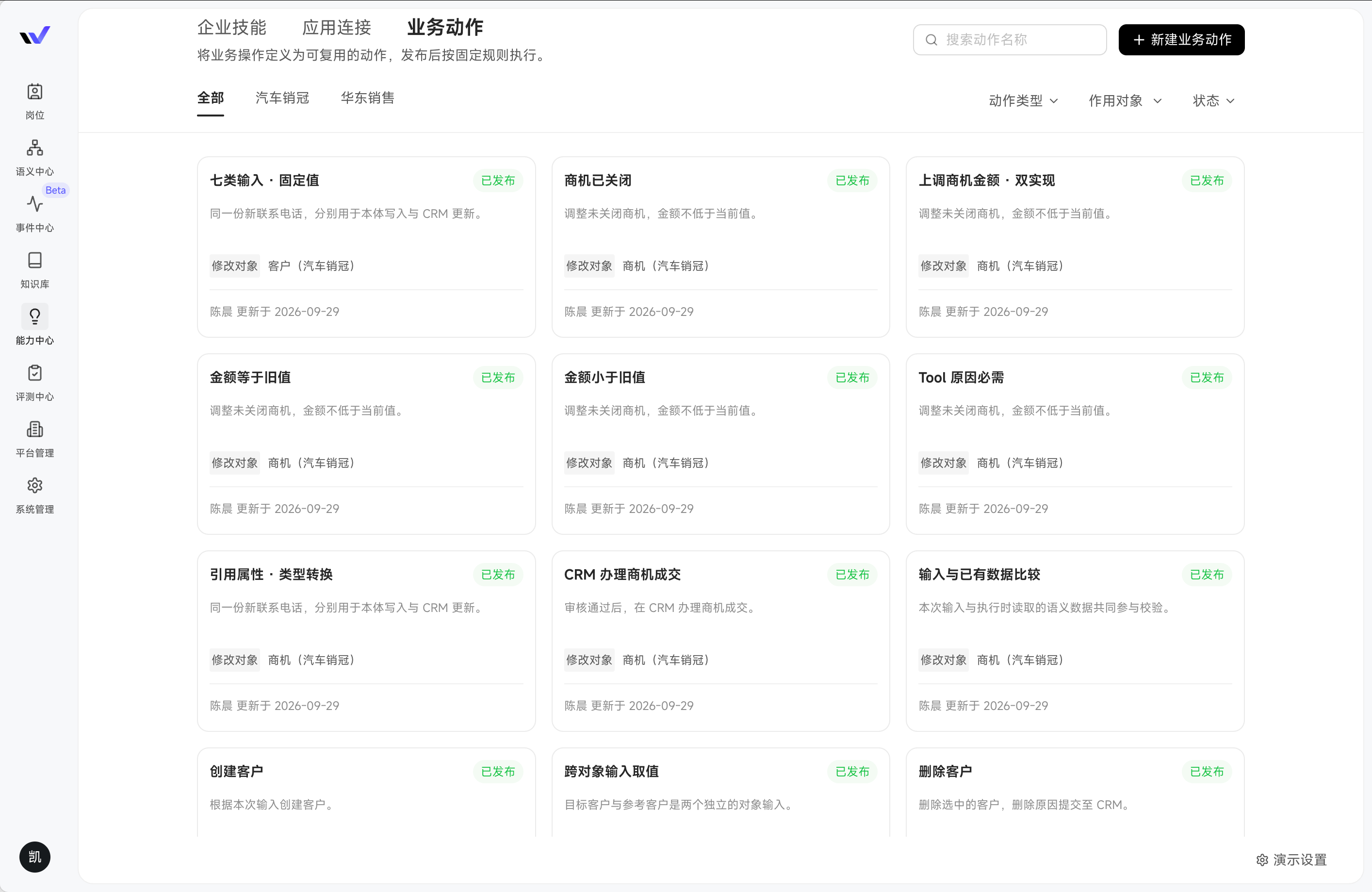
- Business Actions let Digital Workers carry out business operations: Define the scope, conditions, and permissions for critical business changes in advance, then publish them. Requests in chats and triggers from automation tasks use the same definition, keeping data changes controlled and business rules consistent.
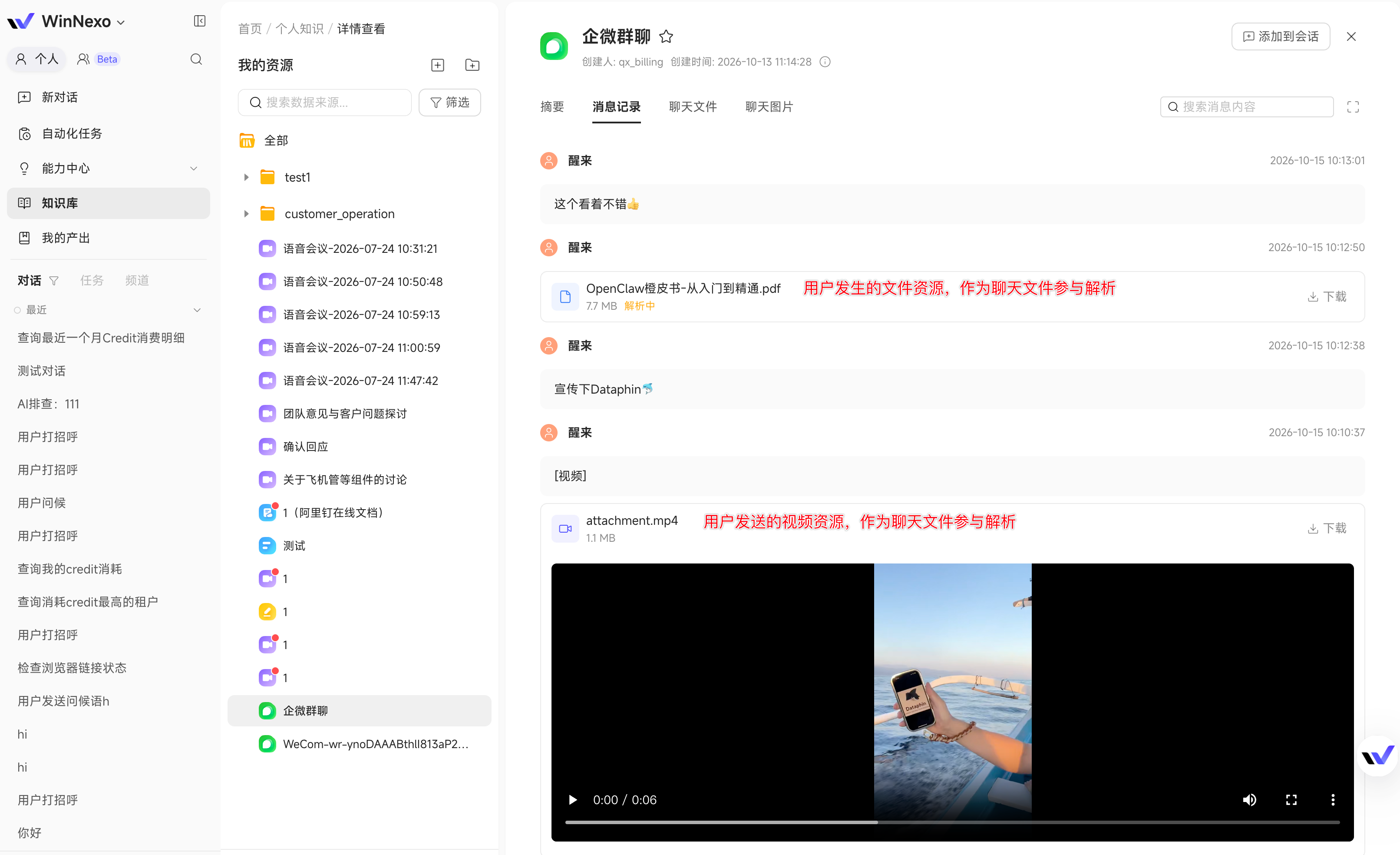
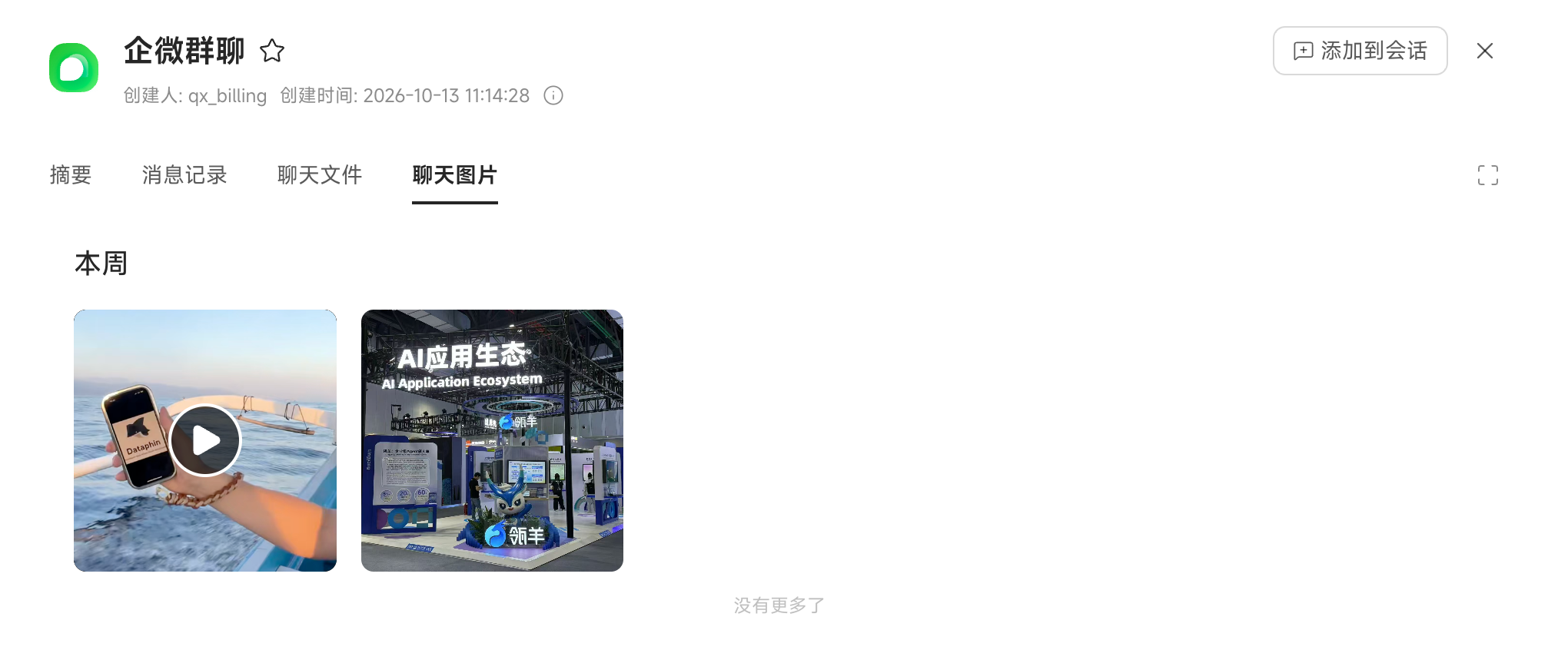
- Non-text WeCom messages can now be parsed: Collection previously parsed only text. Images, voice, videos, files, and mini program messages can now be parsed individually, making quotations and demo videos shared by customers available for retrieval and Q&A.
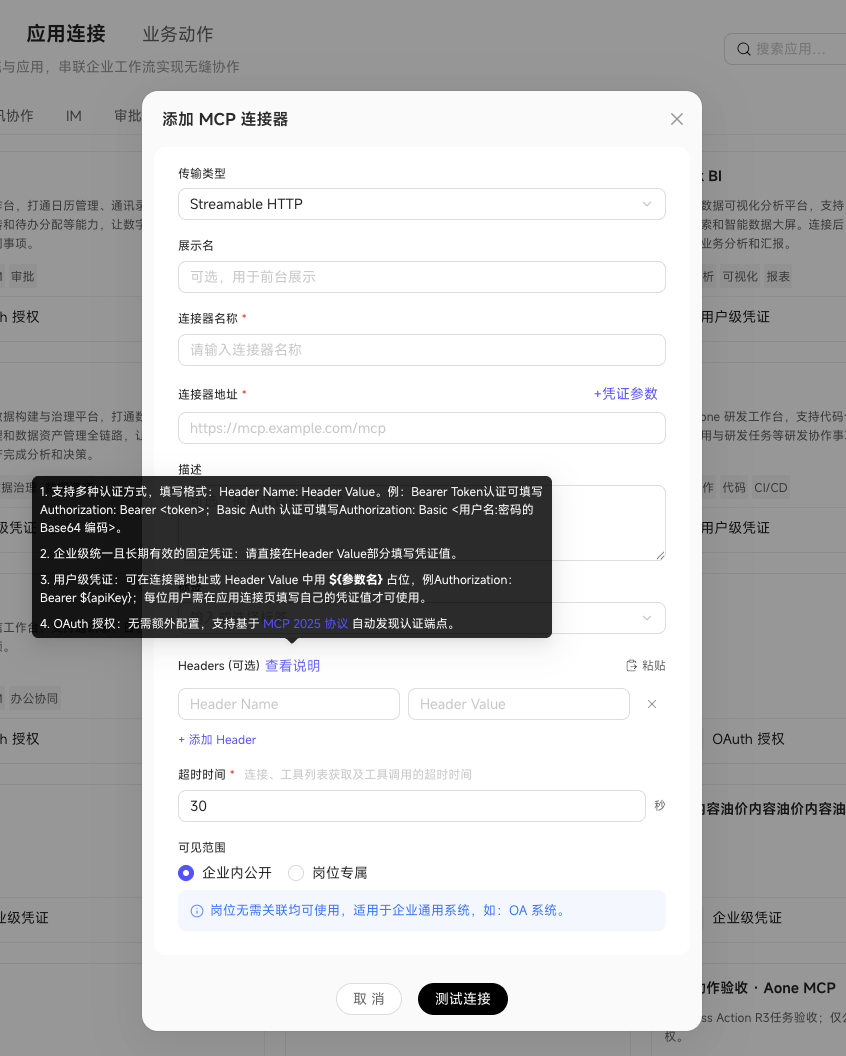
- App connections add custom user credentials: For internal systems that issue individual keys without supporting OAuth, administrators define credential parameters and their request locations once. Members enter their own values, reducing configuration effort.
This Release's Focus: Business Actions Let Digital Workers Follow Your Rules
The new Business Actions in the Capability Center let teams define and publish operational rules in advance for Digital Workers to follow.
- Bounded operations: Specify the business object, required information, and permitted changes.
- Checks before execution: Verify permissions and business conditions. Request missing information first; do not submit if conditions are not met.
- Reusable rules: Use the same published action in chats and automation tasks.
How to use Business Actions:
- Define the rules for marking an opportunity as won
For example, the team requires an opportunity to be approved and in the negotiation stage before it can be marked as won, with a reason provided. An administrator defines a “Mark Opportunity as Won” action with the checks, required information, and updates. Once published, everyone follows the same rules.
2. Act in a chat: state the request and confirm before changes are made
After the contract is signed, a salesperson says: “This renewal opportunity is won. The reason is that the customer confirmed the annual renewal.”
The Digital Worker matches the published action, finds the target opportunity, checks permissions, information, and conditions, then shows the proposed changes. Only after the salesperson confirms does it mark the opportunity as won. If conditions are not met, it explains why without making changes.
- Scenario 1: Update an opportunity after a visit
After a customer visit, the salesperson confirms that the project has entered the proposal stage and the expected contract value is now RMB 800,000.
The salesperson can say: “Move this opportunity for Customer A to the proposal stage and change the expected contract value to RMB 800,000.”
Using the published “Update Opportunity” action, the Digital Worker locates an opportunity the user is allowed to operate on and checks the proposed changes and execution conditions. If several opportunities match, it asks the salesperson to identify the right one. It updates the record only after validation and confirmation.
- Scenario 2: Mark an opportunity as won after signing
The annual renewal contract has been signed, but the CRM opportunity is still in negotiation.
The salesperson can say: “Customer A has signed the annual renewal. Mark this opportunity as won, with the reason that the customer confirmed the renewal.”
If the team has published a “Mark Opportunity as Won” action and connected the corresponding CRM tool, the Digital Worker checks the opportunity, permissions, and win conditions. It asks for missing information first. After the user confirms the change, it executes the operation in the CRM.
3. Let tasks handle routine changes using the same rules
Automation tasks can also invoke published actions. Each opportunity is still checked against the action's permissions and conditions, and the execution result is recorded. There is no need to define a separate set of rules for automated processing.
The Semantic Center Becomes Ontology: Separate Definitions and Mappings, Manage Versions Together
The Semantic Center is renamed Ontology. Teams can organize business objects such as customers and opportunities and their relationships more easily, while maintaining them collaboratively in one ontology space:
- Define ontologies in natural language: Describe business objects and relationships to generate an ontology definition with system assistance. Conversational modeling replaces configuring each item individually, making it easier to get started.
- Separate logical definitions and physical mappings: Save and maintain business definitions independently from data source mappings. Business rule changes do not affect data configuration, and data source changes do not alter business definitions.
- Manage drafts and versions centrally: Ontology drafts and version history are shared across the entire space instead of belonging to individuals, keeping team modeling versions aligned.
Knowledge Base: More Complete WeCom Chat Collection
- Expanded WeCom message parsing: WeCom collection already covered multiple message types but parsed only text. Images, voice, videos, files, and mini program messages are now parsed individually. Customer quotations, demo videos, and mini program cards shared in groups can be retrieved and cited in Q&A instead of remaining only raw collected messages.
- Card view for the knowledge list: Switch to cards to browse image and screenshot thumbnails without opening each item.
- Knowledge Base folder descriptions: Add a description when creating a folder. Digital Workers use it to narrow retrieval and find relevant materials more quickly and accurately.
App Connections: Custom User Credentials
- The problem: Some enterprise systems issue a separate access code to each employee but do not support OAuth redirect authorization. These systems were previously difficult to use through app connections.
- What's new: Administrators can configure which credentials members must provide and how they are submitted to the system. Administrators set shared enterprise information; members enter their individual values.
- How members use it: After the connection is published, members enter their own access codes in App Connections. They do not have to share credentials, and can update expired credentials when prompted.
- Example: An enterprise CRM gives each salesperson an access code. After an administrator configures the connection, each salesperson enters their code so Digital Workers can call the CRM using the appropriate credentials.
Data and Open Integration: For Developers and Platform Administrators
These capabilities are available to enterprise integration developers through OpenAPI and CLI.
- Memory management through OpenAPI / CLI: Manage memory through API calls and the command line. Enable or disable automatic memory collection and choose whether to clear existing automatic memory when disabling it. Replace or clear manual memory, and clear automatic memory by type or in full. Both personal memory and memory in a specified Collaboration Space are supported, letting you manage what Digital Workers retain from your own workspace.
- Collaboration Space workflows through OpenAPI / CLI: Invoke workflow capabilities through API calls and the command line to integrate workflow creation and run management into your enterprise platform.
- Data source support extends to MaxCompute: Define partition queries using conditions in an ontology or scan entire tables, giving more control over queries on very large tables. Extended attribute objects are not supported in this release.
Other Updates
- Resource handling when members are deleted: Removing a tenant or Collaboration Space member automatically cleans up or transfers associated resources according to defined rules. Departures and role changes no longer leave unmanaged data, and collaborative content retains a clear owner without manual cleanup.
Try it: Ask an administrator to define a business action for your team's most frequent business change. Then say in a chat, “This opportunity is won because the customer confirmed the renewal,” and see the steps from request to completion.
Highlights
- Automation tasks support enterprise templates — When sales staff create customer follow-up summary tasks, they can use templates configured by administrators instead of building each task from scratch.
- Automation tasks can be distributed to individuals — A store manager can configure and distribute daily morning and evening meeting summaries. Staff can turn them on to receive summaries each day, while the manager maintains future changes centrally.
- Collaboration Space to-dos and @mentions — Receive notifications in chat tools when you need to add customer information or approve a campaign plan, then open the relevant page from the to-do link.
- Feishu meeting ingestion — Collect existing summaries and transcripts from customer meetings into the Knowledge Base to review customer requirements and conclusions afterward.
- Shared Knowledge Base self-improvement — Configure review tasks for Collaboration Spaces and enterprise Knowledge Bases to identify conflicting information and propose improvements. Approve changes before they are applied to keep external messaging consistent.
Automation Tasks
- Enterprise task templates: Administrators can configure daily customer follow-up summaries and campaign reports as enterprise templates. Members can select a suitable template for a Digital Worker when creating a task, avoiding repeated setup.
- Central task distribution: Administrators can configure and distribute customer callback reminders and campaign reviews. Members enable them as needed, while the creator maintains the content centrally so the team follows the same requirements.
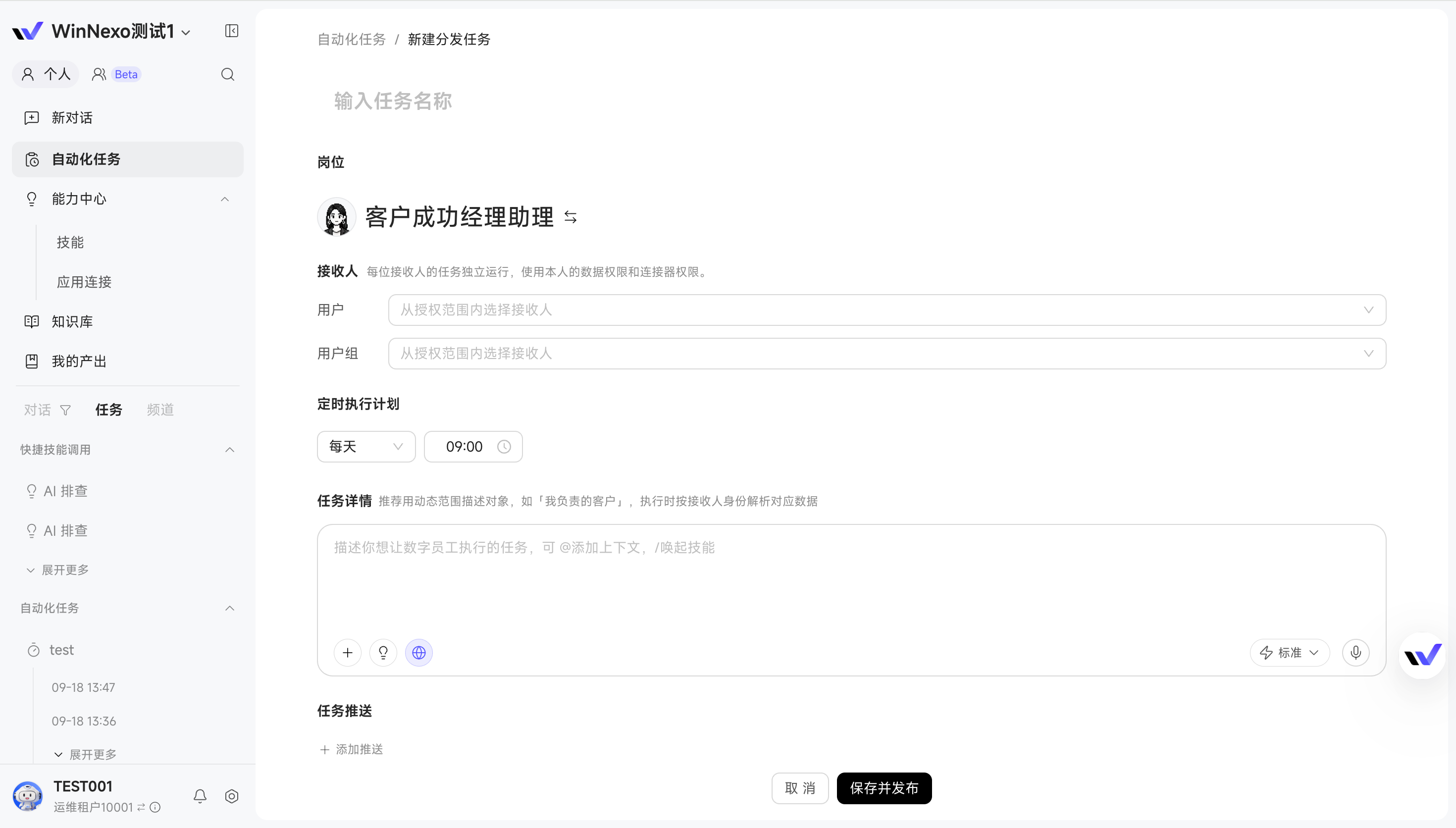
- Improve task descriptions: When configuring customer follow-up summaries, daily campaign reports, or other automation tasks, click the optimization button at the bottom right of the task details input to refine the description, clarify execution requirements, and reduce misunderstandings.
Collaboration Space
- Automation tasks can create workflow mode work items: When scheduling recurring sales meeting preparation or campaign reviews in a Collaboration Space, choose free mode or workflow mode with predefined steps to avoid repeating the process instructions each time.
- Work item notifications: Receive to-do and subscribed @mention notifications in chat tools when customer information or campaign approval is needed. Follow a to-do link to respond, or filter unread @mentions in the work item list to track related work.
:::
Tip: The notification bot only sends reminders and does not answer questions. Open Collaboration Space to-dos through their links in WinNexo.
:::
Knowledge and Resources
- Unified knowledge ingestion sources: Personal Knowledge Bases, Collaboration Spaces, and enterprise Knowledge Bases use the same ingestion sources. Collect customer group chats, shared meeting notes, and other materials directly into a team space or enterprise Knowledge Base for centralized management.
- Feishu meeting ingestion: Collect existing summaries and transcripts from customer meetings or campaign reviews into the Knowledge Base to check requirements, conclusions, and discussion details afterward.
- Shared Knowledge Base self-improvement: Configure a task such as “Check whether all proposals for this campaign use the same discount rules” for a Collaboration Space or enterprise Knowledge Base. The system identifies conflicting statements and suggests changes for your approval, helping keep external messaging consistent.
Admin Console
- Evaluation Center upgrade: Review answers against a test case set. AI helps interpret reports and diagnose problems, then drafts changes to business definitions based on suggestions selected by the administrator.
- Expanded intelligent troubleshooting: Diagnose failures across personal and Collaboration Space automation tasks, collaborative work items, app connections, and knowledge uploads, in addition to personal chats.
- Semantic optimization: Faster Dataphin semantic integration and more accurate AI recommendations for business definitions reduce the time administrators spend organizing and correcting concepts such as customers and opportunities.
Try it: Set up the team's daily customer follow-up summary as an automation task template, such as “At 9 a.m. each day, summarize yesterday's follow-ups and list customers to call back today.” Once an administrator configures it, sales colleagues can use it directly when creating tasks, saving setup work and keeping the team on the same follow-up process.
Highlights
- Collaboration Space workflows move work through a complete process — For a major deal, sales needs to fill in requirements, presales needs to prepare a solution, and everyone needs to confirm the delivery scope. Define these steps in a template: Digital Workers prepare the materials, people review them through to-dos, and approved deliverables feed into the next step, reducing repeated requests for materials and explanations of context.
- Quick Q&A supports web search — Before meeting a customer, look up their latest business developments or public news directly in Quick Q&A. Catch up on context and find a starting point for the conversation.
- Knowledge Base management improvements — Clean up older materials in bulk, find group chat images by thumbnail, and use summaries to check document changes, making organization and review easier.
In Focus: Collaboration Space Workflows Move Multistep Work Forward (Beta)
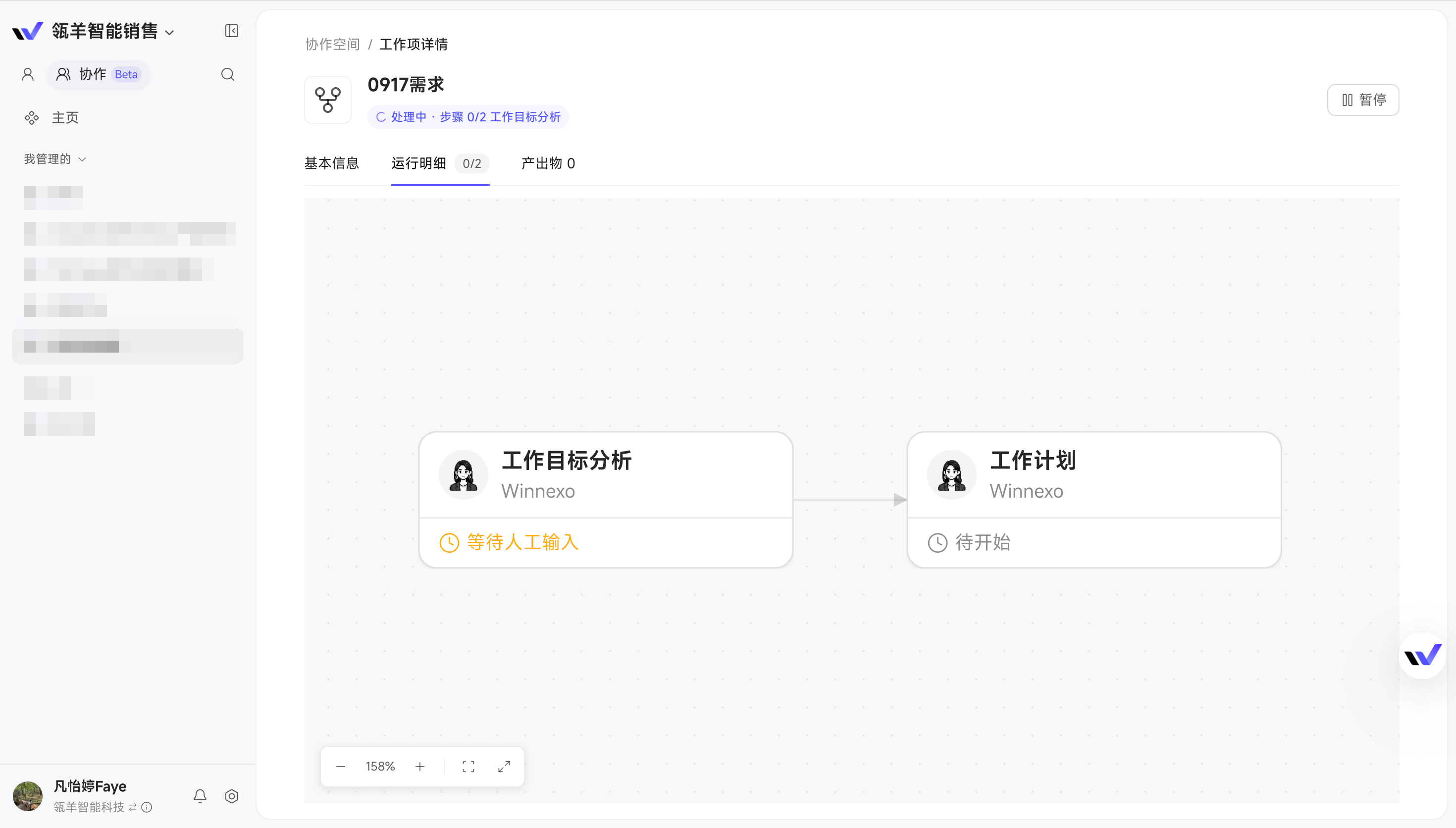
When people and Digital Workers need to complete work together, first define a workflow template, then create and run a process from it. This release brings free mode and workflow mode together in work items, with workflow run management, to-do creation, and feedback. Teams can discuss open questions and follow a defined process.
To use it, turn recurring work into a template, then start a process for a specific item. Respond to the to-dos generated by the workflow; authorize the relevant connector first if a Digital Worker needs to use an external application.
Scenario 1: B2B opportunity management—turn your team's sales approach into a reusable process
For a major deal, sales needs to organize customer background, complete requirements and budget information, and coordinate the solution, SOW, and contract. Teams often need repeated explanations of what materials each step requires and when someone needs to approve them.
When creating a template, select AI-assisted generation and describe the sales process in natural language to generate a draft. For example: “Start with Opportunity 360, organize customer requirements, project initiation, and budget, then move on to the solution, SOW, contract, and decision-making chain, with human approval at key steps.” Review and adjust the steps, then save the template for the team to reuse.
Each step specifies its inputs, processing requirements, human involvement, deliverables, and validation criteria. For example, after a customer conversation, use the meeting notes as input. A Digital Worker organizes requirements and open questions, then asks the relevant people through a to-do to add information and confirm their views. The resulting requirements list feeds into the solution and SOW preparation. New opportunities can follow the same workflow, reducing repeated explanations and scattered feedback.
:::
Value: Turn your team's sales experience into concrete deliverable requirements for each step. Digital Workers know what to do, people know what to approve, and new opportunities can follow the same approach.
:::
Scenario 2: From requirements on Sunday to code delivery on Thursday, every step has a deliverable
Each week, the team writes requirements, reviews them, and moves into development. Build a workflow around “prepare requirements on Sunday, complete the engineering review on Monday, and deliver the code package on Thursday,” with different Agents and team members passing deliverables between steps:
- Sunday: The requirements Agent prepares the materials: Generate prototypes and a PRD (Product Requirements Document) from this week's requirements, then deliver them to the product owner for review.
- Human review confirms the direction: The product owner checks business logic and prototype interactions and provides feedback. The requirements Agent incorporates it to produce reviewed prototypes and a PRD.
- Monday: People review the Agent's outputs with engineering: The product owner uses the prototypes and PRD to confirm implementation scope, technical constraints, and acceptance requirements with engineering, delivering the approved requirements and development task list.
- Tuesday through Thursday: The development Agent implements the reviewed requirements: Develop against the approved requirements and task list, then deliver a code package on Thursday for the engineering team to validate.
Each step makes clear what to deliver and who reviews it. Approved deliverables become inputs to the next step, connecting prototypes, the PRD, review results, and code packages in a single workflow.
:::
Value: Establish a repeatable weekly rhythm from requirements to development. Agents produce the outputs, people review key results, and every step provides deliverables that can be checked and handed over.
:::
Move work forward in a Collaboration Space
- Choose free exploration or a workflow when creating a work item: If requirements are still unclear, discuss them with Digital Workers and colleagues. When the delivery goal is clear, choose a workflow, enter the delivery requirements, owner, and supporting materials, and proceed step by step.
- View workflow progress and outputs in one place: After creation, click “Schedule” to view step statuses and execution details in the run details, and view deliverables under outputs. Track work without asking for individual progress updates.
- Automatically generate to-dos when information or confirmation is needed: For example, if the background or acceptance criteria are unclear while preparing a PRD, the Digital Worker collects the questions into a to-do. Add the missing details and click “Send and Continue,” or transfer it to a colleague, to feed human input back into the workflow.
Chat and Tasks
- Quick Q&A supports web search: When preparing for a customer visit and you need the latest background, ask “Find this company's recent public news” to search the web directly in Quick Q&A.
- Attribution analysis helps explain data query results: If a review shows a drop in signed contract value, follow up with “Why is this month's signed contract value lower than last month's?” Attribution analysis helps identify reasons for the change.
- External notifications (webhooks) can include additional information and support signing: For example, a customer system can include the customer name, requirements, and recent communication records in a notification, so the Digital Worker can generate follow-up suggestions. Enable signing as needed to verify the notification's source and content integrity.
Knowledge and Resources
- Clean up older materials in bulk: Select and delete multiple personal, enterprise, or space resources at once when organizing outdated proposals and earlier requirements, keeping frequently used materials manageable.
- See what changed in knowledge at a glance: The system summarizes changes automatically and shows who made them and when, making it easy to review updates. This currently supports text-based knowledge; group chats, audio, and video are not yet included.
Concurrency and Credit Quota Management
- Configure concurrency and Credit quotas separately for individuals and Collaboration Spaces: Administrators can set the number of simultaneous tasks and usage quotas separately, reserving resources for key projects while budgeting for everyday personal use and preventing a small number of members or projects from consuming too many resources.
- Allocate concurrency proportionally across individuals, spaces, and task types: When a team generates reports in bulk, reserve resources for personal chats and adjust the concurrency ratio between conversations and tasks to reduce waiting for everyday queries during concentrated task runs.
Administration
- Create semantic objects with separate creation permissions: When maintaining business records such as customers and opportunities, create new objects as well as modify existing attributes. Administrators can control who can create objects based on team responsibilities.
- Import team members in bulk: When onboarding a new team, import members together and match them to external systems using employee codes, phone numbers, and other information, reducing individual maintenance.
- Customize the name and logo: Enterprises can customize the tenant name and logo to help employees recognize it.
- Connect external data managed in Doris: Connect external tables managed through Doris to add data sources for business analysis.
Commercialization and Purchasing
- Coordinate resources across multiple tenants: Private deployments can configure model types and allocate account, concurrency, and Credit resource packages to different tenants. Accounts and concurrency come from a shared resource pool, and all tenants have the same validity period. Changing configured model types, canceling subscriptions, and downgrading are not currently supported.
Try it: Start with an active opportunity. Define the steps for organizing customer requirements, the deliverables, and the human approval requirements in a workflow template, then create and run a work item to see how Digital Worker outputs, human reviews, and preparation of subsequent materials connect.
Highlights
- Chat now offers Quick Q&A and Deep Work modes — Use the lightweight mode to check a number or ask about a customer for noticeably faster responses. When you need Skills or a multistep task, branch into Deep Work and keep using the conversation so far.
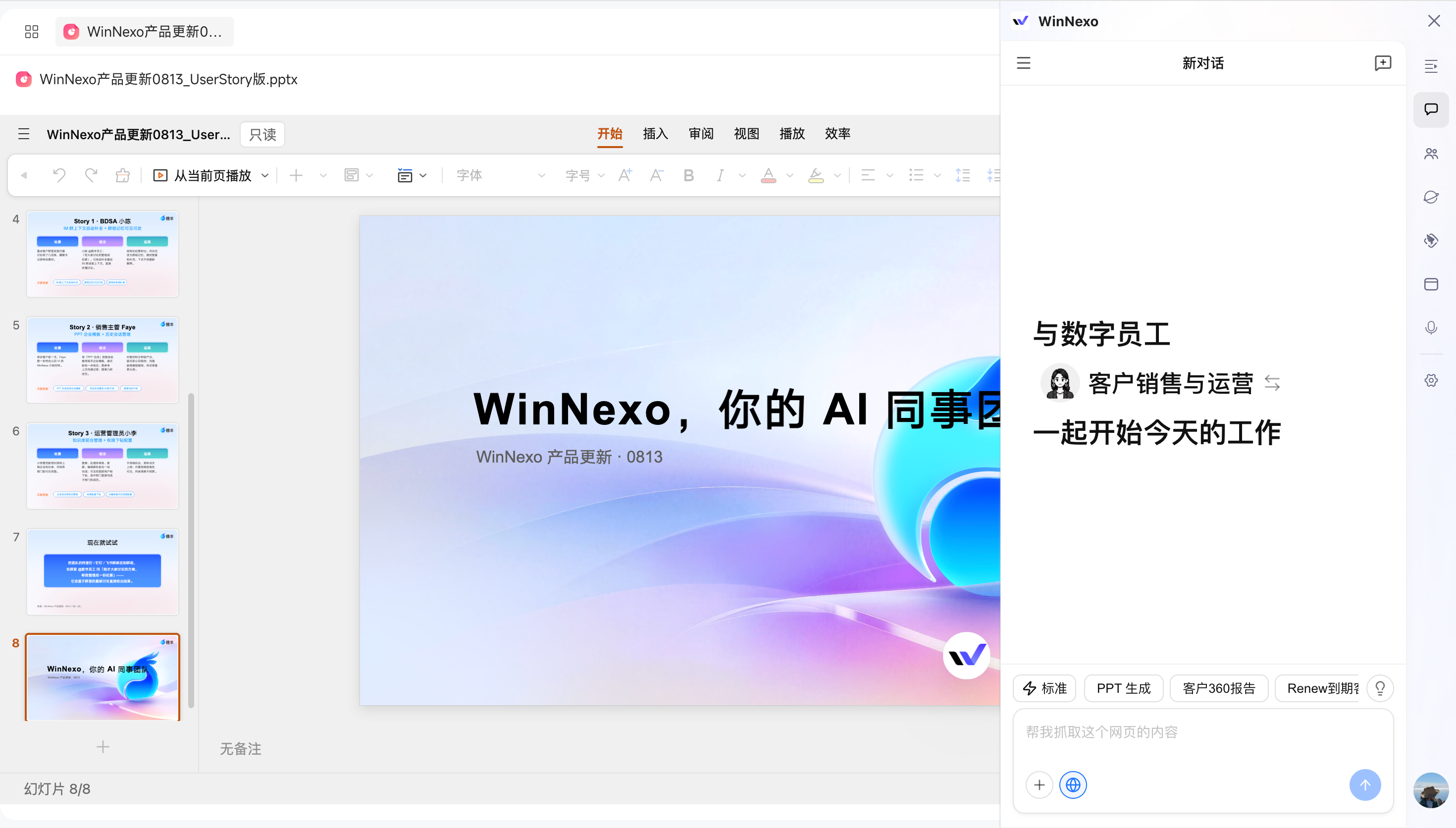
- The browser extension supports Chat and automatically detects browser connections — While browsing a customer's website or researching an industry, ask the extension to “Summarize the customer background from this page.” It can collect the current page's information or operate the page as requested, without manually pasting links or switching interfaces.
- Semantic modeling supports standards validation and Dataphin integration — Teams can check naming, duplicates, and conflicts against shared rules to keep modeling consistent. Generate semantic models from existing Dataphin data structures to reduce reconfiguration.
- Add Skills to groups by copying personal Skills or creating them directly: After a sales team's weekly customer follow-up meeting, members need to summarize customer progress and next steps in a consistent format. Copy a personal post-meeting summary Skill into the group, or create one there, so everyone follows the same requirements.
In Focus: Two Chat Modes—Quick Q&A and Deep Work
Previously, every question went through the complete workflow: identifying objects, loading Skills, and connecting connectors. Even asking “How much did this customer pay last month?” could take a while.
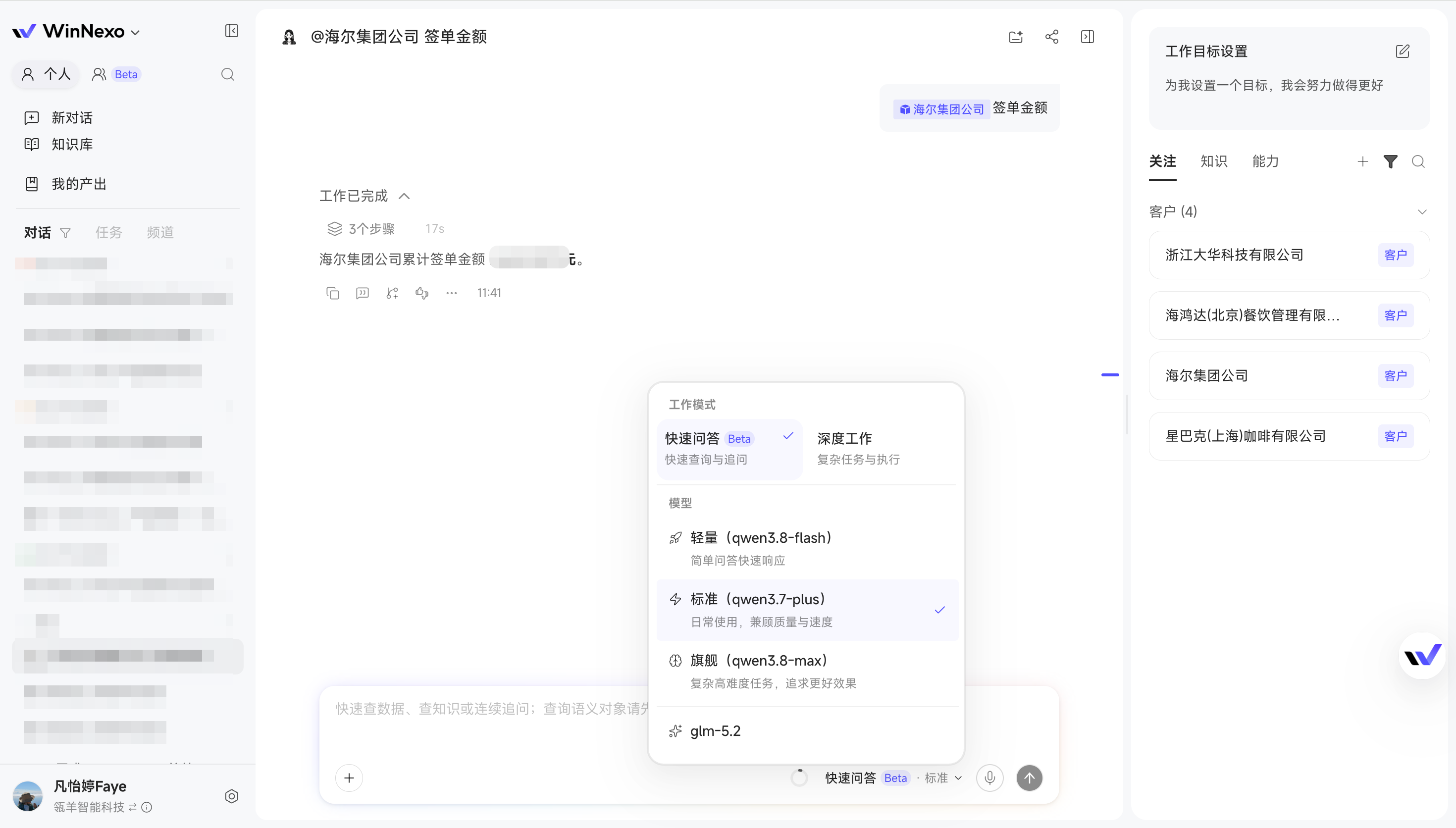
This release introduces Quick Q&A (Beta) and Deep Work. The lightweight Quick Q&A mode handles data queries and information retrieval without loading Skills or connectors, providing much faster responses. When you need to invoke Skills or complete a multistep task, branch into Deep Work and continue from the results you already have.
Catch up on context before answering an unexpected customer call
A salesperson receives a customer call downstairs and needs to respond within a minute. In Quick Q&A, ask for the customer's recent opportunity progress and the conclusions from the last visit. Without multiple rounds of reasoning or waiting for Skills to load, the answer arrives quickly enough to keep the conversation going.
:::
Value: Reduce the effort of “just checking something” to almost zero, making it practical even in unexpected situations.
:::
Switch modes within the same conversation
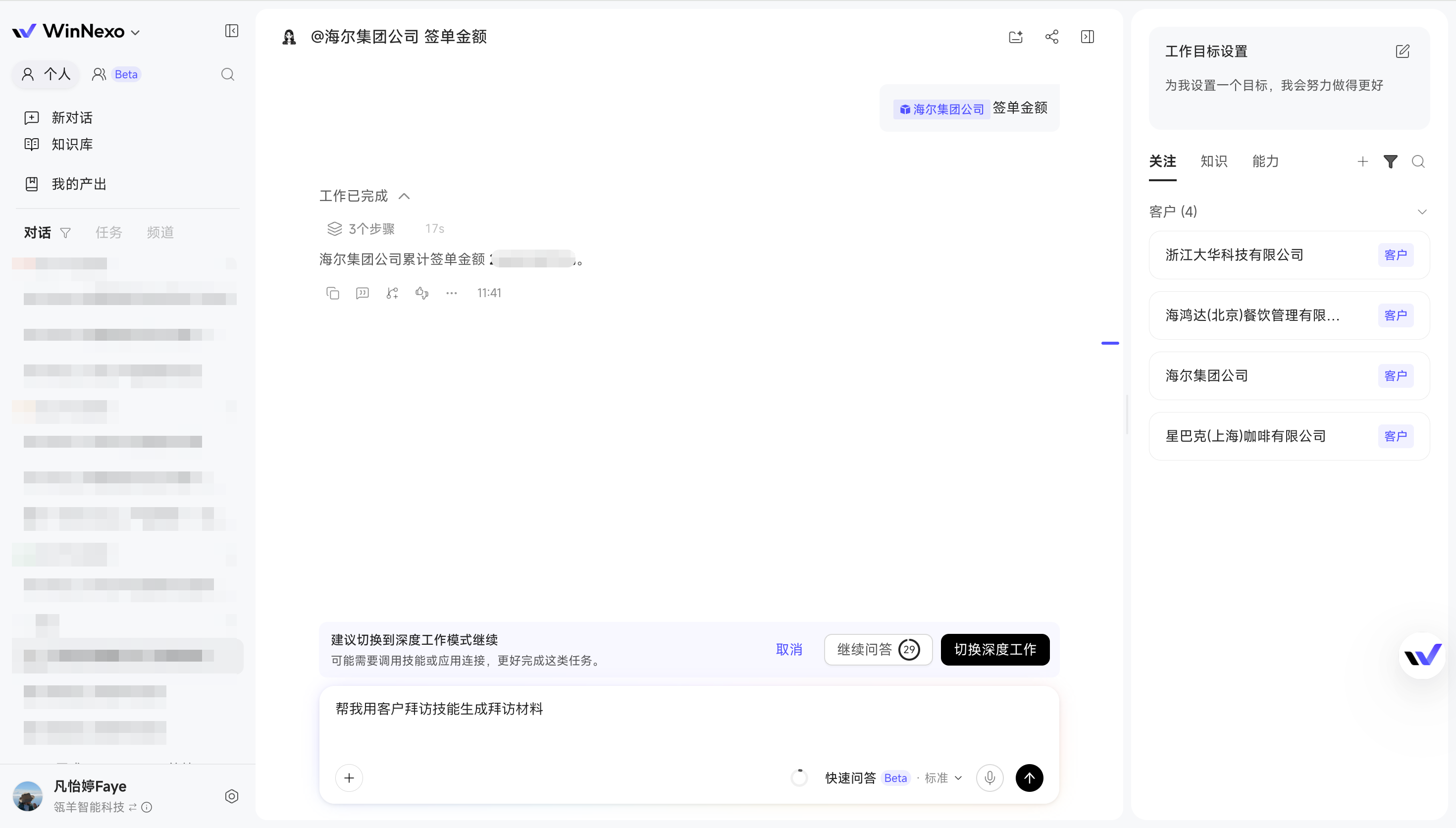
After using Quick Q&A to understand a customer's situation, you may want a Digital Worker to prepare a visit briefing. There is no need to start over and repeat the background: save a separate copy of the conversation to continue, choose Deep Work, and bring the context along. If you ask to “Use the customer visit Skill to prepare the materials,” the system also prompts you to consider switching modes.
:::
Value: Use quick answers and deep work as needed within a single task.
:::
Chat Experience
- View counts for share links: When you send a link or document to a group you manage, see how many people have viewed it. Measure the reach of shared information instead of guessing whether anyone has read it.
- Use Chat directly in the browser extension: Chat while researching customers or reading industry materials, without switching interfaces or copying and pasting links.
:::
Tip: Download and reinstall the browser extension from Connectors, then update it in your browser's extension manager.
:::
Knowledge and Resources
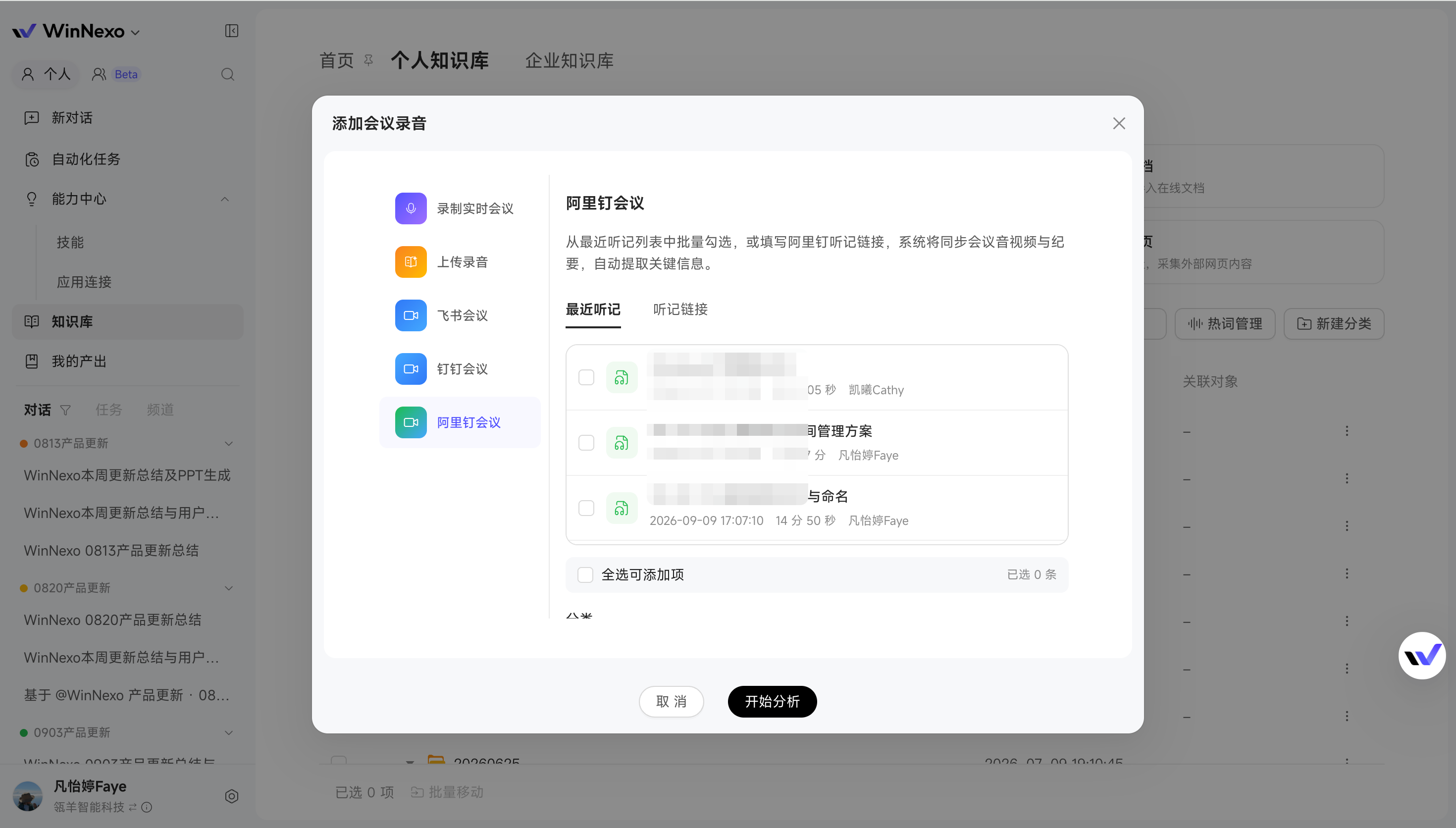
- Select meetings directly from the meeting notes list: After several customer meetings in a week, select AliDing meeting notes on the page to collect them in bulk, without copying links individually.
 - Add tags manually when uploading resources: Knowledge details show manual tags alongside automatically extracted results, giving you both ways to find materials.
 Semantic Modeling and Standards Management
- Semantic Specifications supports custom rules and conflict checks: When modeling as a team, configure naming conventions and other agreements as rules. The system checks noncompliant, duplicate, or conflicting definitions to maintain consistent standards. Run checks manually or configure automatic checks, with issues flagged during publication.
- Dataphin integration: Build business models from existing data. If your enterprise manages data in Dataphin, generate semantic models from its existing data structures to reduce reconfiguration.
Skills and Group Collaboration
- Add Skills to groups by copying personal Skills or creating them directly: Add your personal Skills to a group or create Skills within the group. Members can invoke the same Skills in the collaboration space for customer research and post-meeting summaries, following shared requirements.
- Skill details show the latest editor and edit time: When several people maintain a Skill, see who changed it and when, removing the guesswork when versions do not match.
- More built-in Skills: New sales role Skills include Customer Research and Post-meeting Summary. Review customer background before a visit and organize conclusions afterward to prepare for the next follow-up. General Skills also gain Writing Partner and HTML Report Generator.
Try it: The next time you need data quickly, switch Chat to Quick Q&A and ask, “Break down the value of my opportunities this quarter by stage.” If you then need detailed analysis, branch into Deep Work and continue with the conversation history intact.
Highlights
- Event Center is here: business changes automatically trigger the next task — Opportunity stage changes, important feedback in customer groups, and group membership changes can all trigger automated tasks. Monitor changes in business data and continuously identify important signals in group chats, so opportunity assessments, customer alerts, and follow-up actions start automatically when something happens.
- Automatically triggered tasks can queue in order, even when they all start at once — When scheduled tasks and event-triggered tasks run at the same time, tasks that cannot start immediately wait for resources and run when their turn comes. Automated tasks such as daily reports and customer follow-up summaries are less likely to fail because of insufficient concurrency, even when they are triggered simultaneously.
- Images, voice messages, and attachments from group chats go into the Knowledge Base — Images, audio, video, and attachments in AliDing and standard DingTalk chat records can all be collected and archived. WeChat Official Account articles can also be added directly to the Knowledge Base. Enterprise Knowledge Bases support cross-base search, so you can find materials even if you do not remember which base contains them.
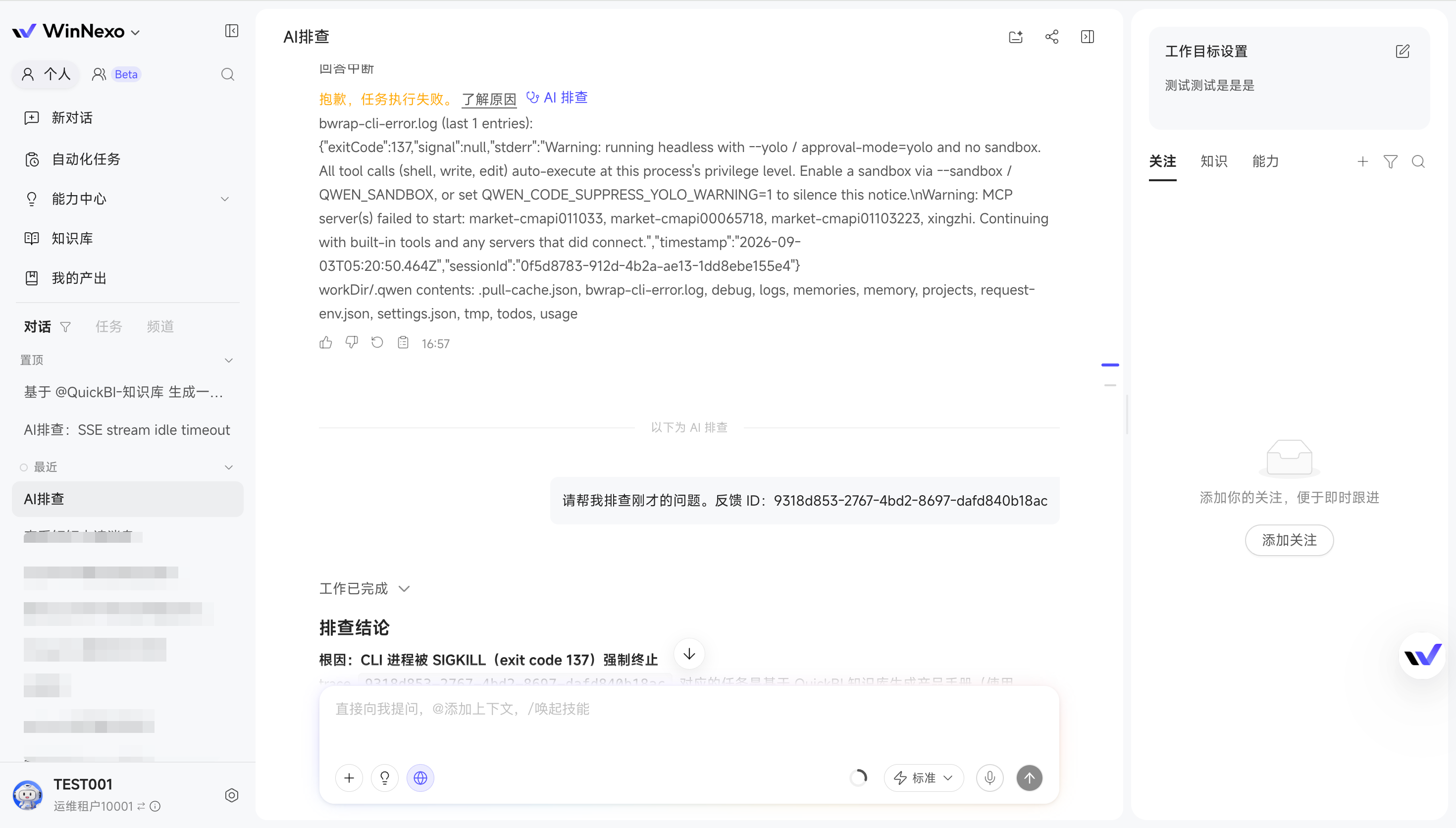
- Troubleshooting is now available directly to end users — When a Chat fails, execution behaves unexpectedly, or results do not meet expectations, users can start AI Troubleshooting directly instead of having to ask around for help every time.
In Focus: Event Center (Beta)
⚠️ This feature is currently in Beta. Its capabilities and workflows are still being refined. Try it out and share any issues or use cases 😄
Event Center can automatically trigger tasks based on real business changes. Opportunity stage changes, risk-related feedback in customer groups, and group membership changes can all be defined as events. Users can describe in natural language what counts as an event or configure conditions manually. When an event occurs, the system checks whether the requirements are met and automatically starts the corresponding task.
Administrators configure the rules; end users choose a template
Trigger on data changes: when an opportunity moves to the next stage or a contract amount rises to 500,000, the change is captured automatically and the associated task starts immediately—no manual monitoring or waiting for a scheduled time. Opportunity follow-up becomes fully automated.
For events such as group messages, administrators also configure evaluation rules, including message windows and cooldown windows. Once configured, commonly used events can be saved as parameterized templates. When creating an automated task, end users simply choose a template prepared by an administrator and enter their own business parameters, such as the customer, opportunity, or group, to start using it.
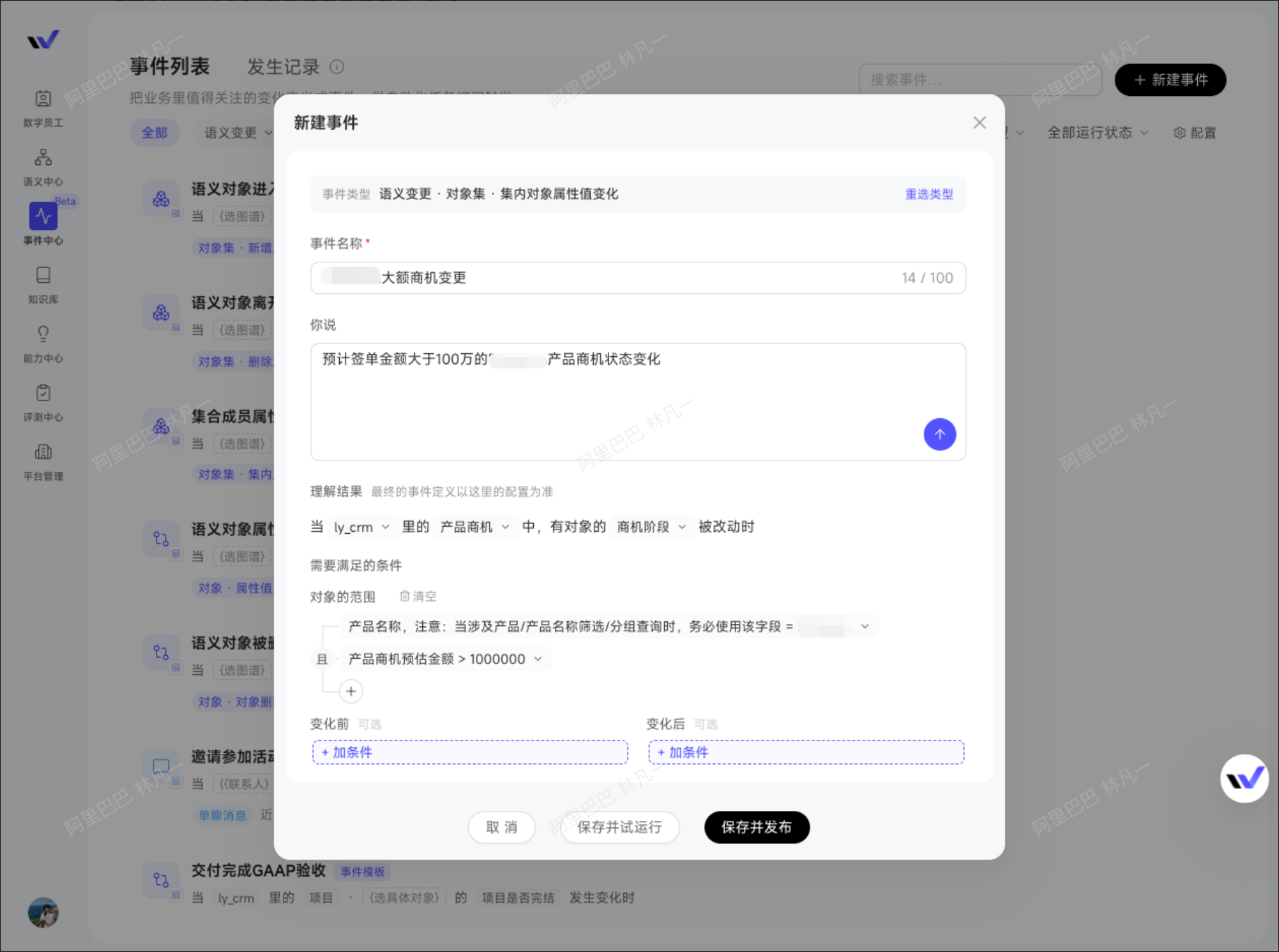
:::
Value: Administrators centrally maintain enterprise event rules, while end users only need to supply their own business information. This makes configuration easier and ensures that similar automations follow consistent standards.
:::
When an opportunity advances, the next step starts automatically
Combine trigger conditions flexibly to focus on what matters—for example, receive stage-change alerts only for opportunities worth more than 1 million that you own. Signals become more relevant, without a flood of unrelated notifications.
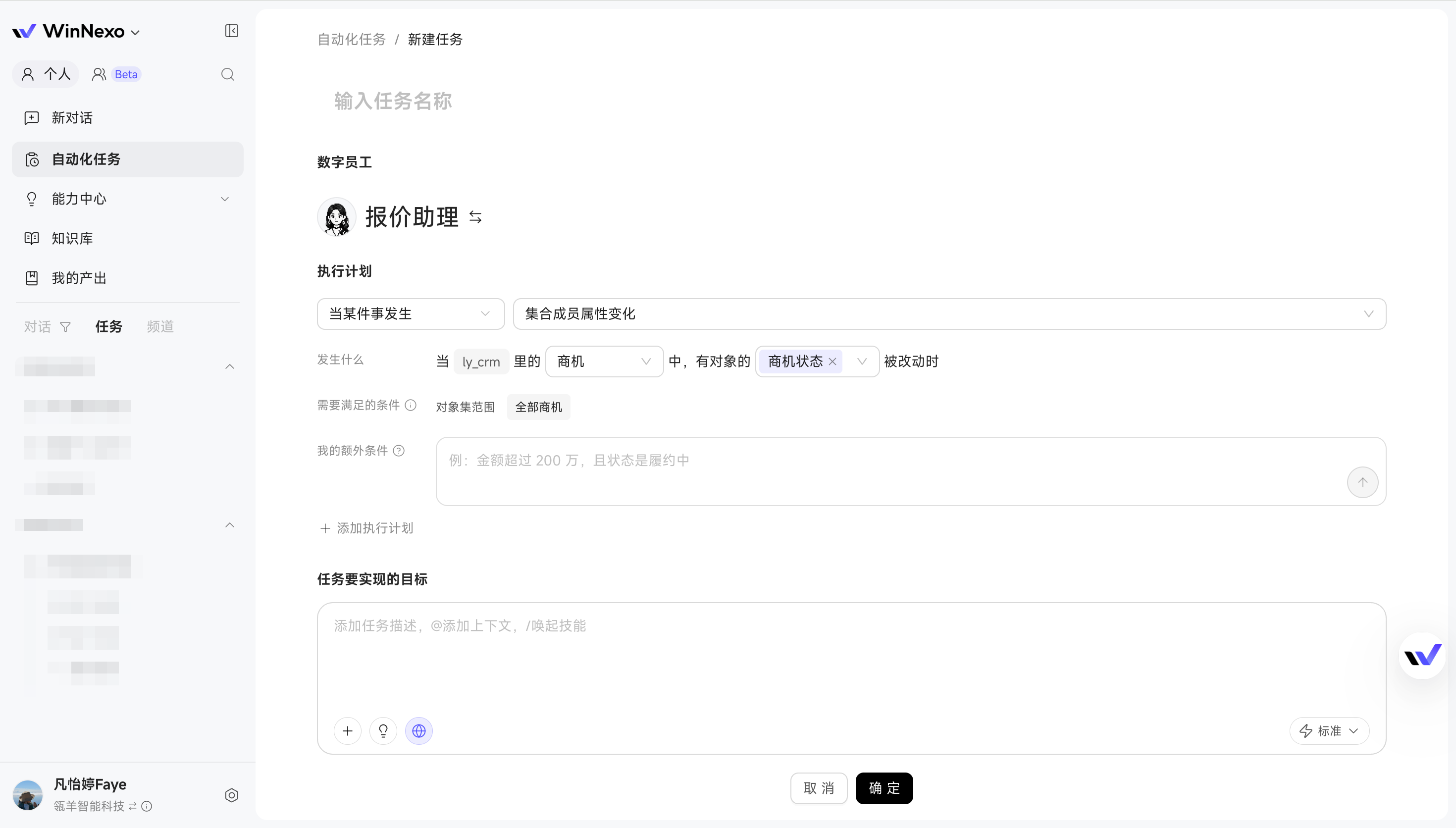
:::
Value: Important changes in opportunity progress promptly lead to follow-up actions, allowing assessments, alerts, and follow-ups to flow naturally from one step to the next.
:::
Risk signals in customer groups automatically trigger alerts and follow-ups
Trigger on IM messages: group messages, direct messages, @mentions, negative customer feedback, and even members joining or leaving a group can all be configured as triggers, allowing immediate follow-up on customer developments.
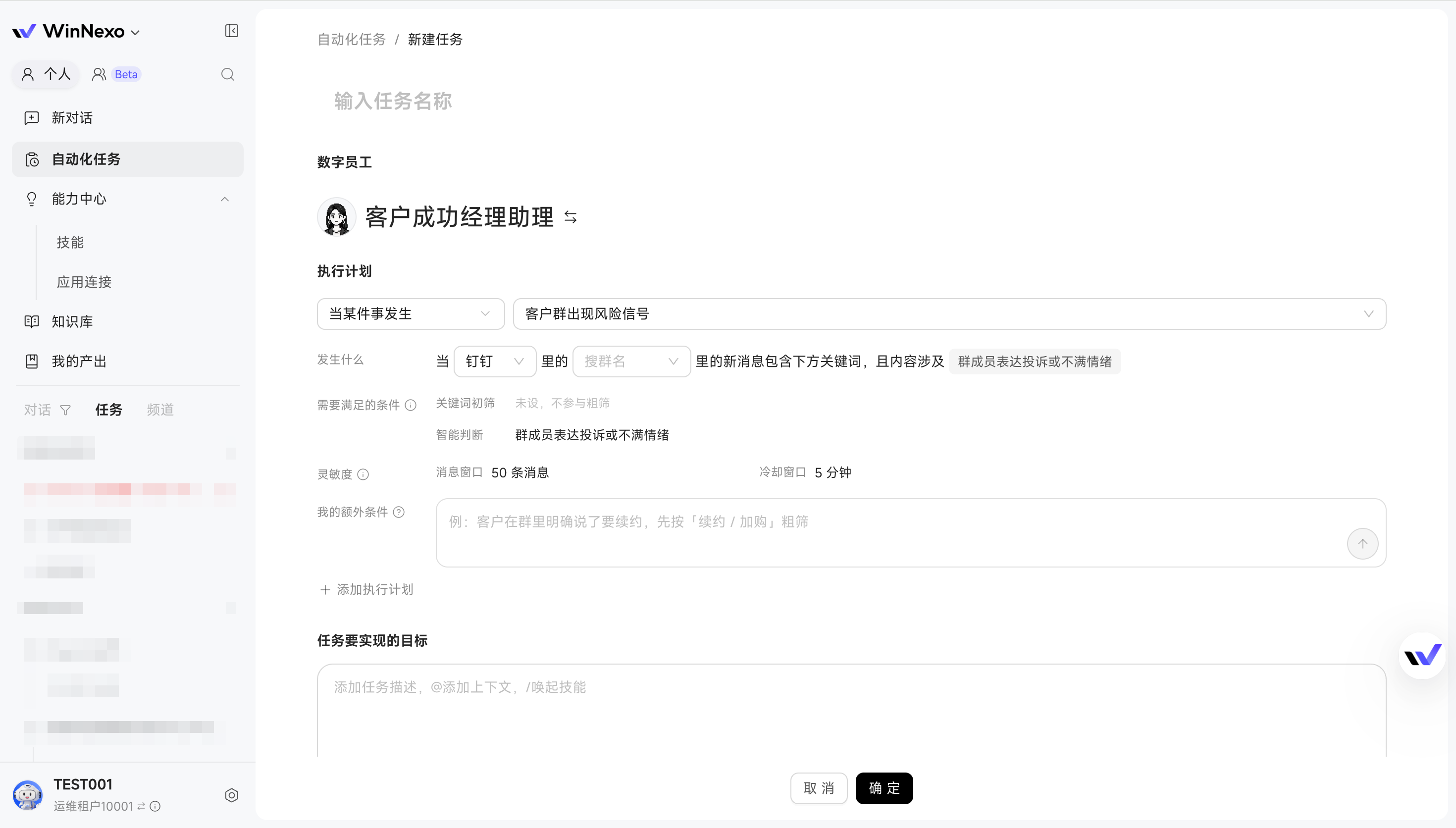
:::
Value: Important signals, such as customer dissatisfaction or changes in key personnel, can enter the follow-up workflow as soon as they appear, reducing the chance that important information stays buried in group chats without anyone acting on it.
:::
Task Concurrency Settings
- Separate concurrency queues by scenario: Concurrency capacity for Chats and tasks can be allocated by percentage, enabled or disabled as needed, and configured by time period—reserve more resources for Chats during the day and allocate them to batches of scheduled tasks at night, without competition between the two.
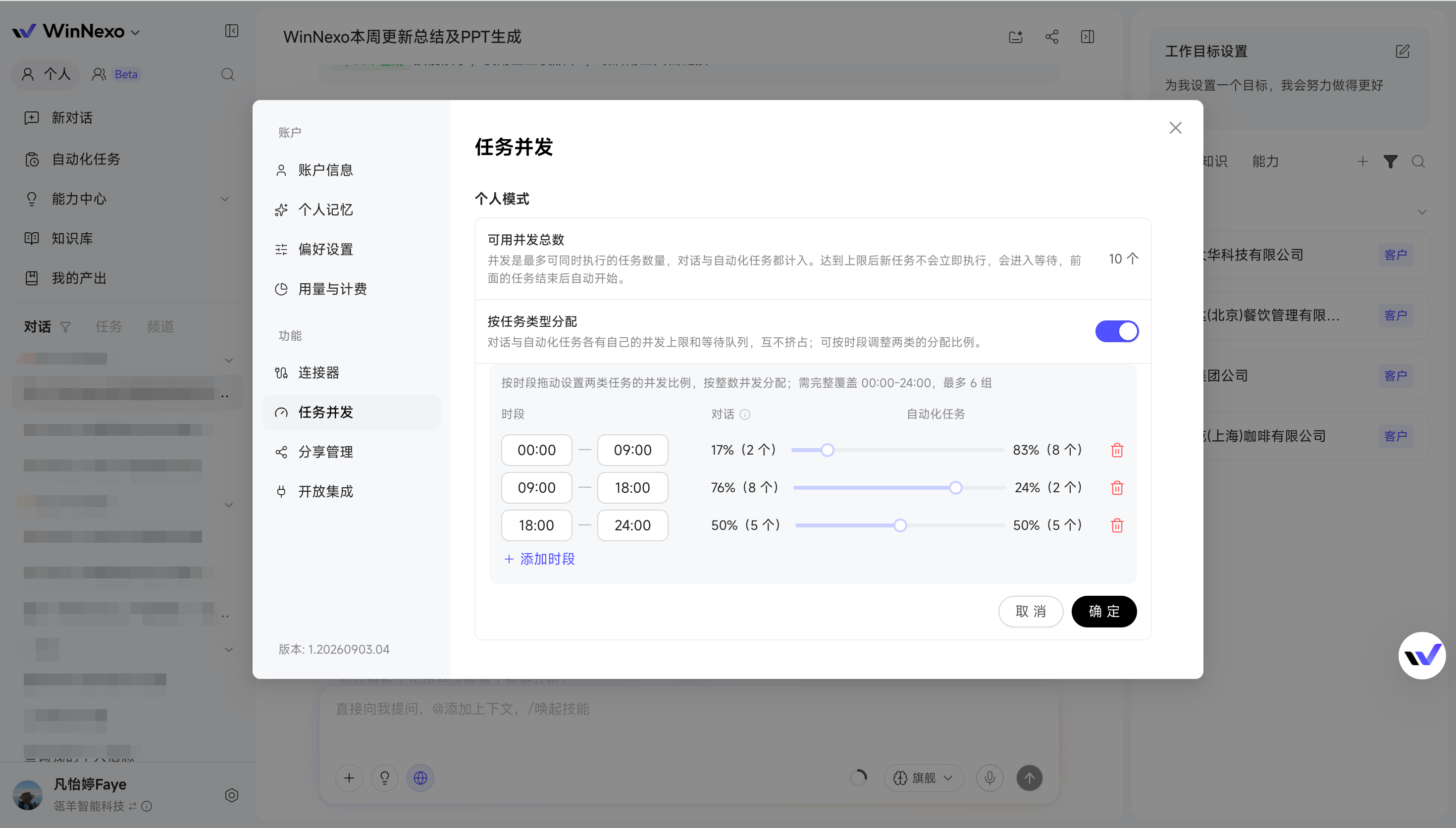
Chat Experience
- When something goes wrong, let AI help investigate first: If a response fails, execution behaves unexpectedly, or results do not meet expectations, end users can start AI Troubleshooting directly to understand what went wrong and what to adjust, resolving issues they can handle on the spot.
Knowledge and Resources
- More complete collection of chat images, voice messages, and attachments: Images, audio, video, and attachments in AliDing and standard DingTalk chats can be saved along with the chat records. When discussing proposals in project groups or sending files in customer groups, there is no need to move attachments separately.
- Collect WeChat Official Account articles directly: Industry news, competitor articles, and frequently referenced Official Account content can be saved directly to the Knowledge Base, reducing collection failures caused by web page restrictions.
- Search enterprise knowledge across bases: If you do not know which Knowledge Base contains a resource, search across enterprise knowledge directly instead of checking each base individually.
Capability Center
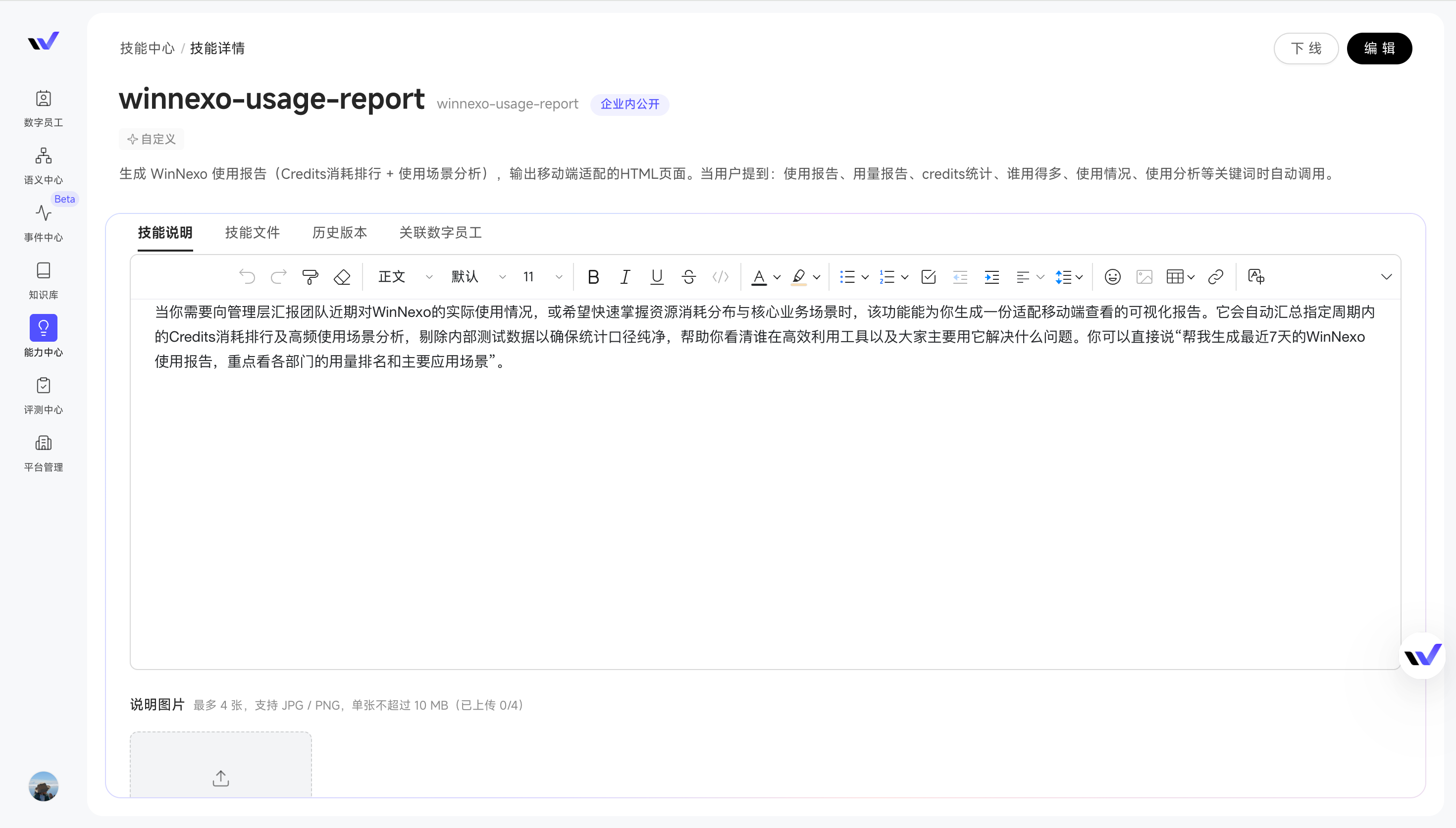
- Clearer Skill descriptions help end users get started: Administrators can edit Skill descriptions, add use cases and triggering instructions, and upload example images. End users can quickly understand what a Skill can help them do and how to ask, making it easier to get started.
Try it: Have an administrator configure an event template for "negative feedback in a customer group" in Event Center. When creating an automated task, select that template and enter the group to monitor and the person responsible. When matching feedback appears in the group, WinNexo automatically summarizes the relevant messages and notifies the person responsible.
Highlights
- The Knowledge Base introduces a new Personal Home page — Recently used, favorited, and enterprise-popular knowledge is clearly displayed for more efficient discovery. Members can also quickly see what the enterprise is following and using, making reusable knowledge easier to find.
- New AI Troubleshooting capability — After business users report an issue, administrators can use AI Troubleshooting to identify the cause of slow responses, failed executions, or abnormal results directly. This makes failed steps easier to understand and helps users improve how they phrase requests.
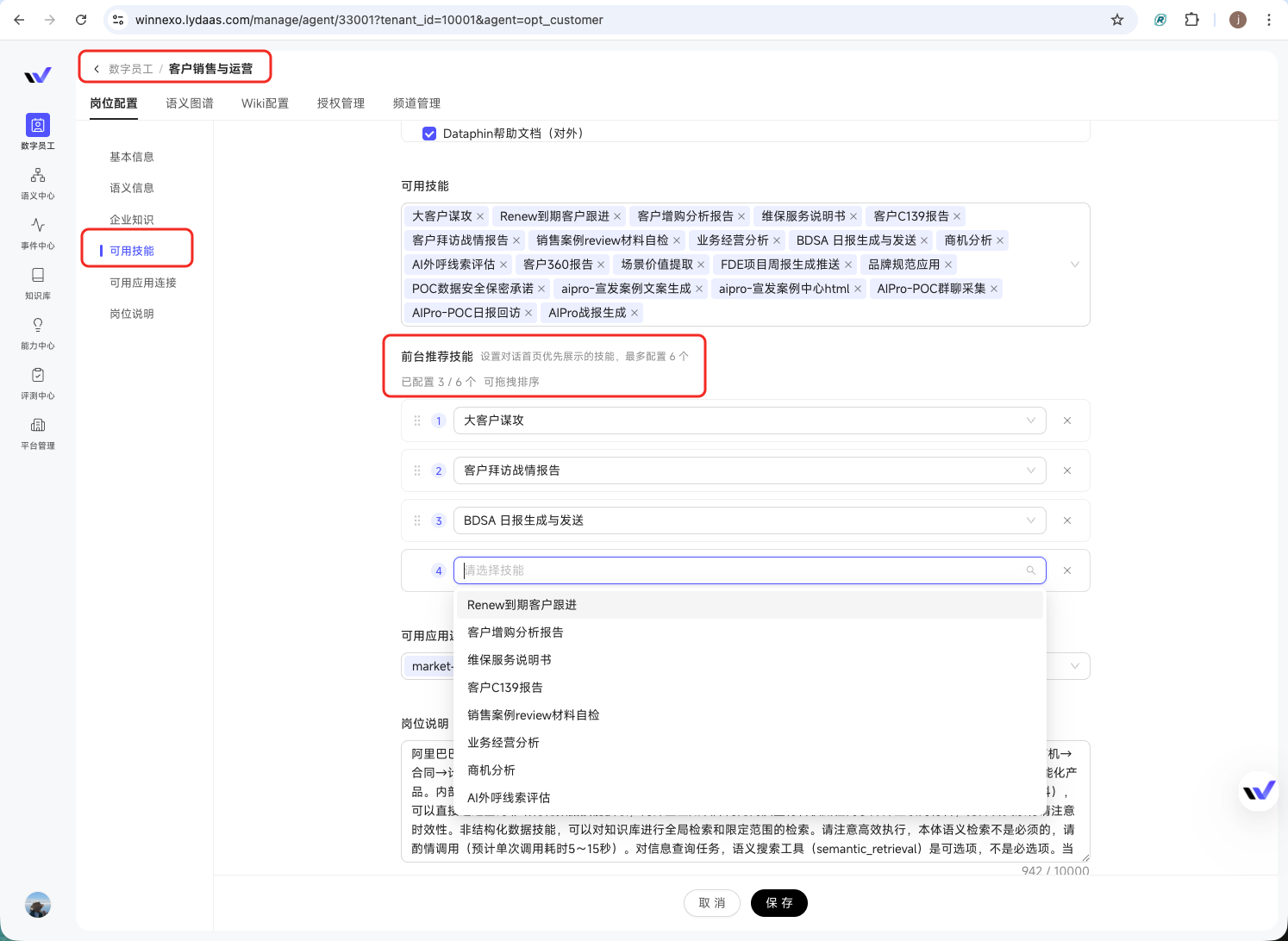
- Skills are easier to discover and tune — Digital Worker administrators can feature key Skills on the Chat home page so users find the right capability faster. During debugging, developers can also compare actual and expected results directly to pinpoint performance gaps.
- Sign in directly with Feishu or DingTalk accounts — Employees can enter WinNexo with the Feishu or DingTalk accounts they already use for work. The organization structure is synchronized as well, making enterprise onboarding and user management smoother.
Group Collaboration
- Topics in a group are named automatically: When a project is being advanced in a group, the discussion can automatically generate a topic name, so every new topic no longer has to be named manually.
- One collaboration group can connect to multiple IM groups: The same group materials, tasks, and Digital Worker capabilities can be reused across multiple business groups. For example, a group Q&A bot can serve several groups at once and continuously improve the group materials using questions and context from each group, without requiring a separate setup for every group.
Knowledge and Resources
- A new Knowledge Base home page: Recently used, enterprise-popular, and favorited knowledge is shown in one place, so frequently used resources no longer have to be found by searching through a long list of Knowledge Bases each time. Enterprise Popular also helps members see what knowledge the team uses most often and quickly discover useful content worth reusing.
- Feishu documents, DingTalk documents, and group chats go directly into the Knowledge Base: Reuse Feishu and DingTalk connectors so teams do not have to move materials already written in other tools again, and keeping the content current becomes easier.
Skill Center
- Skill debugging shows exactly how the result differs from the target: Provide an expected output before debugging, then compare the actual result against the target item by item. For example, if a visit report must contain "Customer Status, Key Issues, and Next Actions," the comparison shows which part is missing without requiring the developer to reread the result repeatedly and look for problems by feel.
Admin Console
- Put the most frequently used Skills directly on the Chat home page: Digital Worker administrators can feature frequently used Skills such as customer analysis, opportunity reviews, and proposal generation—capabilities that best match the Digital Worker's role. When sales users open a Sales Digital Worker for the first time, they can start with the most common work for their role without first understanding the full capability list.
 - AI troubleshooting is now available in the Admin Console: When a response is slow, an execution fails, or a result is abnormal, administrators can start AI troubleshooting with the user's Trace ID to quickly identify the affected step and likely cause.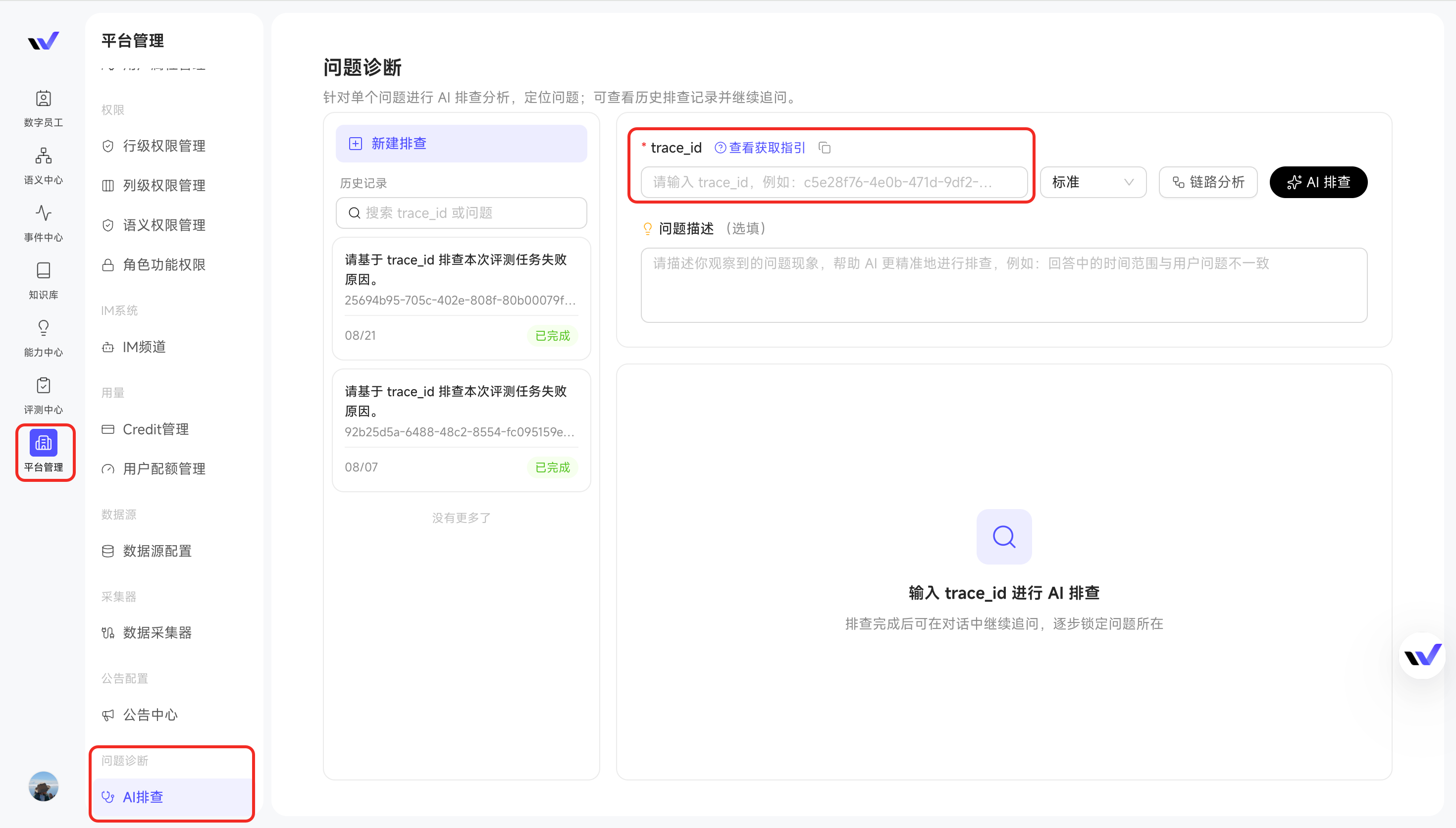
:::
Tip: Grant the "Use AI Troubleshooting" permission under Platform Management → Role and Feature Permissions → Issue Diagnosis before use.
:::
Platform and Ecosystem
- Synchronize Feishu and DingTalk accounts and organization structures: Employees can sign in with their Feishu or DingTalk accounts, and the organization structure is synchronized at the same time. There is no need to maintain a separate account system, making enterprise onboarding and user management smoother.
- Maintain users and user groups through the CLI: Sales teams change frequently, but user groups do not update themselves, leaving administrators to make changes one by one. Now you can simply tell a Digital Worker, "Find everyone under a given manager and add them to the specified user group."
Try it: Open the Knowledge Base home page and set it as the default. See whether Recently Used, Enterprise Popular, and Favorites save you a trip through scattered resources. If you have the "Use AI Troubleshooting" permission, try it on a slow response, failed execution, or abnormal result to see whether it helps you understand where and why the problem occurred, then adjust your request or next action accordingly.
Highlights
- Group collaboration fully opens up with group chat — When advancing a customer or project, you can start a topic around a specific matter right in the group, pull in colleagues and Digital Workers to discuss it, and execute as you talk, putting multi-person collaboration into a single space for real.
- Customer communication keeps flowing into the Knowledge Base — Lark group chats, meetings, and AliDing chat records can all be collected and continuously updated more smoothly, so when you later ask "what's new with this customer," the Digital Worker can answer straight from the earlier conversation.
- PPT supports personal templates — Configure the layout you always use, and next time just say "use my monthly report template" to apply it—no need to re-upload and readjust the layout every time.
- Share only the useful parts of a conversation — The back-and-forth tuning in the middle doesn't have to be shown to others; select the messages with conclusions before sharing.
- Keep talking from a quoted message — Quote the whole message or select half a sentence and "add to conversation" to dig deeper into one point without restating the background.
This Release's Focus: Group Collaboration (Beta)
:::
Tip: refer to the Release Notes of earlier versions for more on what group collaboration can do.
:::
Groups could already share materials and configure tasks, but when it came to actually discussing customers and advancing projects, you still had to go back to other group chat tools. This release adds chat to group topics: multiple group members and Digital Workers share one conversation, split by goal into topics so thinking stays focused. In a customer war-room group, quoting, requirements discussions, and milestone updates are each followed up separately, and anything that needs to cross over is added as group materials for reuse within the group.
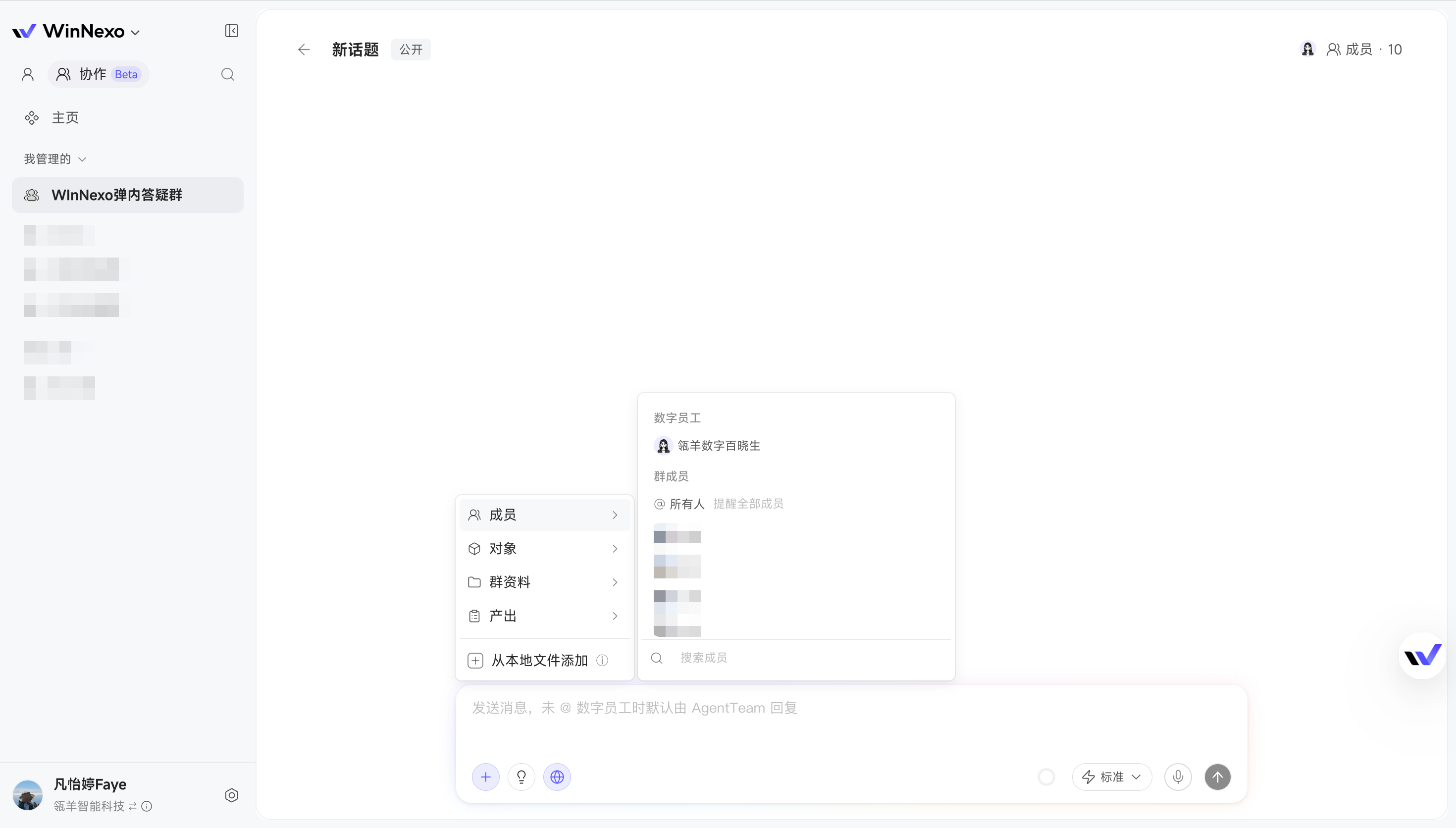
Start a focused topic in the group and push the work through together with Digital Workers
For example, a sales manager starts a topic around "key customers" and first asks, "Summarize these customers' progress over the past two weeks and flag the ones that need close follow-up"; the Digital Worker provides the analysis first. When something needs confirming, @ the responsible colleague to fill it in, or keep letting the Digital Worker carry on. Topics can also be set to private, collaborative, or public to control who participates and who can see them.
:::
Value: things like customer follow-up no longer require "aligning in a DingTalk group on one side and asking the Digital Worker separately on the other." Colleagues and Digital Workers talk and work on the same matter in the same place, keeping discussion, execution, and outputs in one collaboration space.
:::
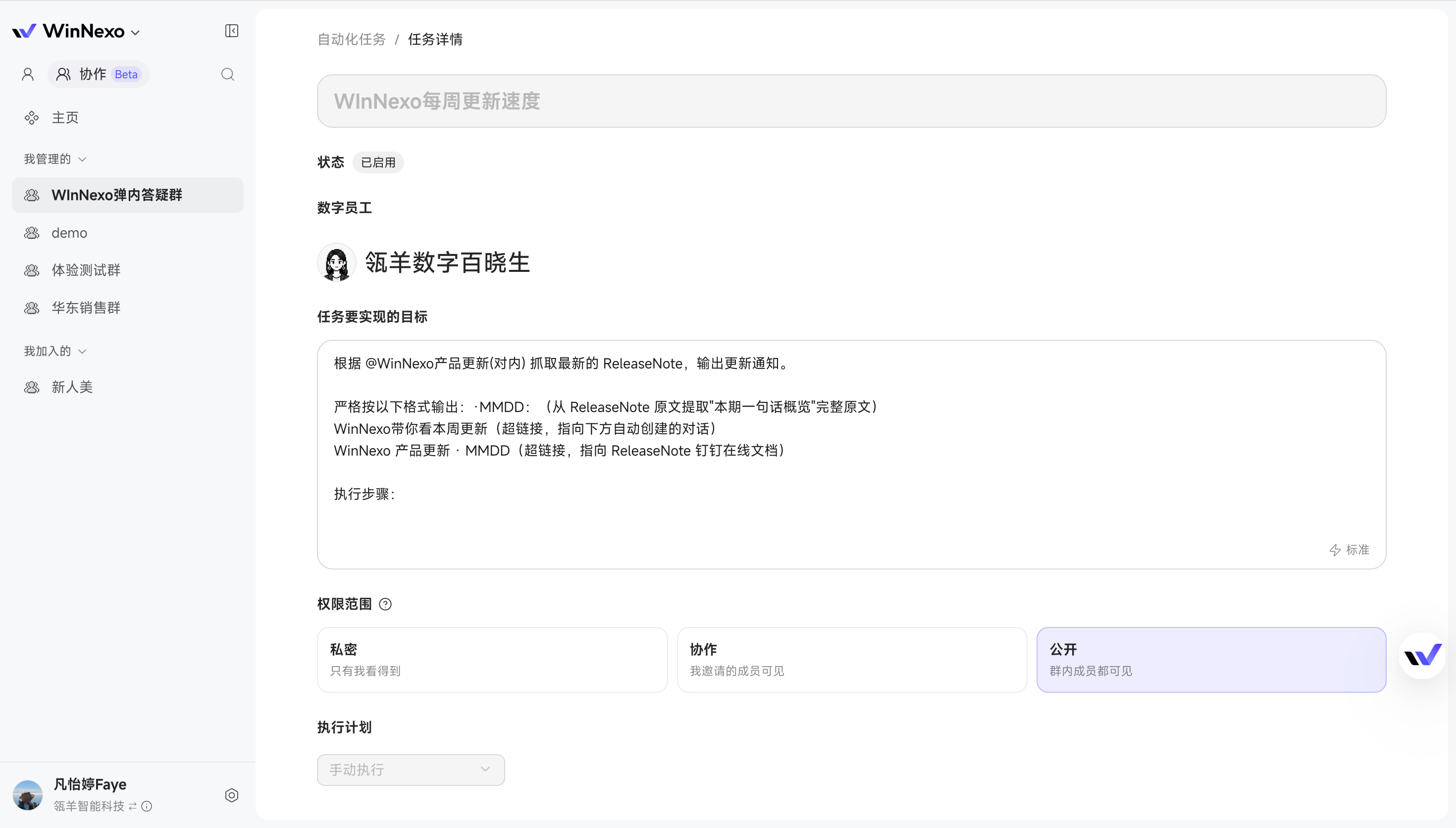
Automated tasks in the group can genuinely be managed by the team together
When the team runs recurring tasks such as customer follow-up summaries and daily sales reports, you can decide who sees the task, its execution records, and its results; you can also check progress while a task is still running, and if it's heading the wrong way, add requirements or stop it directly instead of reworking after it finishes.
:::
Value: recurring work can be handed to Digital Workers with confidence, the people who need visibility always know where things stand, and anything off track can be pulled back in time.
:::
Group collaboration also moves closer to how teams really work:
- Set group administrators: group administrators do not carry data permissions—they manage only members, group materials, and related settings, and cannot configure the business scope—so handing group management to an assistant is safe;
- Proactive alerts for duplicate groups: when creating a group, a duplication check runs automatically and warns you when the name, goal, members, or bound IM group closely resemble an existing group, avoiding several groups doing the same thing;
- Save to group materials just by saying so: summaries, proposals, and other content produced during a discussion can be added to group materials or submitted into the Enterprise Knowledge Base with one sentence—"save that summary to group materials"—with no manual organizing and moving.
Chat Experience
- Follow up from a quoted message: when a Digital Worker gives a long answer and you want to confirm one conclusion in it, quote the whole message the way you'd reply in DingTalk, or select that half-sentence and "add to conversation" to ask again—no restating or copy-pasting.
- Share part of a conversation: when syncing a customer analysis or proposal to a colleague, you can share only the Q&A that's genuinely useful instead of sending the earlier attempts and tuning along with it.
- One-on-one channels can read quoted content: when chatting one-on-one with a Digital Worker in IM, it also reads the message you quoted, completing the context automatically.
- Improved document link display: for content already collected into WinNexo that also keeps an external source document, both the original link and the WinNexo internal link are provided; when the source document isn't accessible or convenient to open, you can view it directly from WinNexo, reducing collaboration breakdowns caused by unopenable documents.
Capability Center
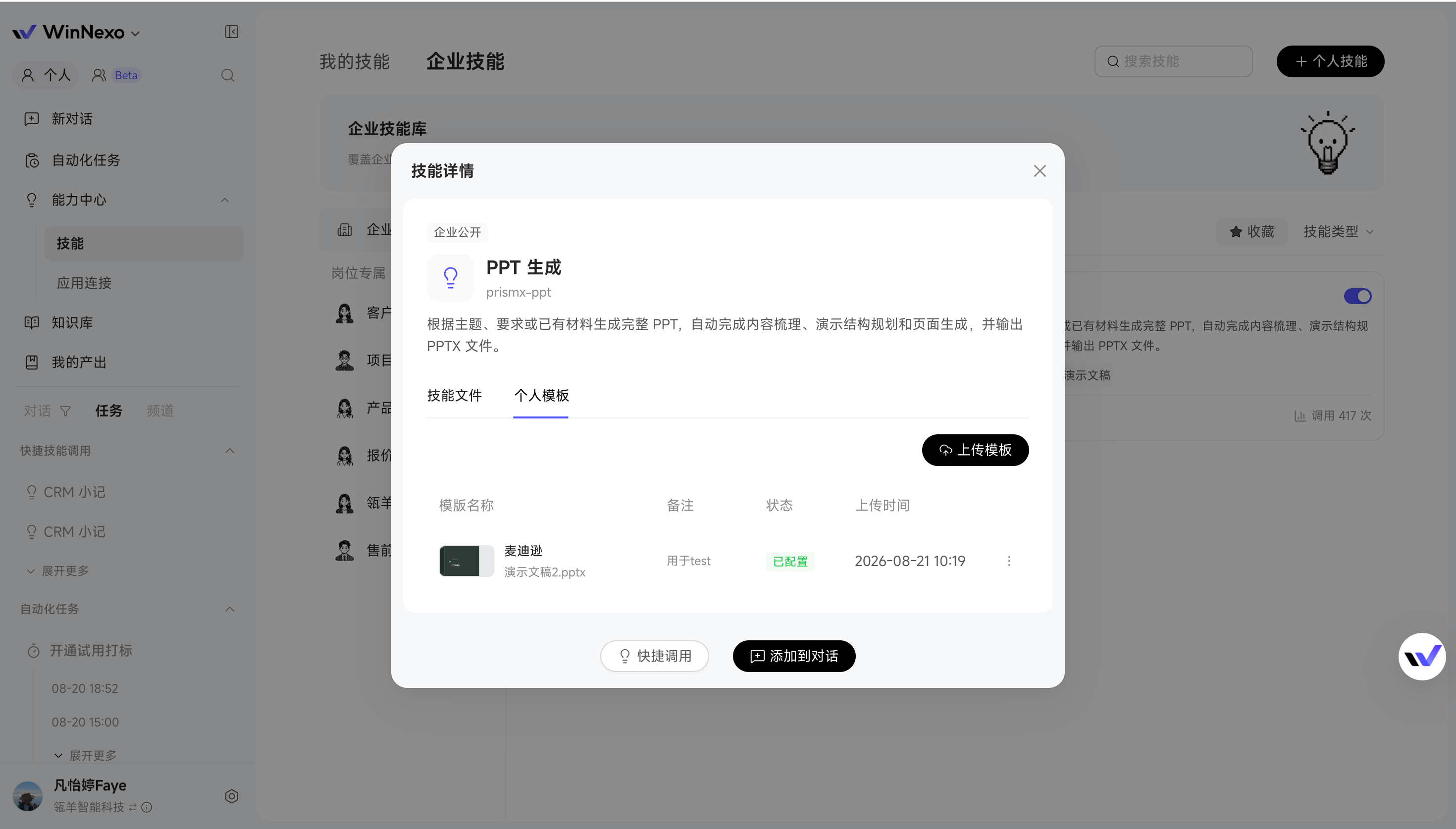
The "PPT Generation" skill supports personal templates: personal templates can be configured, and while chatting you can specify an available personal or enterprise template in natural language.
:::
Scenario: sales rep Wang often has to build customer proposals and reporting materials in a fixed layout. Now he can upload his frequently used template right on the skill detail page—no re-uploading and re-explaining the format each time—and the generated results come closer to what actually has to be delivered.
:::
Enterprise-level capabilities in one place: available enterprise-level skills and enterprise-level app connections can be viewed on a single page; role-specific capabilities also show how many Digital Workers are bound to them, so you can judge the impact before flipping a switch.
Knowledge & Resources
- New Lark group chat collection: when customer or project discussions accumulate in Lark groups, group chat messages can be collected into WinNexo directly, group materials can use that communication too, and Digital Workers can continue answering from the earlier discussion.
- Less configuration for Lark meeting collection: meeting record collection now reuses the existing Lark connector instead of going through a separate configuration path; teams already connected to Lark can move meeting content into WinNexo more directly.
- AliDing chat records support incremental analysis: for customer groups followed over a long period, historical messages keep piling up and full analysis used to time out easily; now only new chat records are analyzed, so sales can keep adding the latest customer developments without rerunning the entire history.
Try it: in group collaboration, start a topic around your key customers and say, "Summarize this week's progress for these key customers and flag the blockers"; if you have a question about one of them, @ the responsible colleague to fill it in, then finish with "save this summary to group materials." From multi-person discussion to Digital Worker analysis to sedimented results, a full round of customer follow-up can happen inside one topic.
Highlights
- Group collaboration levels up (Beta) — Finer-grained permission management, group memory that's visible and manageable, broader sources for group materials, and automatic completion of conversation context.
- Conversation history management — Chats support pinning, grouping, and tagging, and paired with search they're quick to locate; no matter how much history piles up, you won't lose track of it.
- Enterprise Knowledge Base management on the front end — Users with management permission can search, approve, and manage Knowledge Bases in one stop on the front end, greatly shortening the operation path.
- Per-person channel preferences — Whether to show the thinking process, whether to recommend follow-up questions, and whether to start a new session on a schedule—everyone can configure the channel bot to match their own communication habits.
Chat Experience
- Conversation history management: Chats can be pinned, grouped, and tagged, and search has been upgraded to match—important conversations stay pinned at the top, and finding what you discussed last week no longer means scrolling through them one by one.
Group Collaboration
- Group collaboration: Finer-grained permission management, group memory that's visible and manageable, broader sources for group materials, and automatic completion of conversation context.
- Group data permissions aligned to the attribute level: Object-level permissions are upgraded to attribute-level permissions—someone can view basic employee information but not sensitive fields such as compensation and cost, so granting exactly what's needed feels safer.
- Group memory you can see and edit: The shared understanding and preferences built up through collaboration in the group can be viewed by expanding them, and group memory can also be added manually.
- Broader sources for group materials: Beyond uploaded files, online documents, online notes, and public web links can all be added directly to group materials, making the group's knowledge sources more complete.
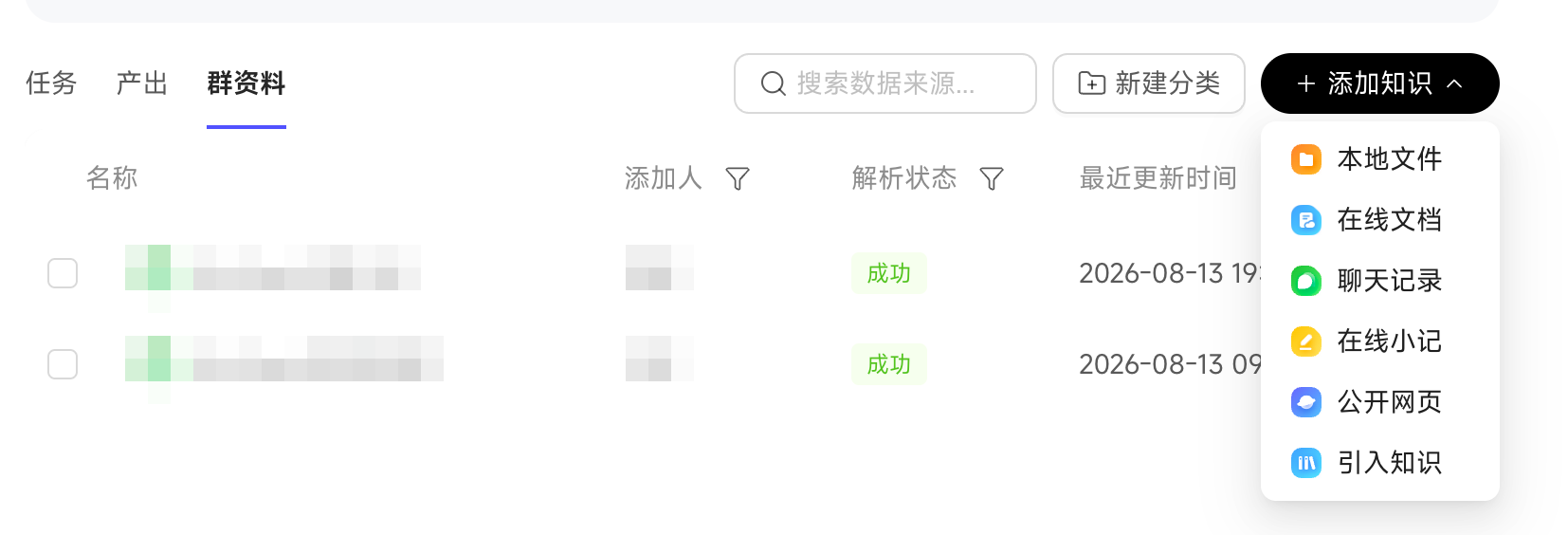 - Automatic context completion in IM groups: Once an IM group chat is bound, the 50 most recent messages are collected automatically, so a Digital Worker hears more than just the message that @-mentioned it.
 Knowledge & Resources
- Enterprise Knowledge Base management on the front end: Enterprise Knowledge Bases are managed directly on the front end—users with permission can search Knowledge Bases, handle pending approvals, create new Knowledge Bases, and edit content, with no more switching back and forth between the front end and the Admin Console.
- Permission configuration made easier: Visibility scope can be selected by drilling down through user groups, and after selecting a department you can check its sub-departments and members directly instead of adding them one at a time.
Channel Conversations
- Per-person channel preferences: Everyone can configure the channel bot to their own habits—whether to show the thinking process when answering (when hidden, an emoji signals "thinking"), whether to recommend follow-up questions afterward, and whether to automatically start a new topic on a schedule; the same bot can keep a communication rhythm that suits each person.
Skill Center
- Built-in skills support visibility scope configuration: Built-in skills are split into general and industry categories, with industry skills bound by an admin to the corresponding Digital Worker—the skill list is cleaner and no longer flooded with skills you'll never use.
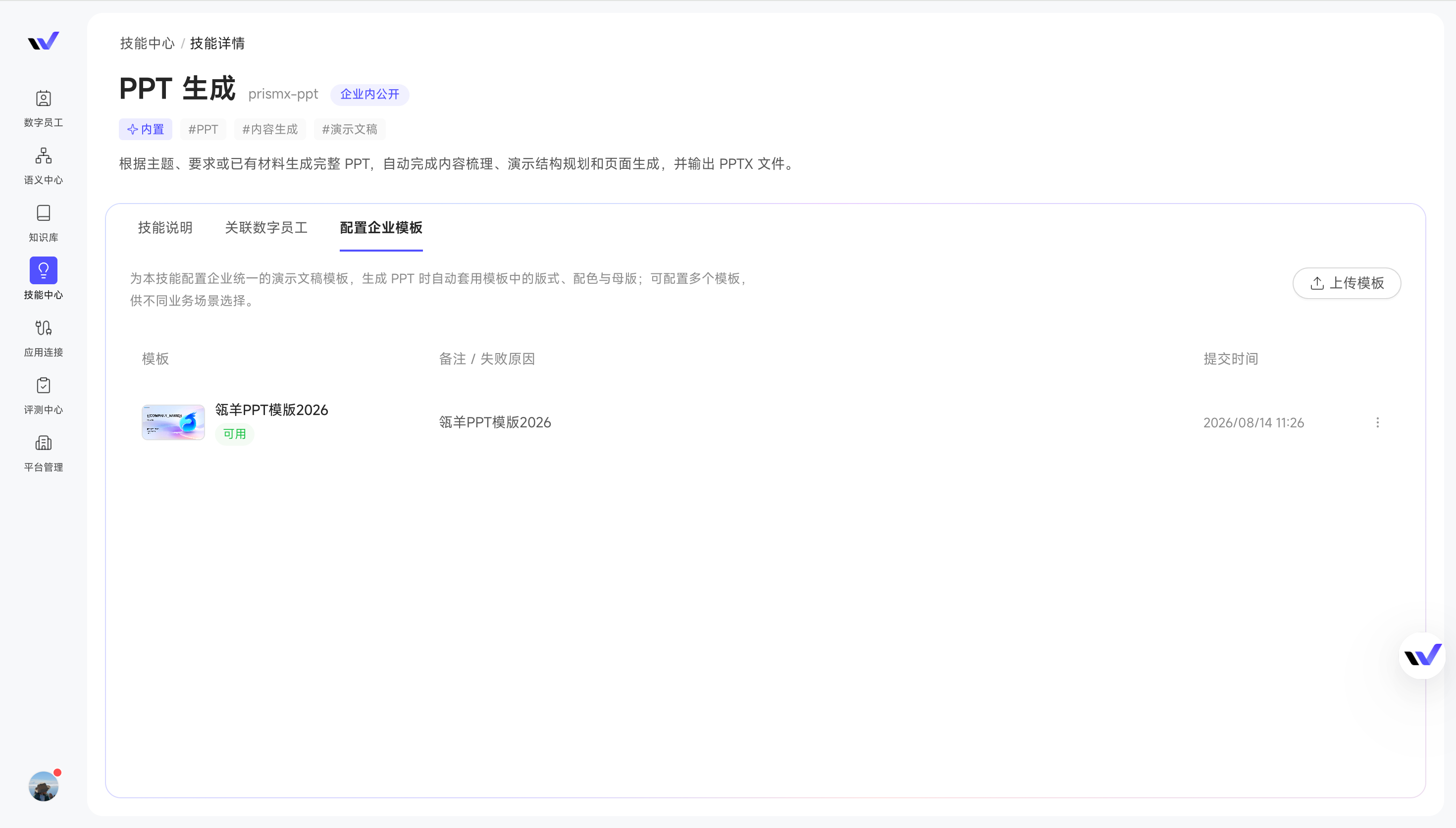
- The "PPT Generation" skill supports enterprise templates: You can upload enterprise-specific PPT templates so generated presentations automatically follow company-standard layouts; guidance and progress feedback during creation are also clearer.
 - Smart skill checks: Configuration problems are checked and flagged automatically before debugging, so you can debug and revise at the same time—skills come together faster with less rework.
 Commercialization & Purchasing
- Costs come down further: Some Qwen models follow official price cuts, so the same budget runs more tasks.
Try it: Bind your team's AliDing/DingTalk/Feishu group to a group, then @-mention the Digital Worker in the group and ask, "Take the plan everyone just discussed and organize it into a summary for me"—it will answer directly based on the group's latest discussion.
Highlights
- See the execution plan, change direction anytime — Ask a sales Digital Worker to write a competitive analysis, and expanding the task plan shows you its outline and which step it has reached; if you notice a missing requirement, just add "focus on analyzing their product pricing" and send it right away—the current round of the reply immediately pivots and rethinks its approach, with no need to terminate and start over.
- Press and hold to ask by voice — A salesperson pulls out their phone at the customer site, finishes speaking, and the words are automatically transcribed and sent—no more poking at a small screen.
- Built-in Browser connector — Once the Browser connector is connected, web automation, content capture, and live meeting recording can all be handed to a Digital Worker.
- Semantic permissions down to the attribute level, with authorization straight to user groups — Want a Digital Worker to analyze HR data but not read the compensation column? Attribute-level control handles it; both row-level and attribute-level permissions can be granted to user groups, so people joining or leaving a team no longer means changing them one by one.
- Collaboration Groups support publicly authorized connectors — Systems the team shares are configured once and usable across the whole group, while those requiring personal accounts are authorized individually, balancing collaboration efficiency with security.
Chat Experience
- See the execution plan, and change direction mid-run: Expand the task plan and you'll know which steps it will take and where it is now; if you spot a missing requirement halfway through, just send an extra sentence and the current round adjusts to the new requirement—no terminating and rerunning.
- Voice input: Tap once and speak, and it's automatically transcribed and sent—at a customer site, on your phone, or on the IM web client, it's far faster than typing.
- Context usage indicator and one-click compression: A usage ring now sits next to the input box and warns you as you approach the limit. Open it for one-click compression—the Digital Worker summarizes what you've discussed so far to free up space, and the conversation continues right where it left off without losing key conclusions. How long the window lasts and how full it gets before auto-compression kicks in can both be tuned by admins in the model configuration center.
- Picking the wrong Digital Worker is no longer just an error: When your selection doesn't match the current Digital Worker, a prompt appears on the submit button recommending Digital Workers that can handle it—swap with one click and keep asking.
- Chat history search extended to input content — Only remember discussing "that customer's quoting basis" but can't recall the title? Now searching the content finds it, and it even marks which sentence matched.
App Connections
- Built-in Browser connector: Once connected to the browser, a Digital Worker can act on pages for you—opening, paging, filling in forms, and stringing information across several pages—so the chores you'd otherwise click through a dozen times a day can be handed off with one sentence; online meetings can also be recorded live, and you can ask for the key points as soon as they end.
A quick tip: after downloading, open your browser's "Extensions" page, turn on developer mode, and choose "Load unpacked extension" once—after that it's ready whenever you open it. Currently only Chromium-based browsers such as Chrome and Edge are supported.
- Built-in WeCom connector: Just as ready to use out of the box as the DingTalk and Lark connectors—sending messages, looking up the address book, and creating schedules and to-dos can all be delegated with a single sentence.
Collaboration Groups (Beta)
- Group materials: Attach the knowledge for this customer or this project as group materials, so whoever asks in the group gets answers based on the same set of source materials, and new members no longer have to chase people for files; results from automated tasks and outputs from conversations can also be filed in along the way.
- Group management: With a dozen customer and project groups on your hands, "My Groups" lists "Joined" and "Managed" separately, so you can spot the right group at a glance.
- Group connectors: Split into public authorization and personal authorization—systems the team shares are configured once and usable across the whole group, while those requiring personal accounts are authorized individually, balancing collaboration efficiency with security.
Knowledge & Resources
- DingTalk meetings captured end to end: Meeting summaries and transcripts are collected straight into your personal Knowledge Base, and attendees are recognized too—"what was decided in last week's customer sync?" is answered the moment you ask, without listening through and writing it up again yourself.
- Knowledge traceable to people: Open the details of a knowledge point cited in Chat and you'll see who created it and who last changed it—so when you want to confirm the basis while writing a proposal, you can go straight to that person.
Skill Center
- Skill cards show invocation counts: Which Skills people are actually using and which no one has picked up yet is clear at a glance.
- Smart variable check: Scan Skill files in one click for sensitive plaintext such as secrets and passwords, then automatically replace them with securely managed variable references once confirmed, preventing sensitive information from traveling with Skills or leaking.
Admin Console
Applicable to: Platform Admins / Semantic Modelers
- Semantic permissions down to the attribute level, with object authorization straight to user groups — Want a Digital Worker to analyze HR data but not read the compensation column? Attribute-level control now closes that off; row-level and column-level permissions can both be authorized by user group, so people joining or leaving a team no longer means changing them one by one.
- Centralized IM bot management: Q&A bots and one-on-one bots in groups are managed on the same page, making it clear who bound which Digital Worker; you can also send a screenshot or a voice clip in the group and ask it directly.
Commercialization & Purchasing
- Support for multi-tenant purchasing and allocation: A single enterprise can split purchasing across multiple tenants by subsidiary or business unit, with base-package quotas and Credit allocated centrally by headquarters.
Give it a try: next time you have a Digital Worker handle a multi-step job, don't stop when the direction feels off—just add "look at this quarter's data only" and watch it adjust on the spot.
Best Practices
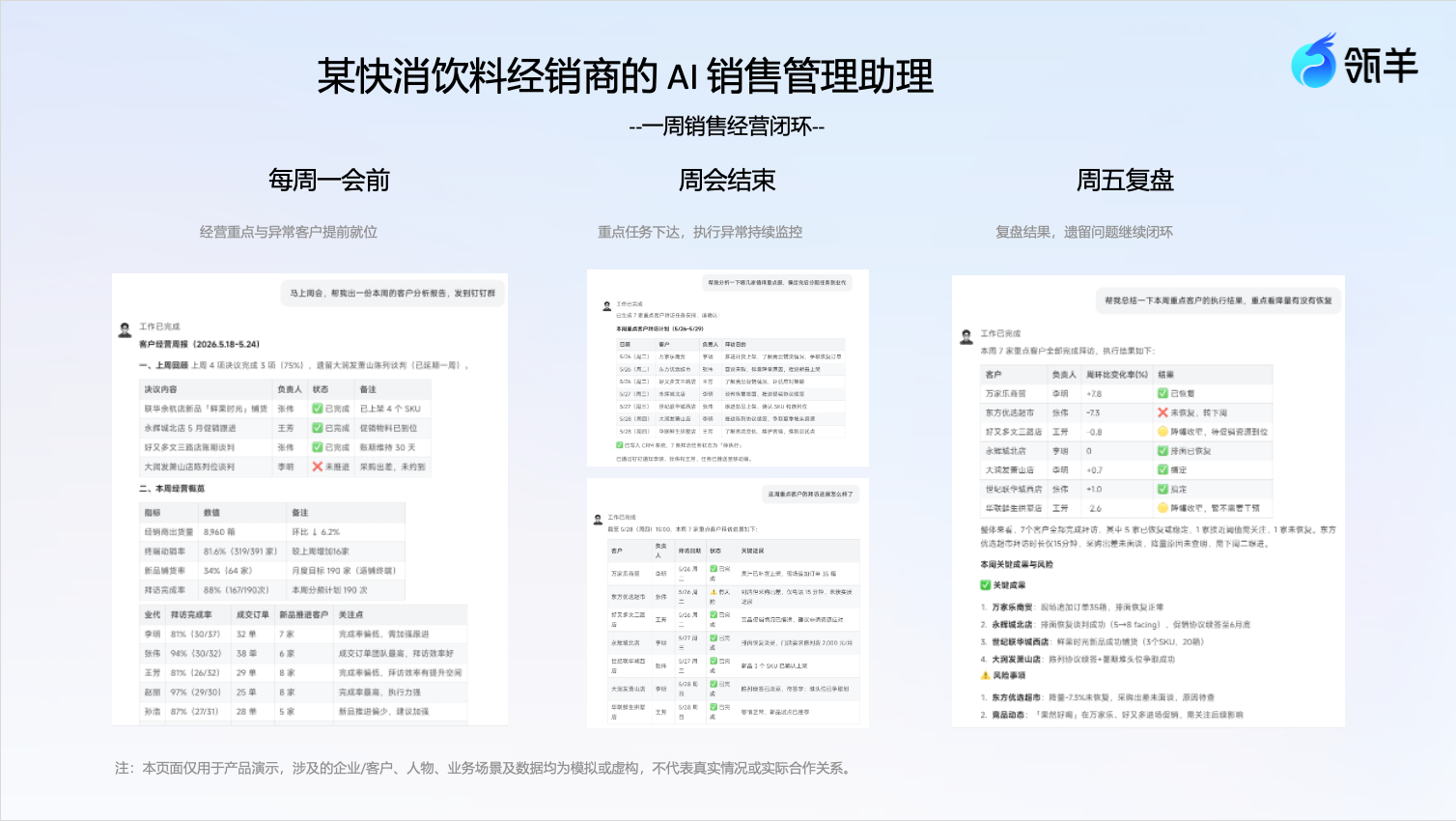
FMCG beverage distributor: sales management assistant
Functional positioning The sales management assistant Digital Worker runs through a distributor's weekly sales management loop—automatically generating a business report before the weekly meeting that tells the manager "which customers are declining in volume, which new products haven't been placed, and whether last week's resolutions were completed"; after key customers are identified in the meeting, it automatically breaks them into visit tasks assigned to sales reps; during execution it continuously monitors visits and changes in customer shipments, and on Friday it automatically summarizes "which issues were resolved, which customers still haven't recovered, and who to focus on next week."
Best practices
Feature Updates
Highlight Features
- Group collaboration spaces launch first (Beta) — Teams can create group spaces around customers or projects, configure group tasks, and add group materials, bringing Digital Workers into real collaboration scenarios.
- "Scheduled Tasks" upgraded to "Automated Tasks" with external notification (webhook) triggers — When a ¥5M opportunity in CRM flips to "Won," the task fires instantly, generating a win bulletin pushed to the team; the same task can also handle the routine Friday weekly report—routine plus ad-hoc, one task covers both.
- New message queuing — Waiting long for a proposal PPT? Send whatever comes to mind right away—the Digital Worker picks it up automatically after finishing the current reply, and you come back from your meeting to review the results.
- Maintain the Knowledge Base by "just saying it" — Spot a missing FAQ entry mid-chat? One sentence—"add this Q&A to the FAQ"—updates it into the base directly; DingTalk online docs now use the built-in connector for collection, with simpler configuration and broader coverage.
- Batch-update extended attributes in one sentence — "Update the tier, status, and milestones for this batch of projects together"—multiple attributes done at once, no more submitting project entries item by item.
Group Collaboration Space (Beta)
In the past, Digital Workers mostly served individual conversations, but in real business, work like customer follow-ups, proposal co-creation, and project advancement happens in team groups, where multiple people need to sync information, share materials, and execute together.
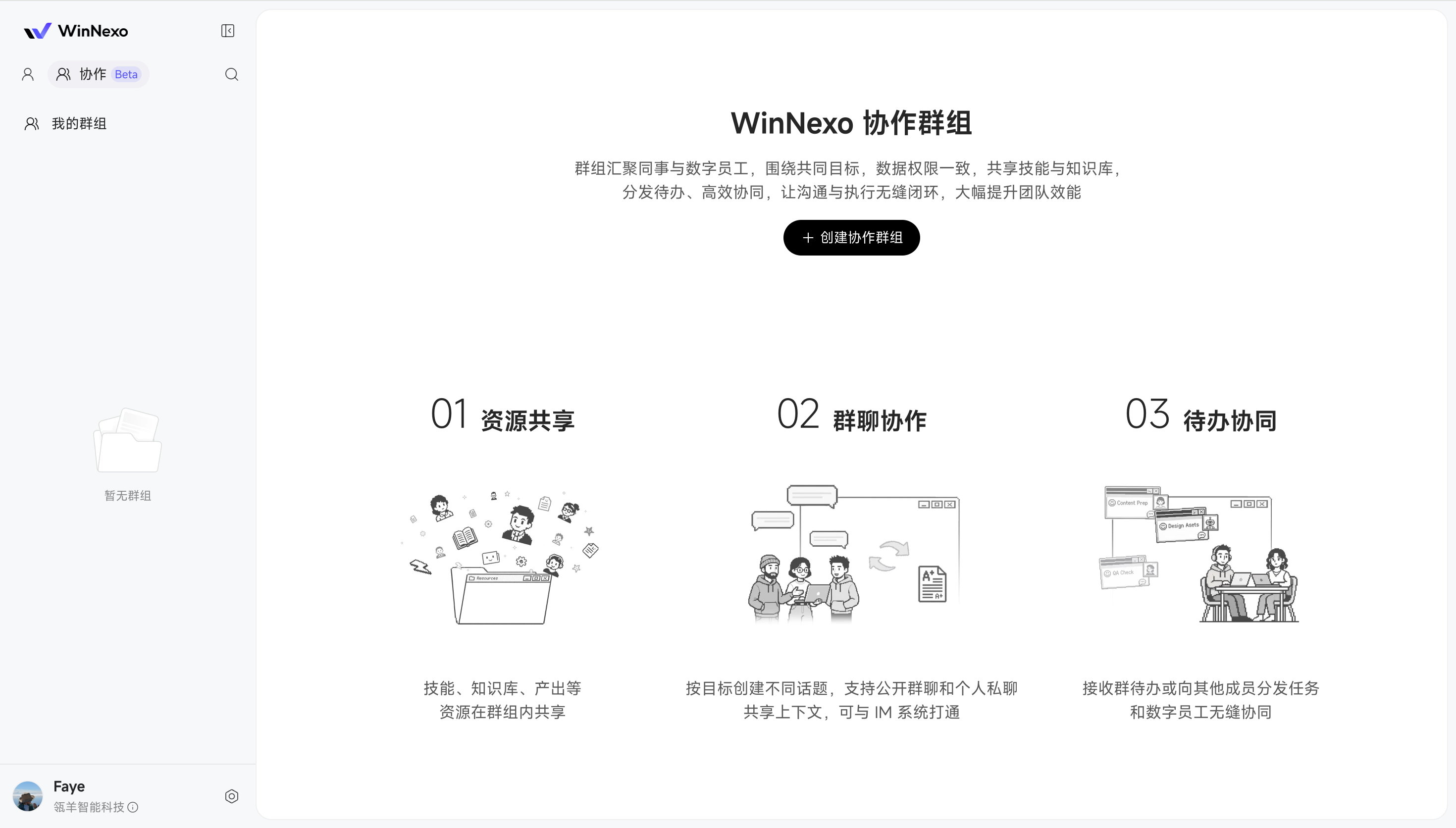
So this release launches "Collaboration Groups": bringing colleagues and Digital Workers into one shared collaboration space, where—around a common goal and within a unified data-permission boundary—they share Skills, Knowledge Bases, and business materials, distribute to-dos, and advance work together, letting communication, decisions, and execution flow seamlessly. The core capabilities cover three parts:
- Resource sharing: Skills, Knowledge Bases, outputs, and other resources are shared within the group—new members can use them the moment they join, no more forwarding and configuring one by one.
- Group chat collaboration: Create different topics by goal, with support for public group chats and private one-on-one chats sharing context, plus IM integration—once the group bot is bound, you can talk to Digital Workers directly in the IM group.
- To-do coordination: Receive group to-dos or distribute tasks to other members, collaborating seamlessly with Digital Workers.
⚠️ This feature is currently a Beta preview—capabilities and workflows are still being polished. You're welcome to try it out and share issues or scenarios 😄
Case 1: In a sales iron-triangle group, consolidate customer materials and follow-up tasks
The biggest fear in advancing a major account is information scattered everywhere: sales adding customer feedback, solution folks adding technical materials, delivery assessing implementation risks—and in the end someone has to string the materials, tasks, and outputs back together. Now you can create a group collaboration space for this customer group, add the customer background, proposal assets, and key materials to group materials, then configure a group task like "every Friday, summarize this week's customer-advancement risks and generate next week's follow-up suggestions." After the task runs, the team can view outputs and execution records right in the group space.
Value: Advancing a customer no longer relies on people hunting for materials, asking about progress, and patching records; the group space concentrates materials, tasks, outputs, and execution history in one place, so sales, solutions, and delivery can keep collaborating around the same set of information.
Case 2: In a project-tracking group, a fixed task keeps producing progress reports
Project work constantly requires periodic progress summaries: the customer wants stage results, the project lead wants risks, and sales needs materials for the next conversation. These used to require manually collecting materials, compiling progress, and distributing to colleagues. Now you can add project materials to the group space and configure a fixed group task, e.g., "every morning at 9, generate a project progress digest based on group materials, listing open items, risk points, and suggested next steps." The team then checks results on the outputs page and traces each run in the execution records.
Value: The group space isn't just a folder—it's a task workbench continuously running around the project; fixed tasks automatically produce stage results, sparing sales and project leads from repeatedly compiling materials, tracking records, and manual roll-ups.
Chat Experience
- Easier multi-file upload: A single public-cloud conversation supports up to 20 file uploads, with compression prompts for large images; for proposals or reviews, hand requirement docs, historical proposals, and reference attachments to the Digital Worker for analysis all at once, reducing back-and-forth.
- Filter chat history by Digital Worker: When using multiple Digital Workers like a sales assistant and a solution consultant, quickly retrieve the relevant Q&As and results by worker, no more scrolling through sessions one by one.
- Message queuing for long tasks: While one message is executing, you can send the next instruction ahead of time—the system processes them in order, so long tasks like PPT generation and data analysis don't keep you waiting.
Automated Tasks (formerly "Scheduled Tasks")
- External notification (webhook) triggered execution: When another system changes and needs to notify a task to run automatically, just copy the task's dedicated URL and hand it to that system's IT staff—for example, a new order landing in the order system automatically triggers an "order change notification" DingTalk alert to the sales owner, no more daily data-pull reconciliation.
- One task, multiple trigger methods: The same task can have both scheduled execution and external notification triggers—a routine Friday "sales scoreboard" weekly report, plus the same task firing instantly when a ¥5M opportunity in CRM flips to "Won" to push a win bulletin to the team—no need to build two tasks for one job.
- Push supports multiple channel bots: The push configuration can add multiple channel bots, syncing task results to several groups at once—the daily report goes to both the sales group and the leadership group, no more manual forwarding.
Knowledge & Resources
- Upgraded DingTalk online-doc collection: Collection now runs on the built-in DingTalk connector, with simpler configuration and a broader collectable document range—getting DingTalk materials into the base is easier.
- Update Knowledge Base docs by just saying it: WinNexo CLI adds Knowledge Base file editing and replacement—spot a missing FAQ entry mid-chat, say "add this Q&A to the FAQ," and it updates directly, no trip back to the backend to re-upload.
Skill Center
- Quick online editing for personal Skills: Found a missing sentence in skill.md? No need to re-upload or ask the Digital Worker—just open editing and update it quickly.
- Faster Skill saving and updates: Saving is noticeably quicker when only changing basics like the display name; the enterprise-Skill "saved but unpublished" red-dot state now comes with an explanatory hint, and the update-publish pipeline has been optimized—no more "I changed it several times, why isn't it live" confusion.
Admin Console
Applicable to: Platform Admins / Semantic Modelers
- Object Graph supports "partitioned" source tables: The semantic retrieval and query pipeline supports partitioned tables—both incremental and full partitions can be modeled, so historical comparison analysis is no longer limited.
- Batch update of extended attributes: One sentence updates multiple object extended attributes at once, no more submitting each attribute separately—a big efficiency boost for project-entry scenarios.
- Custom connectors add SSE access: Custom MCP connectors support the SSE connection method, broadening the range of connectable services.
- WeCom account sync filtered by tag: Account sync supports scoping by WeCom tags, syncing only the people you need for more precise management.
Give it a try: create a collaboration group around a key customer or project, add your frequently used knowledge, Skills, and outputs to the group materials, then bind an IM channel and configure a group task—let the team keep collaborating within one shared context.
Best Practices
- B2C Automotive Sales: Sales Consultant Assistant
Functional positioning The Sales Assistant Digital Worker covers a consultant's three key moments in the day—providing "who to follow up with today, what to discuss, and how to approach them" in the morning; automatically generating a summary and a second-follow-up guide as soon as a test drive ends; and producing an action review automatically for the evening meeting.
Best practices
 1. B2B: Internal Sales Quote Generation
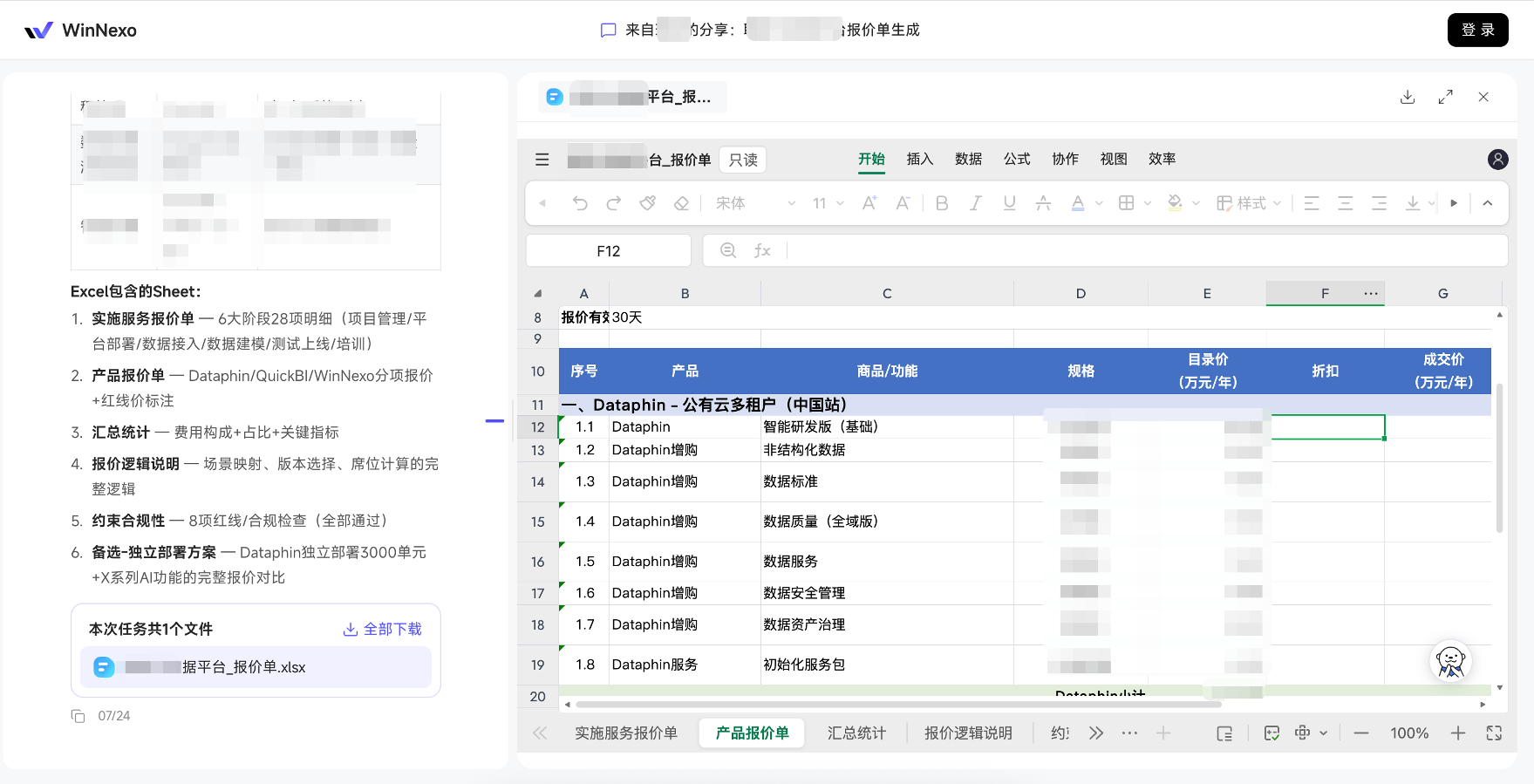
Problems and pain points B2B quotes often require repeated calculations across multiple products, deployment options, subscriptions and buyouts, seats, and add-ons. Just assembling specifications, list prices, discounts, and implementation services into a customer-ready quote can take a salesperson most of a day and still leave room for pricing-basis errors.
Best practices By combining the product enterprise Knowledge Base and pricing-logic documentation with historical customer quotes, a salesperson only needs to briefly describe the customer's requirements. The system can identify the appropriate deployment environment and feature modules automatically, then generate a standardized quote containing product codes, implementation services, summary statistics, and an explanation of the pricing logic—compressing work that once took half a day into minutes and letting sales spend their energy on discussing value with customers.
Highlights
- Image / video generation and editing Skills are live — Produce marketing posters and promotional short videos with a single sentence, making event collateral, social media assets, and lead-outreach content faster to deliver.
- Expanded @ scope in conversations — Not only can you @ the main object, but all associated business objects and authorized enterprise knowledge can now be @'d directly—for example, @ both a customer and an associated opportunity for analysis in one sentence.
- Built-in Feishu connector — Just like DingTalk, you can send Feishu direct and group messages right in the conversation, no more manual forwarding.
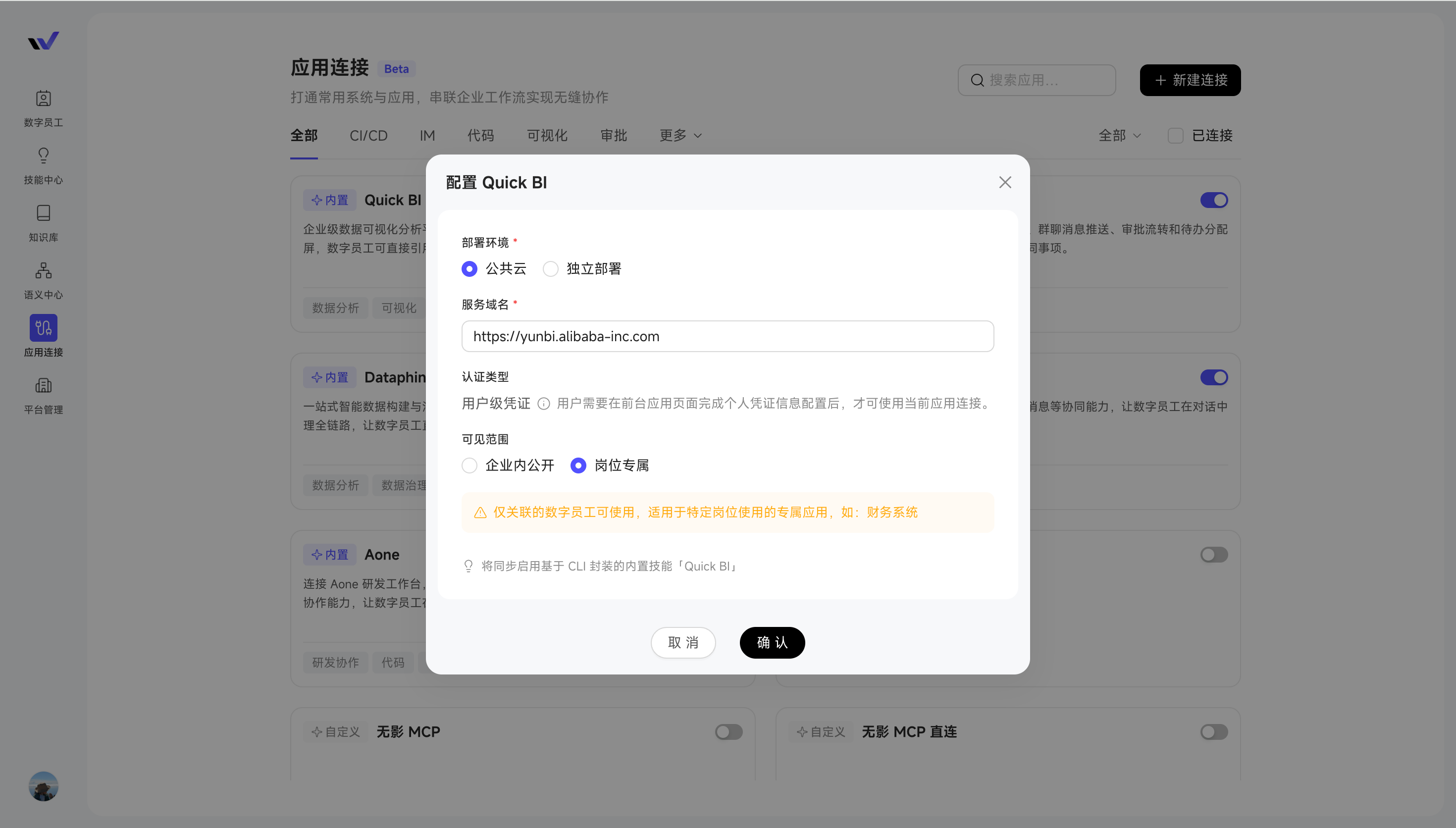
- App connections support availability scope — General systems like "OA Approval" can be set to "available to everyone," so all relevant Digital Workers can invoke them; dedicated systems like "Supplier Management" can be set to "Role-Specific," so only bound Digital Workers can use them.
Chat Experience
- @ any authorized object and knowledge: Previously you could only @ the main object in a conversation; now associated objects like opportunities and orders, along with authorized enterprise knowledge, can be @'d directly, pulling in multiple objects for analysis at once
Note: If the selected object or enterprise knowledge is not associated with the current Digital Worker, you won't be able to further query data or perform calculations, and won't be able to submit.
- Personal panel supports adding focus objects across types: Any object you have view permission for can be added to your personal panel as a focus item; customers, opportunities, contracts—focus on the scope you care about most right now for smoother use.
- Copy with references: When copying text from a conversation, the @'d objects and / invoked Skills are carried along, so there's no need to re-enter them manually—paste into another conversation and use them directly.
Skill Center
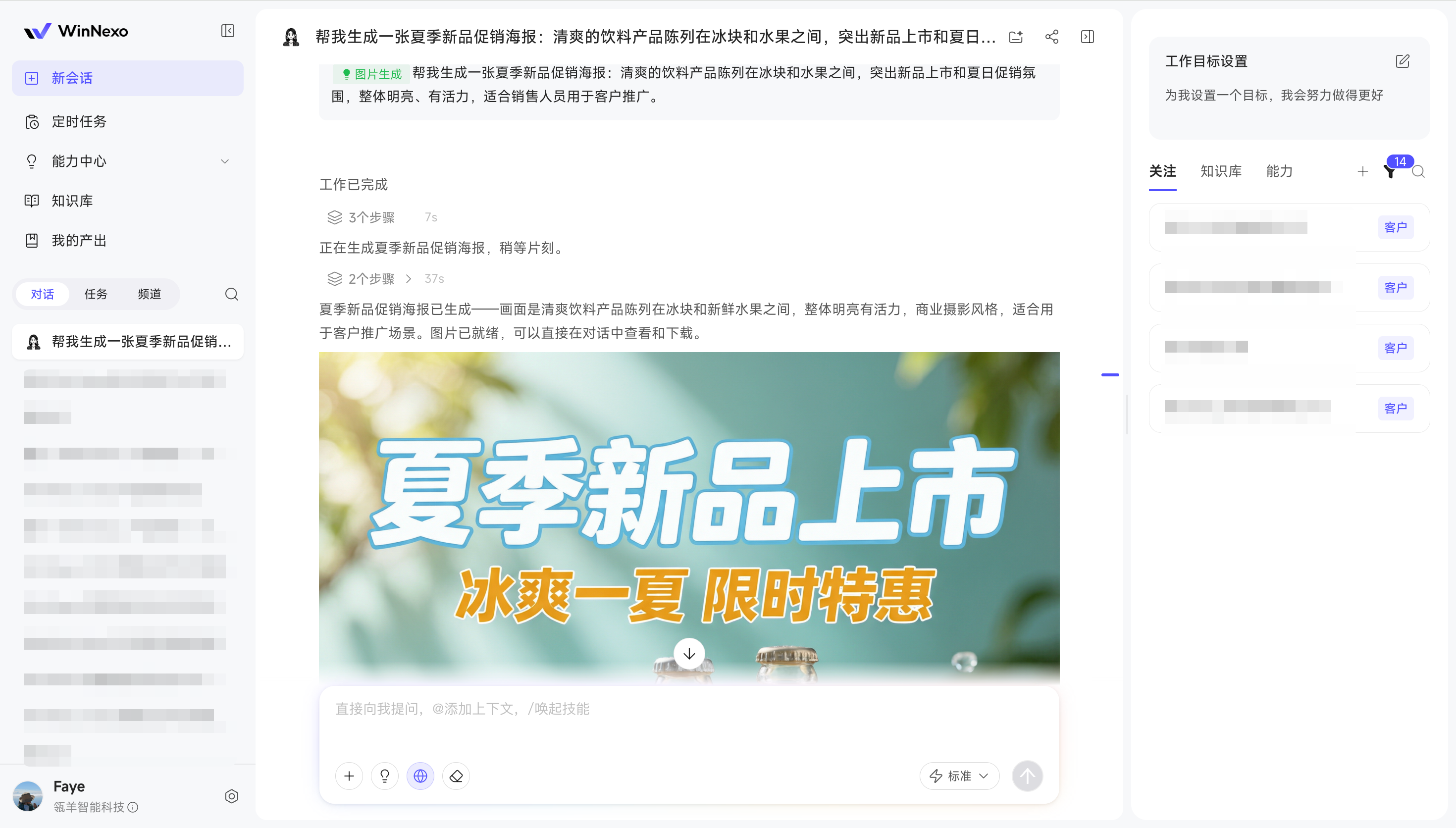
- Image / video generation and editing Skills are live: Built-in image generation, video generation, and video editing Skills let you produce images and videos with a single sentence—for example, "Help me generate a promotional image for the new product launch."
Tip: Currently only some models are supported, and an admin must enable the Skill in the backend before it can be used.
App Connections
- Built-in Feishu connector: Works out of the box just like the DingTalk connector, connecting the Feishu platform and supporting direct and group messages—teams working in Feishu no longer have to move things manually.
- App connection availability scope configuration: General enterprise systems (like "OA System") can be available to everyone, while dedicated systems (like "Supplier Management System") can be authorized by role, for clearer management.
Knowledge & Resources
- Easier Dataphin Knowledge Base integration: Unstructured datasets already built in Dataphin (e.g., consumer reviews, sales badge recordings) can be added directly as an "Enterprise Knowledge Base" for knowledge retrieval, with less configuration and broader querying.
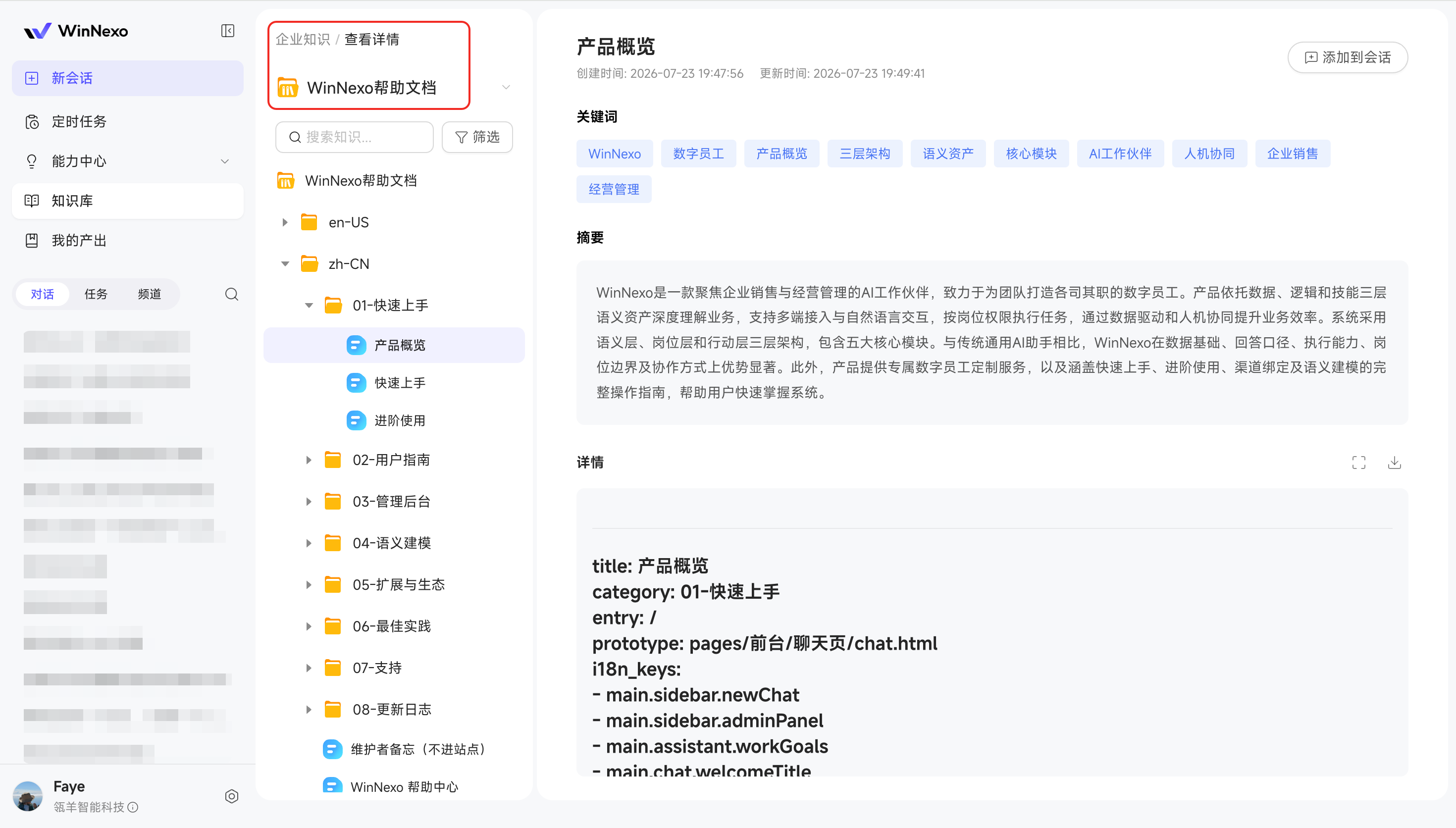
- Built-in help docs Knowledge Base: The product's built-in help documentation is surfaced as a Knowledge Base—when you're unsure about a feature, just ask right in the conversation.
Admin Console
Applicable to: Platform Admins / Semantic Modelers
- Semantic data sources support cross-schema: When data is spread across different schemas within the same data source (e.g., order detail data and summary metric data), it can still be incorporated into the same Object Graph for associated queries, making analysis more convenient.
- Further expanded data source ecosystem: Added connection support for SQL Server, ClickHouse, ADB MySQL, ADB PG, and PolarDB, meeting more diverse enterprise data analysis needs.
Commercialization & Purchasing
- Clearer Credit consumption display: Operations that incur no cost also keep a record and are explicitly shown as 0 Credit, making consumption more transparent.
- Richer Credit purchase specs: The public cloud purchase channel adds Premium and Exclusive Credit specs, and subscription-based dedicated deployments can now also be purchased online, meeting different usage scales and volume needs.
Give it a try: say "Help me create a promotional poster for this week's new product event" in a conversation and let the Digital Worker generate marketing collateral directly.
Highlights
- AgentTeam multi-Digital-Worker collaboration is live (Beta) — Complex tasks no longer rely on a single Digital Worker toughing it out; assign with one sentence and it's automatically split among multiple Digital Workers to complete relay-style.
- Knowledge Base capture and sharing improvements — The plugin can now capture complete web pages, and personal knowledge still being parsed can also be submitted to the enterprise Knowledge Base—no more waiting.
- More data source types — The Semantic Center adds support for Doris, SelectDB, and StarRocks data sources.
This Release's Focus: Multi-Digital-Worker Collaboration with AgentTeam (Beta)
⚠️ This feature is currently a Beta preview, its capabilities and operation flow are still being refined—you're welcome to try it out and share issues or use-case scenarios 😄
In the past, when a single Digital Worker faced a complex task spanning multiple specialties, it had to handle everything from start to finish—context piled up messily, and every step lacked depth. In reality, complex projects are never handed entirely to one person either; instead, they're split by role and assigned to different people, each doing their part. This release, WinNexo introduces multi-Digital-Worker collaboration with AgentTeam: after you assign a complex task, the system automatically breaks it down and dispatches Digital Workers with the right specialties on demand—those that can run in parallel start at the same time, those with dependencies pick up in sequence—and finally consolidates everything into one complete output for you.
It's simple to use: you don't need to assign work one by one; just select the workers you need to form a team, then describe a complex task all at once in the Chat, and the system will automatically break it down, dispatch Digital Workers on demand, and consolidate the results.
Case 1: A quarterly review + renewal and upsell plan for a major customer
You send one message in the Chat: "Help me do a quarterly business review for customer XX, and provide renewal and upsell recommendations based on their usage." The system dispatches several Digital Workers on demand, running in parallel where possible:
- The Product Operations Digital Worker and the Product Manager Digital Worker start at the same time: the former pulls usage data and risk signals to produce a health review, while the latter matches recommendable new features and upsell directions.
- Once the upsell direction is clear, the Delivery (FDE) Digital Worker assesses the implementation scope and person-days, and the Quotation Digital Worker then produces the renewal + upsell quote.
Value: Steps that can run in parallel advance at the same time, faster than one person doing them in sequence; each Digital Worker only handles its own specialty, so quality is more reliable.
Case 2: One bidding document, multiple roles relaying, done in one go
The most time-consuming part of writing a bid isn't the writing—it's coordination: presales, business, and delivery roles relay messages and chase progress through people, with each link blocking the next. Now, drop the tender document into the Chat and say "help me organize a bid response," and several Digital Workers will automatically relay: Presales Solutions first fully understands the requirements and produces the technical proposal, hands it to Bidding Business to complete the commercial bid and qualification materials, then **Delivery (FDE)** fills in implementation feasibility and delivery commitments, and finally it's consolidated into a bid response ready for review submission.
Value: Different specialty roles automatically pass the baton one after another; the output of the previous one flows directly to the next, with no need for people to relay or chase in between—one bid, done in one go.
Preview · Group Collaboration Space: For scenarios like bidding that require long-cycle co-creation between people and multiple roles, it will be even smoother in the upcoming "Group Collaboration Space"—people and Digital Workers collaborate while chatting in the same group, sharing the same context and data permissions. Stay tuned.
Chat Experience
- One-click connector toggle: Turn on whichever connector you need right in the Chat, and turn it off when done—no unnecessary Credit consumption.
Friendly reminder: Enabling custom connectors increases context information, so we recommend enabling them on demand for more economical Credit usage.
- Natural-language model switching on IM: When chatting with the channel bot on IM, type
/模型名称or "switch to model name" to achieve the same model-switching effect as on the web (if unspecified, Standard mode is the default).
Knowledge & Resources
- More complete web capture: The browser plugin supports full-page capture for more complete content, and the download entry is easier to find.
- Share personal knowledge while parsing: Personal knowledge can be submitted to the enterprise Knowledge Base even while it's still being parsed—no more waiting.
Admin Console
- Tenant-level model configuration: In multi-tenant scenarios, you can configure different model sources (official models or your own models) for different tenants separately, so sensitive data goes through your own models for more reassuring isolation.
- Data source ecosystem expansion: Added connection support for Doris, SelectDB, and StarRocks.
Platform & Ecosystem
- Semantic retrieval capability opened up: Semantic retrieval is exposed via OpenAPI and CLI, so an enterprise's own AI scenarios can also reuse unified semantic definitions.
Try it out: Assign a task that normally requires cross-department collaboration (such as producing a renewal plan for a major customer, or organizing a bid response) to a Digital Worker in one sentence, and watch how it rallies multiple Digital Workers to divide the work and produce a first version.
Highlights
- Personal perspective, assign on demand — Knowledge, tasks, and outputs can all be managed centrally from your own perspective; dispatch Digital Workers by scenario and hand the job to whoever is best at it
- Ask the help docs right in a Chat — Don't know how a feature works? Ask a Digital Worker directly, or click your avatar to enter the Help Center and learn as you go
- Connectors add OAuth authentication and support personal MCP — Internal requirement systems, OKR, CRM, and other internal and external systems can all be connected
- Fine-grained permission management for semantic models — Permission types expand to Create, View, and Modify, and you can grant permissions in bulk by object type—more granular control with less effort
Chat Experience
- A brand-new "me-centric" framework: Knowledge, chats, tasks, and outputs can all be managed uniformly from your personal perspective; different Digital Workers each have their specialties—just pick the right one and get started; the left menu is also organized by "My," so you can review what you've done and locate a specific output at a glance
- Switch Digital Workers within a Chat: Your personal knowledge always follows you; when you switch to a different Digital Worker, its own skills, semantics, and enterprise knowledge scope are automatically loaded; on the Chat page you can clearly see what it's good at and what content it can access
- Switch the primary model within a Chat: Switch the model used for the current Chat directly in the input box—different models excel at discussing plans, writing reports, or executing tasks. Pick one based on the current scenario for better results
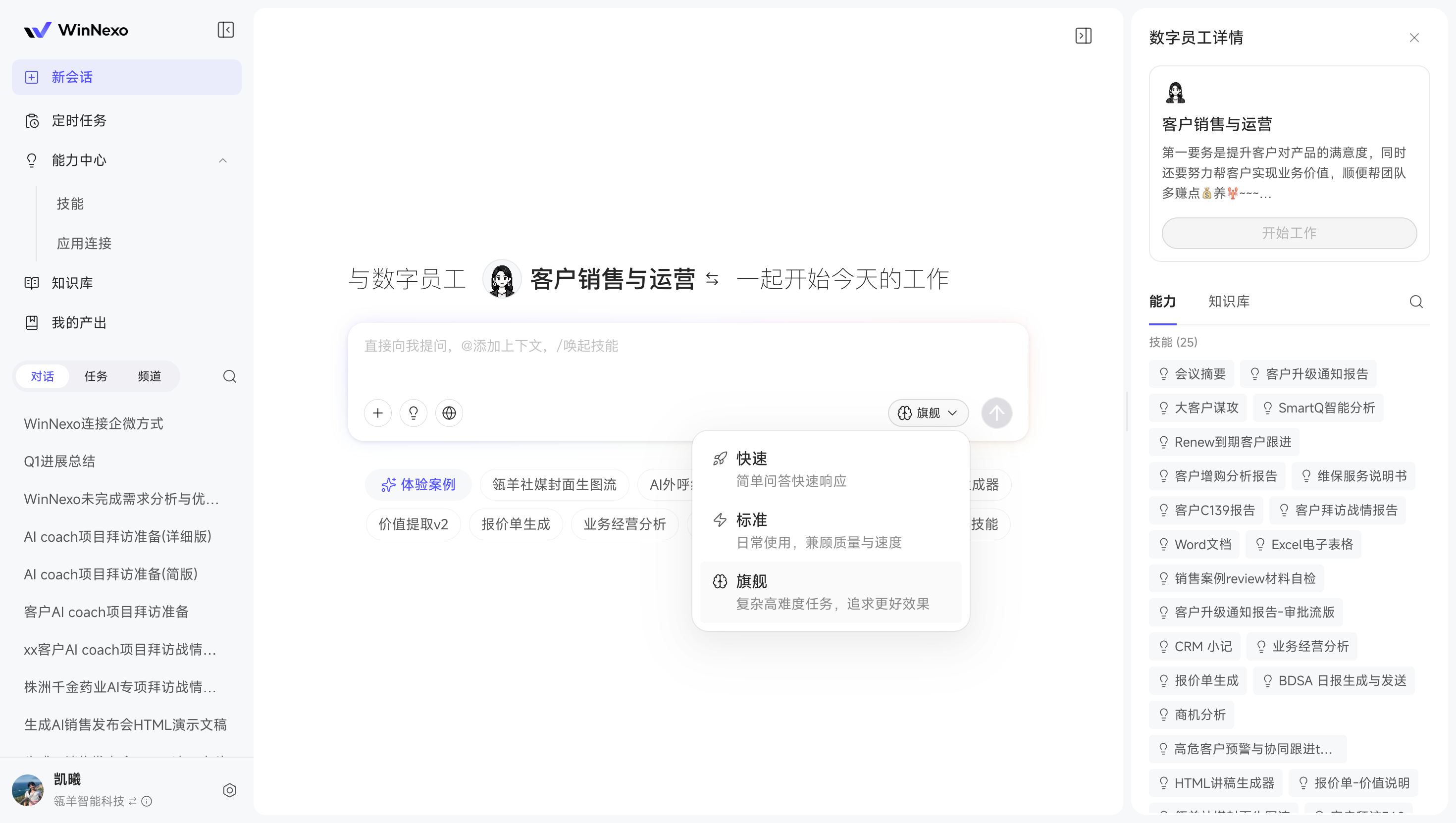
Knowledge & Resources
- Share personal knowledge to the enterprise base: Want to share materials you've organized with your team? You can share them at the granularity of a directory or a single piece of knowledge; unlike before, after submission you still keep this knowledge on your personal side, and when there are updates you can resubmit and go through approval again, so the team always sees the latest version
- Connect the Knowledge Base to Dataphin: Knowledge already accumulated in Dataphin can be connected directly, reusing existing processing results—no need to reorganize it before Digital Workers can use it
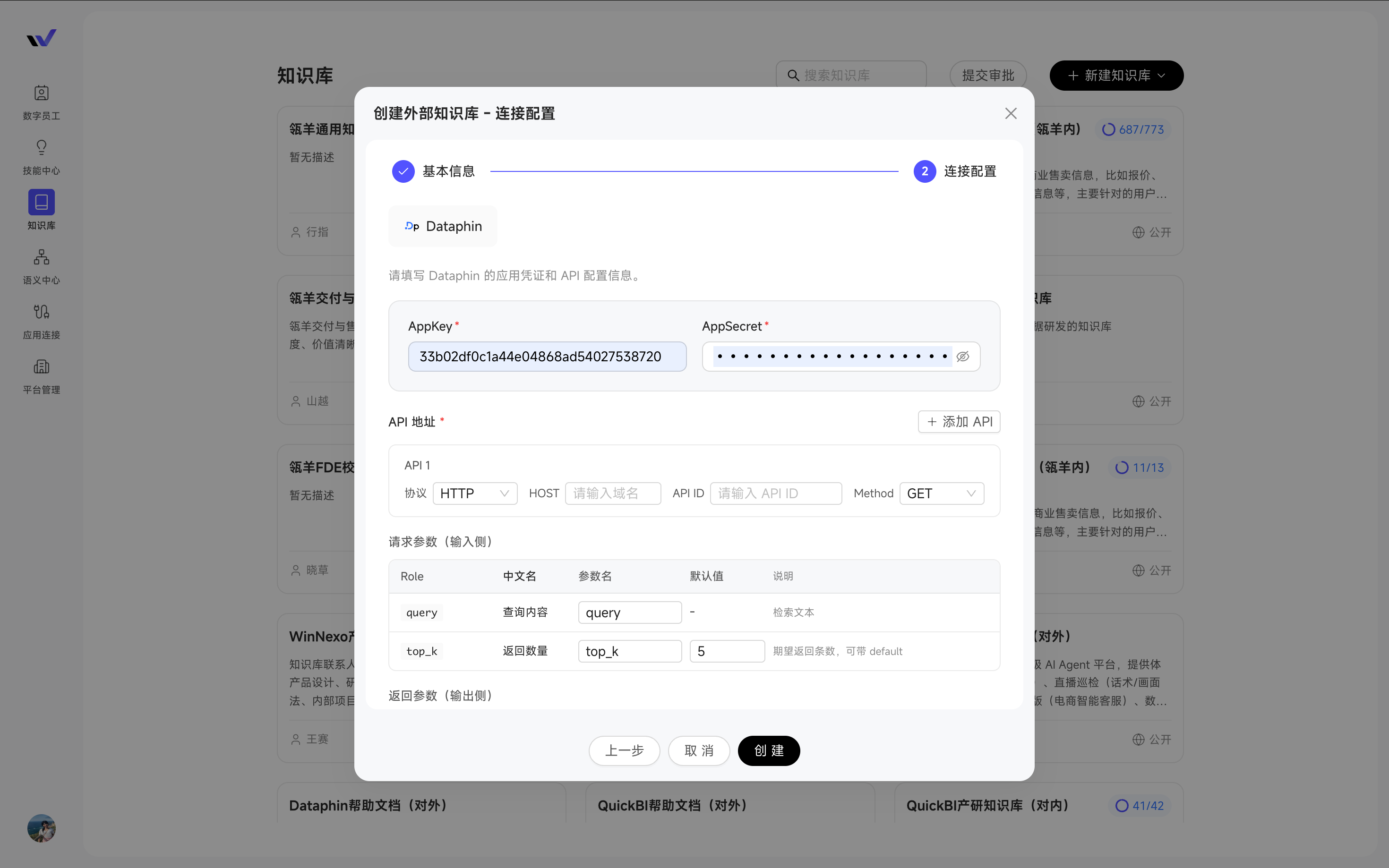
App Connections
- Connectors add OAuth as a connection method: In the past, connecting systems relied on API Key/Token or Basic Auth; now you can also use OAuth—paste the config, and following the MCP 2025 protocol it will find the authorization entry on its own and recognize which method to use. You just click once on the frontend to complete authorization and you're ready to go. Systems that used to be hard to connect, like the internal Aone requirement system and OKR, can now all be connected
- Support for personal custom MCP: No longer limited to a unified account—individuals can configure their own connectors (also supporting multiple authentication methods)—for example, connect a CRM that only you have access to and let a Digital Worker help you look up customers
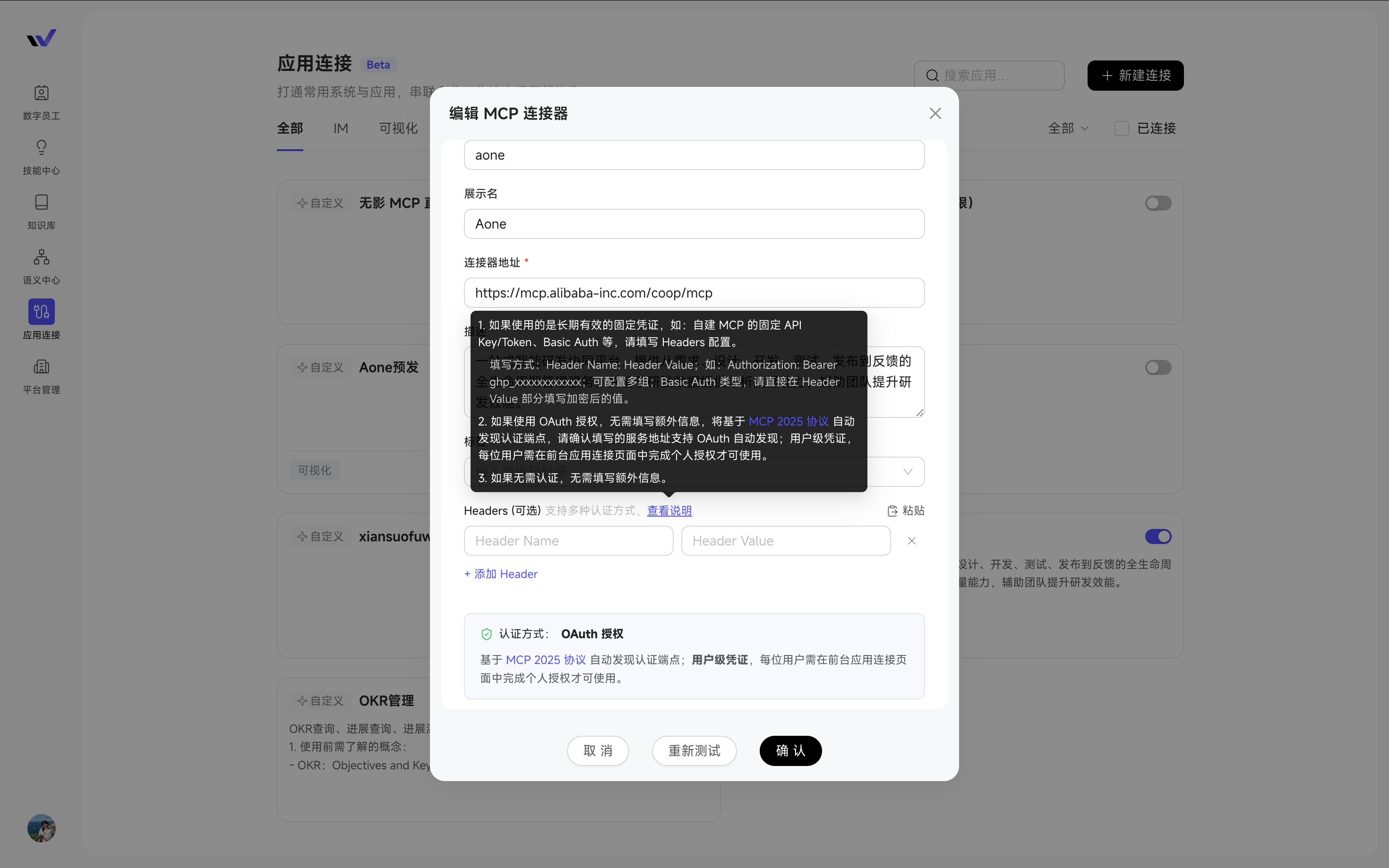
Admin Console
- Fine-grained permission management for semantic models: More granular permission control and easier bulk operations—on one hand, permission types expand from just "Modify" to "Create," "View," and "Modify," and "attribute value modification" can be granted by object type as a whole, no longer requiring you to pick existing attributes one by one; on the other hand, you can grant permissions to multiple object types at once, instead of only being able to select one at a time as before
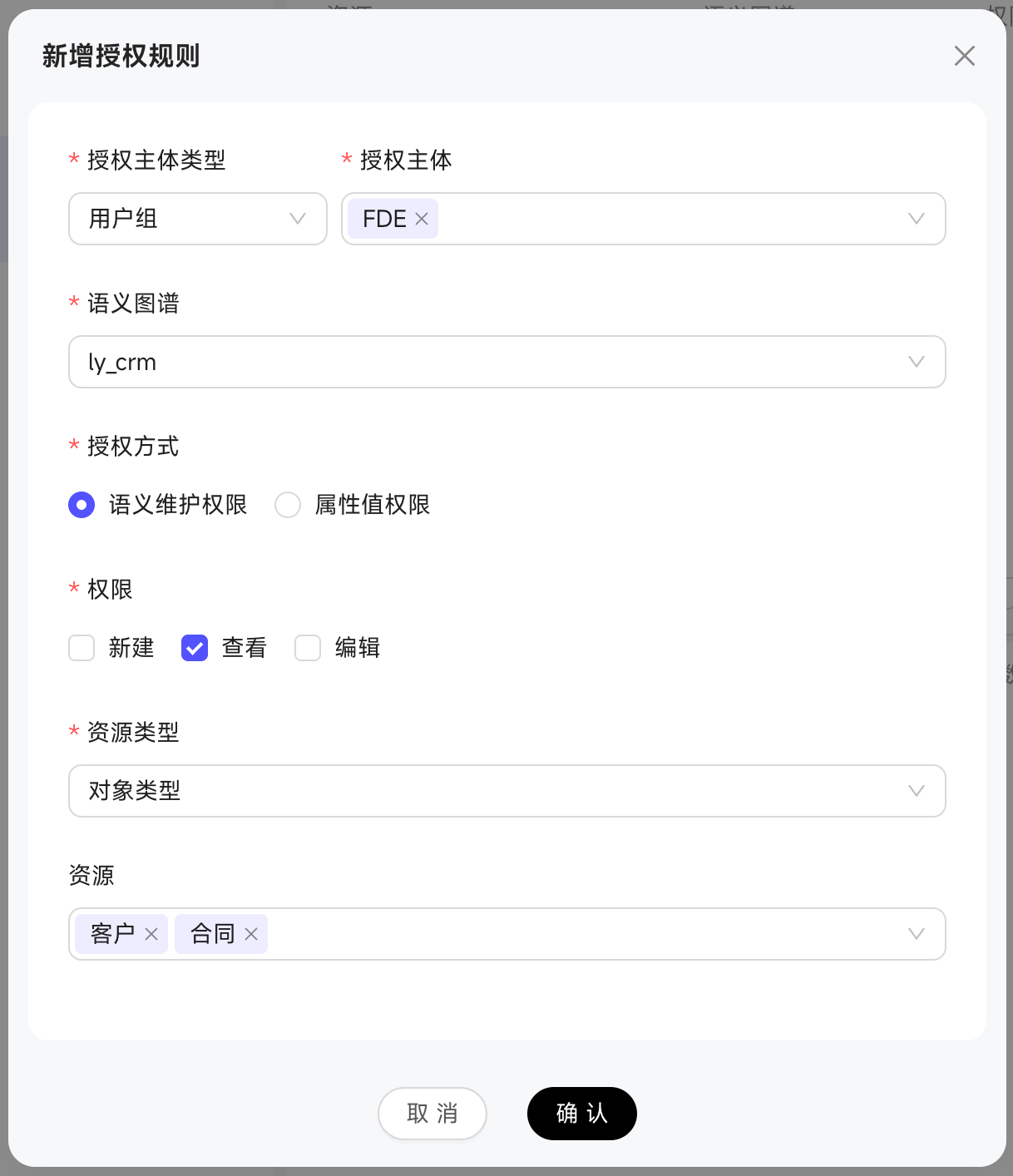
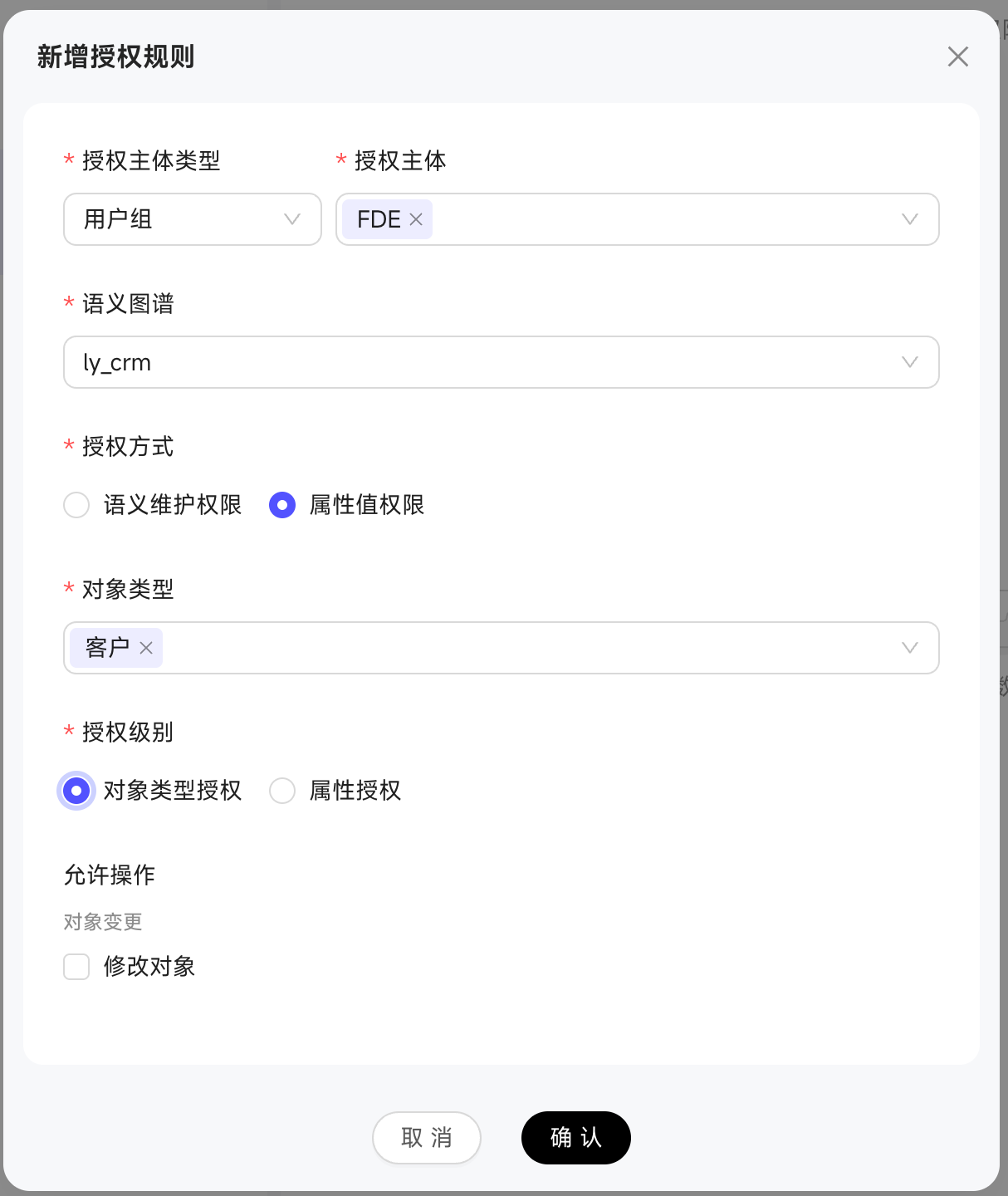
Platform & Ecosystem
- Built-in WinNexo help docs: When you encounter a feature you don't know how to use, just ask a Digital Worker in the Chat to get an answer; you can also click 【Avatar - Help Docs】 to browse systematically on-page—no more hunting for tutorials to get started
- Single tenant supports multiple accounts / multiple enterprises: A single tenant can log in with multiple account types, or manage multiple enterprises under the same account. Login methods for existing accounts are migrated along with them, making switching smoother
- Self-built account API provided: For scenarios that need to be embedded into your own mini-programs or systems, a full set of account management capabilities is now open—create/disable/delete users, generate and retrieve user tokens, and grant users to one or more Digital Workers. Row-level permissions are configured once in WinNexo, suitable for building "multiple AI workers offered externally, each bound to a different digital role"
Commercialization & Purchase
- License supports multi-tenant allocation: A single License can allocate the main package and Credit quotas to multiple tenants separately, making resource allocation clearer and more controllable for multiple teams and organizations
Try it out: Click to switch Digital Workers in a Chat, see what skills and knowledge scope each Digital Worker brings, and hand the job to whoever is best at it; when you're unsure how to use a feature, just ask "how does this feature work" and the built-in help docs will answer right in the Chat.
Highlights
- App Connections (new module) — Digital Workers can finally get things done across systems: built-in DingTalk/Quick BI/Dataphin work out of the box, plus custom integration with any system
- Enhanced semantic object following and association configuration — Support for following semantic objects for a more focused view; metrics, business logic, and analysis views can all be associated with each other for more accurate analysis and reasoning by Digital Workers
- One-click browser plugin capture — See valuable web content? One click saves it to the Knowledge Base—capture as you browse, use whenever
Knowledge & Resources
- Bring Knowledge Base files into a Chat with one click: Select a folder or a single file from a personal or enterprise Knowledge Base and add it directly to a new or recent Chat—for example, before your next visit, drop the customer's annual report and last meeting notes to a Digital Worker together and let it help you organize talking points
- One-click browser plugin capture: When you see valuable content while browsing, one click on the plugin captures it to a designated folder in your personal Knowledge Base—no more copy-pasting or manual uploading; capture as you browse, use whenever
App Connections (new this release)
However many systems an enterprise has, Digital Workers can connect to that many—out of the box + custom extensions, taking AI from "only able to answer" to "actually able to work."
- Built-in connectors: Three app connectors ready to install out of the box, each with pre-packaged companion skills; once enabled, you can operate the corresponding system right in a Chat:
- DingTalk: Say "help me create a customer visit schedule for tomorrow afternoon" and the schedule is created; "sync this week's signing progress to the sales group" and the bot pushes it automatically; you can also look up contacts, create to-dos, initiate approvals, read/write documents, and operate AI Tables
- Quick BI: Ask "this month's sales achievement rate by customer in East China" and the data comes back in seconds; upload an Excel to automatically generate trend analysis and anomaly attribution; view workspaces, datasets, and report lists to quickly locate data resources
- Dataphin: Directly invoke enterprise data assets to complete analysis and decision-making, automatically inheriting the original system's permission policies, with connections controllable at any time—the data team's governance results truly flow to the business frontline
- Custom connectors (MCP): Support connecting any external system via form filling or JSON configuration—whether an ops colleague helps configure it or you paste a config yourself
- Credential hosting: Built-in connectors support personal credential hosting, where each person authorizes with their own account; custom connectors currently support system-level unified account authentication; all credential information can be securely stored without leakage
- Personal MCP and connectors supporting OAuth authentication are coming soon
Semantic Center
- Semantic tag filtering: Support for following semantic objects and toggling to view only followed content for a more focused view—when configuring Digital Workers, you can also batch-select the relevant semantic objects instead of flipping through them one by one
- Enhanced semantic associations: Metrics can be associated with analysis views and business logic definitions, and logic can be associated with each other, making the business semantic network more complete and Digital Workers' analysis and reasoning more accurate
Platform & Ecosystem
- "Personal Sales Assistant" out of the box: Activating WinNexo includes a built-in sales Digital Worker, pre-bound with skills like sales material generation, competitor analysis, customer outreach strategy, communication content generation, and lead discovery. Clicking each skill automatically fills in a real-world instruction—press Enter to get results directly. For example, clicking "Competitor Analysis" auto-fills "help me analyze the moves of Li Auto's main competitors in the new-energy SUV market over the past six months," and pressing Enter gets you conversation material you can use directly with customers. From "not knowing what to ask" to "one-click experience," the onboarding cost is nearly zero
- OAuth 2.0 login protocol: Enterprises can integrate their existing unified identity authentication system—one account works across multiple platforms, sparing you from remembering separate passwords
Try it out: Open WinNexo, find the "Personal Sales Assistant," and tell it "help me prepare a set of visit materials"—if you've already uploaded customer materials to the Knowledge Base, you can also bring the corresponding folder into the Chat with one click, and the sales assistant will combine this context to output a complete visit outline and conversation strategy for you.
Highlights
- Fine-grained permissions for enterprise Knowledge Bases — Define visibility scope by folder, grant by user or user group; batch-bind to Digital Worker authorization for more flexible permission control.
- Push scheduled task results to IM channel bots — After a task finishes, output files and execution results can be pushed automatically via a channel conversation bot, so you get notified and view results instantly
- WeCom QR code login — WeCom users can enter WinNexo directly by scanning a QR code, and the org structure can be automatically synced into user groups
- Multimedia output skills: Support for fused output of multimedia resources such as PDF and PPT files uploaded to user Knowledge Bases. Case, Case.
Chat Experience
- Add context or reference skills via keyboard shortcuts: Use the ↑↓←→ keys to quickly select the objects, resources, or skills you want to add—when the mouse isn't enough, the keyboard takes over
Scheduled Tasks
- Push execution results to channels: Task execution results and output files can be configured to push automatically via a channel conversation bot—no need to log into the web to check results, and no manual forwarding steps
Knowledge & Resources
- Folder- and knowledge-level permission control: Added the ability to set visibility scope by folder or knowledge (inheriting Knowledge Base visibility by default), with support for granting by user and user group separately—sensitive materials go only to those who should see them
Admin Console
- Semantic Center supports draft-state management: Save a draft even when a semantic definition is only half edited, managing in batches for flexible publishing
- Skill variable management: Sensitive information (such as keys and tokens) can be defined and referenced as variables in a Skill—sensitive information won't be printed in plaintext during a Chat, secure and convenient
Platform & Ecosystem
- WeCom account integration: After integrating the WeCom account system, users can log into WinNexo directly by scanning a WeCom QR code; the WeCom org structure can be synced into WinNexo user groups with one click, so personnel changes require no manual maintenance—secure and convenient
- SAML single sign-on integration: Support for integrating enterprise unified identity authentication via the SAML protocol
Highlights
- Continue shared chats — After receiving a chat shared by a colleague, you can keep asking follow-up questions without re-describing the background, making collaboration more natural
- Semantic data needed for object operations, no more waiting for source system changes — Now define "extended attributes" that have no mapped field in the data source directly in WinNexo—for example, add an "operations tier" to a customer, then say in Chat "help me change customer xx's operations tier to KA" to update it directly
- WeCom ecosystem expansion — Channel conversations extend to WeCom, so you can chat one-on-one with Digital Workers directly in WeCom, and group/one-on-one chat records can be automatically captured into the Knowledge Base
Knowledge & Resources
- WeCom group and one-on-one chat capture: Group discussions and one-on-one communications in WeCom can now be automatically captured into the Knowledge Base, so important information is no longer scattered in chat records (PS: the Knowledge Base admin needs to configure the WeCom capture connector in the Admin Console in advance)
- Enhanced DingTalk meeting capture: DingTalk meeting capture content now includes titles and summaries, so you can locate key content faster and more accurately
Chat Experience
- Manually clear context: When conversation context gets too long or you need to switch discussion direction, you can clear the current Chat's context with one click; previous messages are still kept for browsing but won't affect subsequent Chat reasoning. When using channel conversations on mobile, entering "clear context or /clear" achieves the same effect
- Continue a chat after sharing (Beta): After receiving a chat shared by someone else, if you want to ask more details, you can click "Continue Chat" to create your own chat (the sharer must enable continuable chats); the continuation brings in the original shared chat's text as context, but not the files and resources from the original chat, so the answers to some questions may be affected
Scheduled Tasks / Quick Skill Invocation
- Continue a chat from an execution record: A finished task isn't the end but a new beginning—once results are out, you can immediately ask for details and have the Digital Worker continue with the next step, sparing the whole repetitive routine of "open a new chat → restate the background → make the request again"
Admin Console
- Skill creation: When creating a skill, you can reference existing skills to orchestrate and combine them with real-time debugging—combining capabilities as quickly as stacking blocks
- Extended attribute definition: Freely add supplementary fields to objects that the source system doesn't cover—for example, when the CRM only has a unified "customer tier," now define an additional grading dimension that fits your own operations needs. Who can add/delete/modify attribute definitions and who can add/delete/modify attribute values are configured as two independent permissions—modeling stays modeling, daily maintenance stays daily maintenance
- Maintain attribute values in Chat: After analyzing a customer profile in detail in Chat and reaching a conclusion, just say "help me change a customer's operations tier to KA" to complete the attribute update, with real-time permission validation—convenient and secure
- Data source ecosystem expansion: Added support for AnalyticDB MySQL 5.0 connection, and existing data source types now support ECS self-built instance connection
Platform & Ecosystem
- Experience case entry: Added in-product experience case viewing, so new users quickly see "oh, it can be used like this"
- Login password management: Under a self-built account system, users can change their login password themselves on the Personal Settings page, and admins can also maintain them centrally on the user management page
- Channel conversations now support WeCom: Chat one-on-one with Digital Worker bots directly in WeCom, getting inspiration anytime, anywhere
- Private deployment model configuration: In private deployment mode, admins can configure the AI models needed for different scenarios in the ops management console, reducing maintenance costs
Try it out: After receiving a chat shared by a colleague, click "Continue Chat" to keep chatting—no more screenshotting to "restore context" for the Digital Worker.
Highlights
- Generative UI launched — Chat output can present complex information in visual forms like charts and cards for easier understanding; can be turned on or off as needed in personal preferences.
- Personal skills "I upload / I dictate / I distill" — Support for one-click upload of local skills, natural-language description to generate skills, and distilling "a reusable skill" directly from "a great conversation"—personal exclusive skills no longer depend on the development team.
- Credit is manageable and longer-lasting — Credit billing policy optimized, with average consumption for the same task volume reduced to about 1/3 of before; support for per-user quota allocation within a tenant, saving more and offering more control.
Chat Experience
- Generative UI: Complex information that can't be expressed well in text (data analysis, comparisons, workflows, etc.) can be displayed visually for higher comprehension efficiency; toggle on/off with one click in preferences.
- More focused thinking-process display: Sub-processes auto-expand during thinking and auto-collapse when done; parallel tool calls are grouped and aggregated; the AI's own retrieval of built-in tool thinking is presented more focused, bringing attention back to the "result" itself.
Skill Center
- Brand-new "Personal Skills" management: Support for directly uploading local skills, generating them from a single natural-language sentence, and manually distilling a skill from a satisfying conversation—three methods covering the full range from "publishing ready-made skills" to "ideas as skills."
- Disable unneeded built-in skills: The enterprise skill admin can manually disable unneeded built-in skills in the backend Skill Center; app users can also control which skills they need under each Digital Worker; disabled skills don't participate in invocation, avoiding interference from irrelevant skills so Digital Workers pick the truly-in-use skills more accurately.
Knowledge & Resources
- One-click conversion of personal knowledge to enterprise knowledge: All users now have a "Submit to Enterprise Knowledge" entry; previously only admins could do this, now any colleague can contribute good content to the team (knowledge takes effect after admin approval; users can view their shared list).
- Batch move categories: Personal and enterprise knowledge can batch-move resources to a specified category, significantly improving efficiency when organizing large volumes of materials.
- One-click retry on parse failure / automatic system resume: Documents that fail to parse can be retried with one click from the list; after a system restart, incomplete parsing automatically resumes without manual item-by-item handling.
- Auto re-parse after online editing: Locally uploaded md/text documents and online notes can be edited online directly, and after saving they auto re-parse—knowledge content revisions take effect immediately.
Share Management
- Scheduled tasks and quick skills can be shared: Scheduled tasks and quick skill invocations can be shared with colleagues, and all shares can be viewed and managed uniformly in "Personal Settings - Share Management."
- Share config can choose "whether to allow output editing": When sharing chats and outputs, you can choose whether viewers may edit the output (only for editable output types, e.g., md documents), making shared collaboration more convenient.
Personal Settings
- Support for personal preferences: In Personal Settings you can manage: scheduled task completion notifications, scheduled task run timeout duration, next-step recommendation toggle, clarification auto-confirm timeout duration, and more—so a Digital Worker's "proactive behavior" runs at your pace.
Admin Console
- Digital Worker "role configuration" upgrade: The former "basic info" dialog is upgraded to a "role configuration" page, with a new configuration navigation making role information clear at a glance.
- New "role description": Define a Digital Worker's responsibility boundaries and code of conduct, automatically injected into chats and task execution, so the Digital Worker "knows what it should and shouldn't do."
Platform & Ecosystem
- Optimized IM channel thinking-process display: Added thinking-process display, DingTalk channel messages fully support md format, and mobile is as clear and intuitive as web
Commercialization & Purchase
- Consumption for equivalent tasks reduced to about 1/3: The Credit billing policy is optimized overall, with average consumption for the same task volume significantly reduced, so enterprises can cover more scenarios within the same budget.
- Per-user Credit allocation: Admins can enable per-member Credit allocation within a tenant for finer control granularity and clearer cost accounting.
Try it out: Turn on "Generative UI" in personal preferences, then have a Digital Worker create a trend comparison analysis for you and see how much reading cost the visual output saves versus plain text; or dig out a conversation you've been using smoothly lately, enter "help me create it as a skill," and turn it into a one-click reusable personal Skill.
Highlights
- Multi-Graph semantic spaces launched — Create multiple isolated semantic Graphs within a single tenant, each with independently configured data sources and semantic admins, so multiple business lines sharing one platform don't interfere with each other.
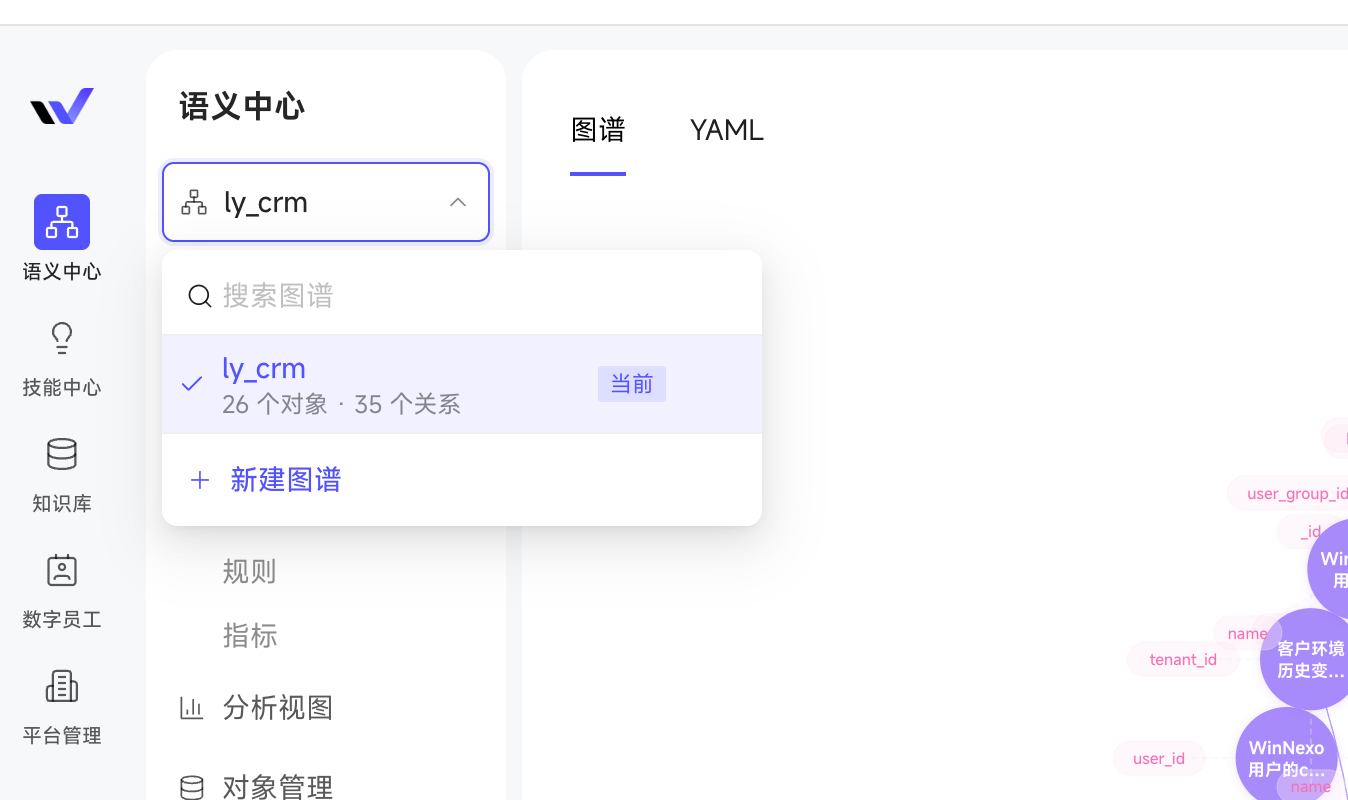
- Skill development pipeline fully connected — Creating, debugging, and modifying skills close the loop in a single pipeline—write then debug, debug then modify—so building your own skills no longer requires switching back and forth between environments, greatly lowering the delivery barrier for custom skills.
- More transparent Chat process, more controllable sharing — The semantic retrieval invocation process displays more detailed information, making the retrieval path clear at a glance; chat sharing supports specifying the visible-to scope, so sensitive content can be shared with confidence.
- Upgraded channel conversation experience — IM channel-side messages support multimodal data processing such as images and files, with a friendlier output display.
Chat Experience
- Semantic retrieval on any object: In Chat you can mention any business object associated with a Digital Worker to ask questions, no longer limited to the primary object, so you can get right to the point even in complex business scenarios.
- @ folder for precise retrieval: In a Chat you can @ a specific folder in personal or enterprise knowledge, effectively filtering the retrieval scope for more efficient material location.
- Transparent semantic retrieval invocation process: Tool call results display more detailed information, making the retrieval process easier to understand and result credibility clear at a glance.
- Chat sharing supports limited scope: You can specify the visible-to scope when sharing, so sensitive chats can be shared with confidence.
- Attach local files via shortcut: Copy-paste to attach local files into a Chat, for more convenient operation.
- Auto-resume on stream interruption: After a page refresh or network jitter, streaming responses can resume, so your train of thought isn't broken.
Scheduled Tasks
- Hourly scheduling: Tasks can run at an hourly frequency, covering higher-frequency automation scenarios.
- Specify output file storage location: Configure scheduled task outputs to a specified folder in personal resources or the enterprise Knowledge Base; if the target folder doesn't exist, it automatically falls back to the root directory.
Knowledge & Resources
- Standard DingTalk document capture: Personal Knowledge Base management adds standard DingTalk document integration, so content you've accumulated in DingTalk can also be used directly by Digital Workers.
Skill Center
- Create-debug-modify pipeline fully connected: Skills can go from creation and debugging to iterative modification within a single conversation, bidding farewell to multi-entry switching and context loss—done in one step.
Admin Console
Applies to: Platform admins / semantic modelers
- Multiple semantic graph spaces per tenant: Create multiple semantic graphs within a tenant, each Graph independently configurable with data sources and space semantic admins, achieving semantic isolation across business lines.
- Built-in YAML authoring conventions in the semantic editor: Consult the conventions right while modeling, lowering the YAML learning cost.
Platform & Ecosystem
- Upgraded IM channel message format: Channel-side message display is optimized to handle various message forms such as images and files, with a more attractive output display.
Try it out: In Chat, @ a folder in personal or enterprise knowledge and then ask a question to feel whether retrieval is more focused; or copy-paste a local file directly into the input box, skipping the upload button step; then in Scheduled Tasks, attach "run hourly" + "output to a specified folder" to a task and let a Digital Worker keep producing for you.
Highlights
- Automatic memory pickup launched — Digital Workers automatically distill your preferences and habits from conversations without you having to tell them; they understand you better with use, greatly improving continuity.
- WinNexo API and CLI open for integration — Chats, quick skill invocation, My Resources, and other core capabilities are simultaneously available via API and command line, callable directly from your CRM, ticketing system, local scripts, and IDE workflows.
- Mobile officially integrated — WeCom and Feishu micro-apps launch alongside DingTalk, Feishu channels (one-on-one bots), so you can collaborate with Digital Workers anytime, anywhere.
Chat Experience
- Memory management upgrade: Added automatic memory pickup—during conversations it automatically captures your preferences, feedback history, external reference information, etc., and distills them into long-term memory; manual addition of personal memory is also supported; you can toggle automatic memory on/off in "Personal Settings," view picked-up memory entries, and clear them with one click—the initiative is always in your hands.
- Drive WinNexo with natural language: Chain cross-module operations right in a Chat, e.g., "find customers who signed in the past month and follow them for me," "add this output file to the xx folder in My Resources"—complex actions in a single sentence.
- Optimized unstructured information processing: Filter the resource scope by resource creation time, update time, associated object, tags, etc., for more precise recognition; even massive Excel files with thousands of rows parse stably.
- Chat-related file aggregation: The "Related Files" in the upper right uniformly displays the reference files and output files uploaded in this Chat.
Skill Center
- Skill favorites: Add frequently used personal skills to favorites; a new "My Favorites" category is added to skill invocation in Chat for smoother operation.
Scheduled Tasks
- The scheduled task description input box supports uploading local files and a web-search toggle, staying consistent with the Chat experience.
Knowledge & Resources
- Expanded DingTalk meeting capture formats: DingTalk Meeting Notes now supports capturing m3u8 format resources.
- Tag enterprise knowledge for retrieval: You can tag knowledge when adding it, for more organized management.
Admin Console
- Link-type attributes can associate with the enterprise Knowledge Base: For example, a "Product - Quote" attribute can point to a product Knowledge Base document, connecting enterprise knowledge with semantic data.
- Semantic object attributes can associate with multiple tables: Different attributes of the same object type can map from multiple source tables under the same data source (e.g., "customer dimension table" and "customer tag table"), simplifying data preparation for more flexible use.
Platform & Ecosystem
- WinNexo API and CLI opened: Chats, quick skill invocation, My Resources, and other frontend core features are available via both API and command line for easy integration. Example use cases: embed WinNexo chat and skill capabilities into business systems like CRM/ticketing/OA; call skills with a single command in local scripts/scheduled tasks to process documents and reports; consult personal resources and enterprise knowledge directly in IDE/terminal workflows.
- Announcement center: Support for License expiration reminders and product upgrade announcements, so you don't miss key changes.
- Mobile adaptation: WeCom and Feishu are integrated as "micro-apps" (the entire WinNexo as one app); added channel conversation feature: DingTalk, Feishu support integration as one-on-one bots (each Digital Worker corresponds to a bot app; after the admin completes binding, users can pair and use directly).
Try it out: In Chat, enter "find customers who signed in the past month and follow them for me" to experience driving WinNexo cross-module operations with a single natural-language sentence; or try invoking your frequently used quick skill with a single command in your local terminal via CLI, integrating WinNexo into your existing workflow.
💡 Try it out: Enter the "My Shares" center to view your sharing history and manage links; or initiate a chat share with cascaded outputs in Chat to sync your results to colleagues all at once.
🎯 Highlights
- Unified "My Shares" center — Your shared chats and outputs are aggregated in one place, and when sharing a chat you can choose whether to cascade-share the embedded outputs.
- Knowledge Base integration upgrade — "My Resources" and the enterprise Knowledge Base are merged on the frontend into "Knowledge Base," adding reference viewing, sync progress, failure retry, and local folder upload, plus an open management API.
- WinNexo capability opening (API) — Chats, quick skill invocation, My Resources, and other core capabilities debut with open interfaces for easy integration into your own business systems.
💬 Chat Experience
- Historical chat search: No more manually flipping through history—search by "chat name," with support for mixed retrieval of chats and tasks.
- More human-like chats: Optimized thinking-process display, with chat narration that's more natural and closer to the tone and rhythm of real-person collaboration.
- Shared chats support cascaded outputs: When sharing, you can check to also share the output files within the chat, without sending each one again.
- Unified "My Shares" center: Centrally manage "my shared chats" and "my shared outputs" in Personal Settings, making it easy to recall and reuse links.
- Source links and traceable files: Messages can jump directly to view the referenced Knowledge Base, resources, and output files, making the basis for tracing more intuitive.
📦 My Outputs
- Time-dimension display and sorting: Added chat last-updated time and output creation time, with sorting by creation time or update time (each sort displays the corresponding time).
- Quick filter "Sharing Enabled": Filter out outputs shared externally with one click, for easier checking and management.
📚 Knowledge & Resources
- Frontend merged into "Knowledge Base": The former "My Resources" and the enterprise Knowledge Base now share a unified viewing entry.
- Choose upload directory during capture: DingTalk meeting capture allows selecting the storage directory directly in the plugin, for cleaner resource categorization.
- Local folder upload: Upload an entire directory to the Knowledge Base, bidding farewell to uploading single files one at a time.
- Knowledge Base observability and ops: View Knowledge Base references, creators, and sync progress, with batch retry supported for failure lists.
- Digital Worker authorization quick entry: Authorize an enterprise Knowledge Base to a Digital Worker with one click, without detouring to the settings center.
🧩 Skill Center
- Skill file download: Download skill files locally, for easy backup, reuse, and external sharing.
⚙️ Admin Console
Applies to: Platform admins / semantic modelers
- Semantic objects support link-type attributes (OSS): Business objects can directly attach OSS file links, bringing document-type materials into the semantic system.
- Data source ecosystem expansion: Added connection support for Hologres and Oracle, covering more enterprise data foundation scenarios.
- Support for developing skills with natural language: The backend Skill Center supports developing skills conversationally, simplifying the skill development pipeline and lowering the barrier.
- Expanded built-in skills for sales/operations scenarios: Ready to use out of the box.
🌐 Platform & Ecosystem
- Internationalization adaptation: Multilingual (English) interface adaptation, covering overseas user scenarios.
- WinNexo capability opening (API): Provides a unified authentication scheme, with chats, quick skill invocation, My Resources, and other core features all integrable into your own systems via API.
💰 Public Cloud Commercialization
- Clear Credit billing: Credit pricing standard adjusted (1 Credit = 0.01 CNY), with 200,000 credits gifted by default upon activation.
- Credit add-on packs launched: Credit add-on packs are available for purchase.