
Share a Chat
When colleagues need to understand the task process or reuse its conclusions, share the entire chat or only selected messages. Before sharing, check whether the messages contain business information that should not be distributed.
Configure Shared Content
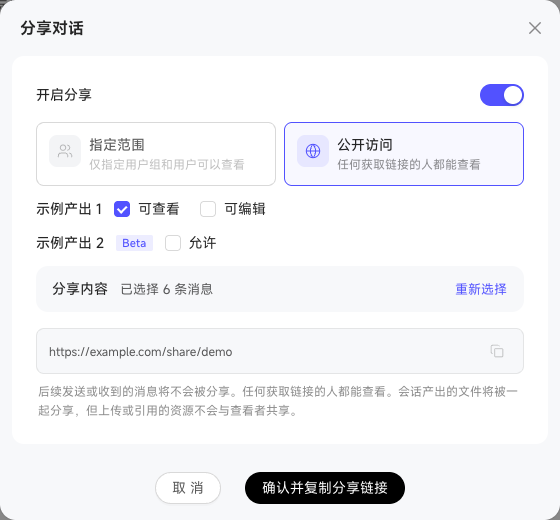
- Open the sharing entry for the current chat, then choose a public link or grant access only to specified people and user groups.
- Choose whether to share the entire chat or selected messages. If the result contains Output files, set the recipient’s view or edit permission.
- Turn on “Allow Follow-up Chat” if needed, confirm the settings, and generate the shared content.
When follow-up chat is allowed, recipients continue from the shared text using their own identity and permissions; they do not inherit the sharer’s business permissions. Messages they send afterward belong only to their own new chat and are not written back to the original sharer.
A follow-up chat carries the shared text context but does not automatically carry files or resource references from the original chat. To continue working with those resources, recipients must add context again using content they are authorized to access.