
Create a Data Collector
How It Works
The backend Data Connectors page (under the "Platform Management" group) lists all current connectors. Each connector has:
- Connector Type: Currently only supports "WeCom Conversation Archive"
- Status: Running / Syncing / Error
- Last Sync: Time of last successful pull
Click to enter the detail page with four tabs:
| Tab | Content |
|---|---|
| Configuration | Connector's basic parameters (credentials encrypted, displayed as ●●●●●●) |
| Run Logs | Each sync's time, trigger method (manual/scheduled), status, messages pulled, new groups, new members, duration |
| Group Chat List | All synced group names + group conversation IDs + last update time |
| User List | All synced member names + user IDs + last update time |
Creating a WeCom Conversation Archive Connector
You need two sets of credentials—one for pulling messages, one for retrieving group names/contacts:
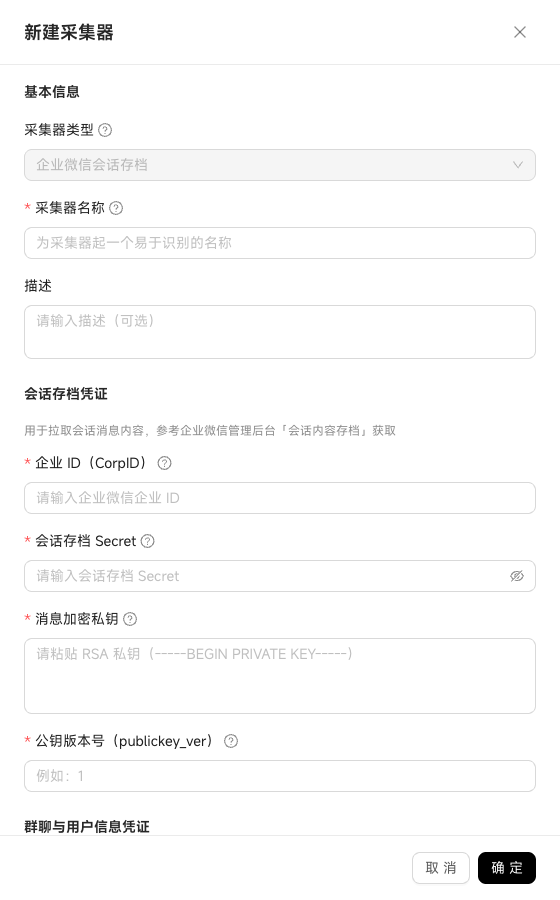
Choose an easily identifiable connector name (e.g., "Sales Customer Group Archive") + optional description.
Get the "Corp ID" from WeCom Admin Console → My Enterprise → Enterprise Info;
Get the "Conversation Archive Secret" from Admin Tools → Conversation Content Archive, configure public key to get "Public Key Version" and your maintained "RSA Private Key."
This credential set can only decrypt pulled conversation content—it cannot look up group names or member names.
Create a self-built app in WeCom → get the Secret from app details → authorize the app in "Customers & Partners → Customer Contact → API."
This Secret is used to get "external customer group names, owners, member lists" and "enterprise directory."
If not filled, message parsing can only retrieve group IDs and user IDs (numeric strings), without displaying group names and member names.
WeCom conversation archive uses "full pull"—the first sync automatically captures all external customer group IDs + group names + directory members. Subsequent syncs follow the system's default incremental schedule.