
Manage Credit
How it works
The Credit Management page in the Admin Console has two tabs:
[使用明细] [下发明细]| Tab | Content |
|---|---|
| Usage Details | Individual consumption records filtered by user, type, and time |
| Allocation Details | Current balance, purchase history, and each purchase's amount, consumption, source, and expiration |
Credit Quotas is a separate page under Platform Management → Usage, with Personal and Space tabs. It determines how much each member and space can spend per cycle, separately from the organization's Credit balance.
Allocation Details: Balance Transactions
The top of the page displays the Credit Balance: all unspent, unexpired Credit.
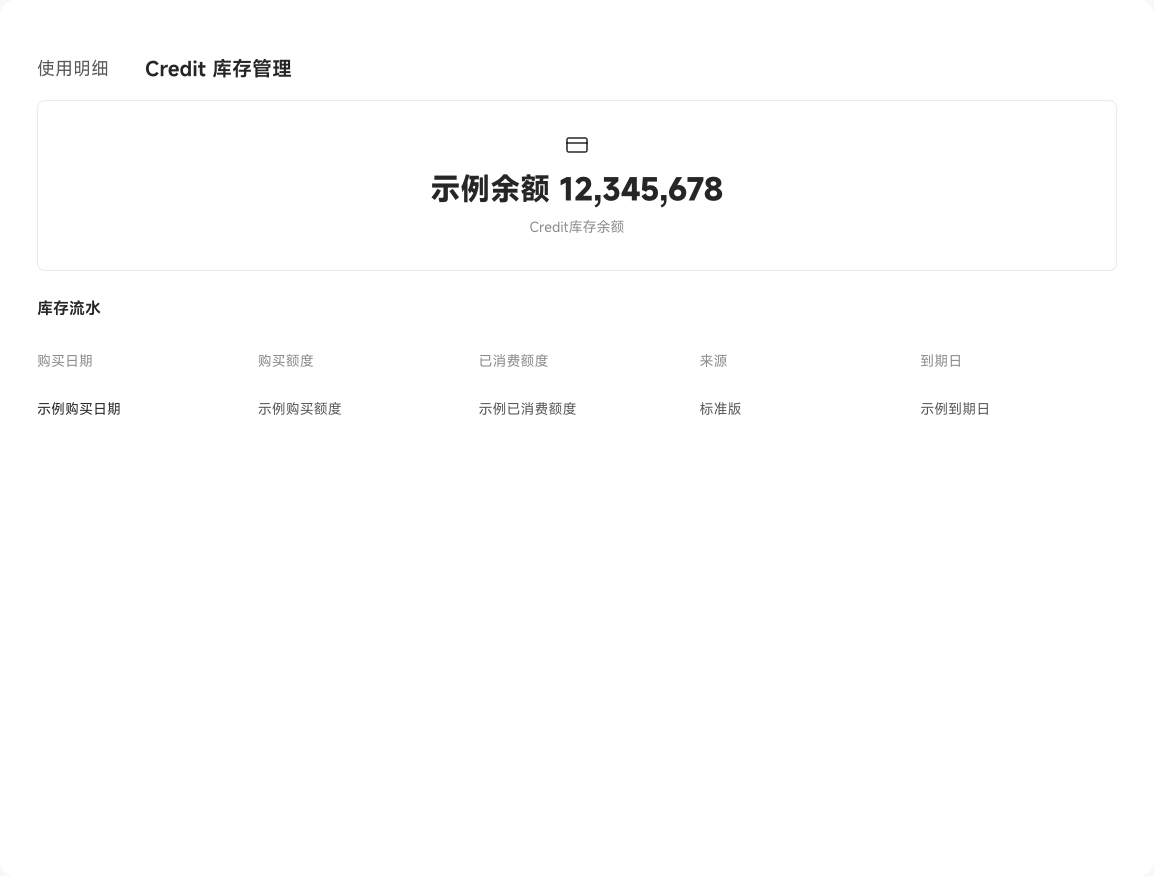
The Balance Transactions table lists one purchase per row:
| Field | Meaning |
|---|---|
| Purchase date | When the Credit was added |
| Purchased amount | Total amount, such as 100,000 |
| Consumed amount | Amount already used, such as 73,251 |
| Source | Standard plan or add-on pack, distinguishing subscription Credit from additional purchases |
| Expiration date | When this Credit expires; any unused amount is lost afterward |
Credit is consumed earliest expiration first, avoiding waste such as an add-on pack expiring while Standard plan Credit remains.
Usage details: trace every transaction
Filter usage details by date range:
[今天] [最近7天] [最近30天]Search by username using "Select Username to Search" to inspect individual records:
| Field | Meaning |
|---|---|
| Consumption time | Precise to the second |
| Quota charged | The quota actually deducted: personal usage charges the individual's quota; space usage charges the associated space |
| Credit consumer | The initiating or attributed member, space, or Digital Worker. Usage without a specific owner, such as space memory updates, shows Unattributed Consumer |
| Consumption type | Chat, Skill shortcut call, knowledge parsing, scheduled task, evaluation, or PPT template extraction |
| Credit amount | Credit consumed by the operation |
| Deduction source | The balance entry used: Standard plan, add-on pack, or promotional Credit |
To investigate a sudden 5,000-Credit spend, sort by time descending and identify the relevant user or Skill.
Under Personal Settings > Usage and Billing, each personal usage record offers "Locate", opening its source in a new tab: the Chat message, Skill execution details, source file in the personal Knowledge Base, or scheduled task execution details. Intelligent queries and Wiki generation also link to their source locations. Untraceable usage, such as inspiration generation or memory updates, has a disabled Locate action.
Analyze Credit through Chat
You can also ask a position questions such as "Who used the most Credit this month?" or "How much remains in the add-on pack?" The system queries recent data and returns structured analysis.
Handle Credit Alerts
When consumption reaches 80%, 90%, or 100%, an alert is sent for the highest threshold currently reached. Organization balance alerts go to super administrators and system administrators, personal quota alerts go to the corresponding members, and space quota alerts go to space creators.
Enabling or adjusting a quota also triggers an alert if usage already meets an alert threshold. No quota alerts are sent if the quota is disabled or its limit is zero or less. After receiving an alert, check the current balance or quota usage. Historical alerts reflect past conditions and do not mean current usage still exceeds the threshold.