
Manage Credit Quotas
Personal quotas: limit usage by member
Balance management tracks how much Credit the organization has; quota management determines how much each member and space can use. Open "Platform Management → Usage → Credit Quota Management", which has Personal and Space tabs.
Personal quota control
The page has a master enable/disable switch:
- Disabled (default): No per-member limits, encouraging exploration of AI capabilities. Everyone shares the organization's Credit balance.
- Enabled: Each member has a periodic limit; usage pauses when it is reached.
After enabling, set a Default Periodic Limit, such as 1,000 Credit per cycle. New members inherit it automatically.
Quota cycle
The quota cycle follows the account expiration date, with the next cycle starting the following day. For example, if the subscription expires on June 30, the next monthly cycle begins July 1.
The top of the page shows:
- Current Quota Cycle:
2026-06-01 ~ 2026-06-30 - Next Reset:
2026-07-01
Member table
The quota table below is paginated by member:
| Column | Meaning |
|---|---|
| Member | Username |
| User group | Groups the member belongs to |
| Periodic limit | The member's limit, such as 1,000, or Unlimited |
| Cycle consumption | Credit consumed in the current cycle |
| Progress | Percentage shown as a progress bar |
| Status | Normal, Near Limit, or Over Limit |
Filter by Near Limit to identify members who may be running large tasks and discuss temporary increases proactively.
Edit individuals or in bulk
| Action | When to use it |
|---|---|
| Edit one member | Click Edit on a row to adjust the member's periodic limit, or choose Unlimited to exempt them |
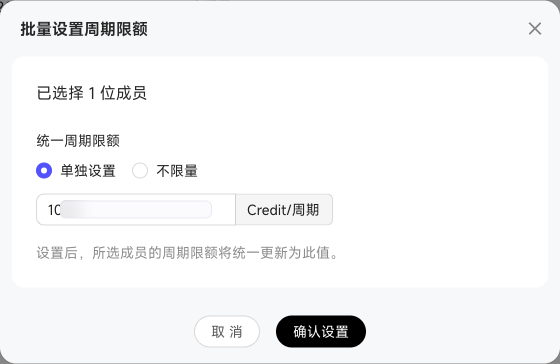
| Bulk edit | Select multiple members and set the same limit, useful for increasing a team's allowance |
The dialog provides reference information: Average Consumption over the Past Three Months and Consumption This Cycle.
Space quotas: limit usage by space
Switch to the Space tab to limit Credit consumption by space.
Space quota control
This tab also has a master enable/disable switch:
- Disabled (default): No per-space limits. All spaces share the organization's Credit balance.
- Enabled: Each space has a periodic limit. Paid execution pauses when the quota is exhausted.
Set a Default Periodic Limit, such as 1,000 Credit per cycle. New spaces inherit it automatically.
Space table
The quota table below is paginated by space:
| Column | Meaning |
|---|---|
| Space | Space name |
| Creator | The space's creator |
| Periodic limit | The space's limit, such as 1,000, or Unlimited |
| Cycle consumption | Credit consumed in the current cycle |
| Progress | Percentage shown as a progress bar |
| Status | Normal, Near Limit, or Over Limit |
Click Edit on a row to adjust a space's periodic limit or select Unlimited. Select multiple spaces to set the same limit in bulk.
Quota statuses
| Status | Threshold | User experience |
|---|---|---|
| Normal | < 80% | No notification |
| Near Limit | 80%–100% | A yellow banner appears at the top |
| Over Limit | ≥ 100% | Usage pauses until an administrator increases the limit or the next cycle begins |
Chats and Skill calls are blocked for members over their limit, with the message "Your personal Credit quota is exhausted."
Consumption attribution
The scenario determines whose quota is deducted and who is recorded as the consumer:
| Scenario | Credit consumer | Quota deducted from |
|---|---|---|
| Personal Chats, personal tasks, and similar work | Individual | Individual |
| Space work items | Message sender | Space |
| Space IM group chats | Associated space | Space |
| Space workflows and nodes | Workflow node owner / Digital Worker | Space |
| Space resources | Uploader | Space |
| Space automated tasks | Task creator | Space |
| Space memory updates | Unattributed consumer | Space |
Consumption examples
| Scenario | Approximate consumption (reference only; actual billing applies) |
|---|---|
| A regular Chat | Tens to hundreds |
| A data-query Skill call | Tens to over a thousand |
| A scheduled task with data queries and report generation | 1k–5k |
| A Knowledge Base search | Around a dozen |
| A complex cross-object analysis | 1k–20k |
For precise billing rules, consult the product billing documentation and confirm its latest version with Product Marketing.