Create Custom Skills
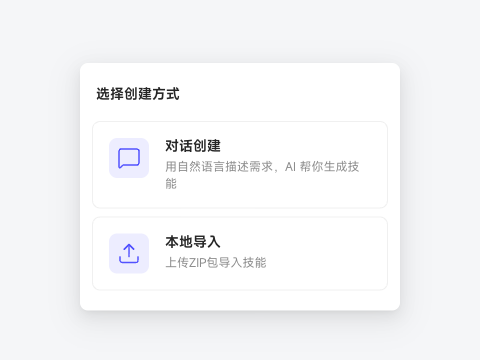
If built-in Skills do not cover your scenario, create your own. There are two methods:
Method 1: Create through Chat (recommended for beginners)
Describe your requirements in natural language, and AI generates SKILL.md for you.
In Capability Center → Skills, click Personal Skills and choose Create through Chat.
Explain the use case, input materials, and desired result. For example: “Review a sales script draft and suggest improvements to the opening, value proposition, objection handling, and closing.”
Read the generated Skill and add requirements through the Chat. Save it once the steps and Output meet your expectations.
Method 2: Import locally (recommended for advanced users)
Import an existing Markdown Skill file or a ZIP package with supporting files. A single .md file can have any filename; a ZIP package must contain SKILL.md at its root.
Click Personal Skills, choose Import Locally, and upload a .md or .zip file.
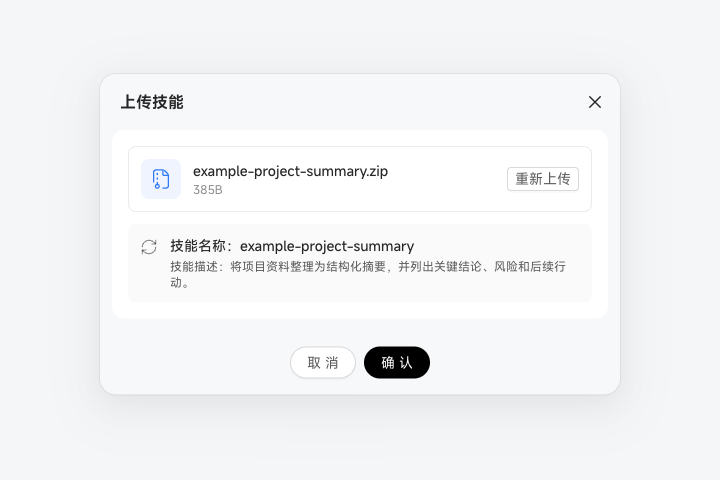
Check the name, description, and tags. If the file lacks complete YAML information, fill in the missing details on the confirmation page and continue without rewriting the local file.
Click Confirm after checking that the information matches the Skill's purpose. Choose Upload Again to replace the file.