
Manage Personal Memory
Personal memory stores information used in future Chats, such as communication preferences, work habits, project background, and feedback on responses. Digital Workers can capture this information automatically from Chats, and you can also add it manually.
View and adjust memory
- Open the avatar menu and go to Personal Settings > Personal Memory.
- In Captured Memory, view information identified from Chats. In Added Memory, view manually saved information.
- Add information you want retained over time. Delete information that is inaccurate, outdated, or no longer wanted.
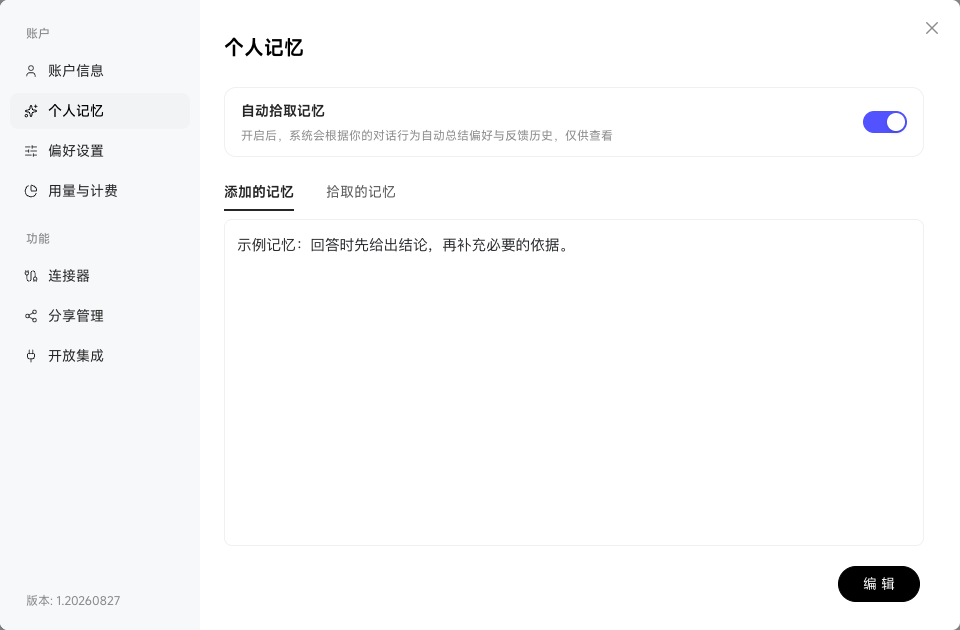
Turning off automatic capture prevents new Chats from generating memories automatically. Existing memories must still be managed individually in the list. Personal memory affects future responses, so update it when your responsibilities, project stage, or preferences change.
Maintain memory by source
Click Edit in Added Memory to maintain long-term background information and preferences, then save. Canceling discards the changes.
Captured Memory is grouped into Your Preferences, Feedback History, External References, and Other. Automatically captured information is available for viewing; edit manually maintained information in Added Memory.