
Creating a Data Source
Accessing Data Source Configuration
Go to Admin Console > Platform Management > Data Source Configuration. The page displays data sources as cards showing the name, type, creation time, and Semantic Center usage status, and provides search, refresh, create, and edit operations.
Creating a Data Source
- Click Create.
- Enter the Data Source Name and select the Data Source Type; if the page shows Database Version, select it based on your business instance or use the system's fixed version.
- Fill in the connection configuration according to the data source type.
- Click Test Connection. Once the connection succeeds, click OK to save.
We recommend using a dedicated account with read-only access to business data, and make sure the network where WinNexo runs can reach the database address and port.
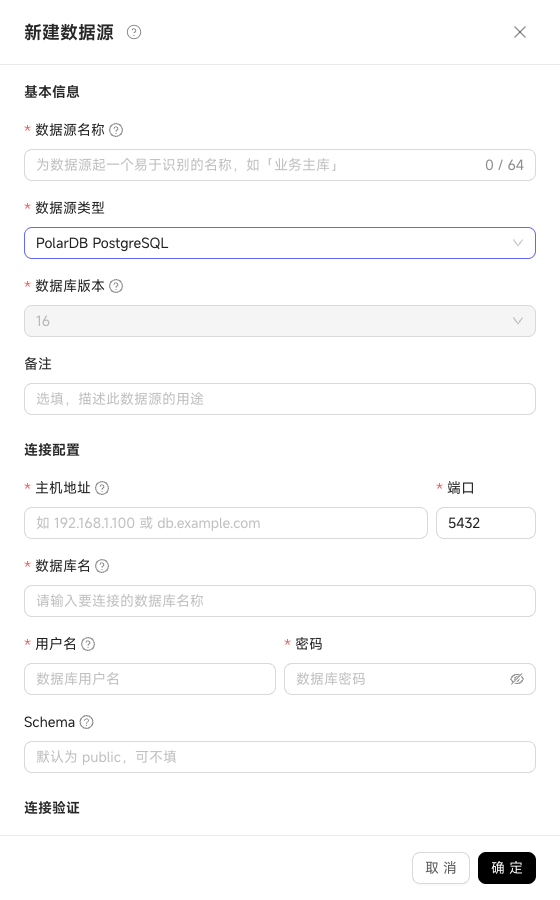
Relational Data Sources
Except for Oracle, relational data sources use the following common configuration:
| Configuration | Instructions |
|---|---|
| Host | A domain name or IP address where the database is reachable |
| Port | The database service port; a default port is filled in after selecting the type |
| Database Name | The name of the Database to connect |
| Username | The database account used to connect and read metadata and business data |
| Password | The database account password |
| Schema | Available for PostgreSQL, PolarDB PostgreSQL, ADB for PostgreSQL, SQL Server, Hologres, etc.; if left empty, the page default or the database's default Schema is used |
Oracle
In addition to host, port, username, and password, Oracle also requires:
| Configuration | Instructions |
|---|---|
| Connection Method | Select Service Name or SID based on the instance configuration |
| Service Name / SID | Enter the instance identifier corresponding to the selected connection method |
| Schema | Enter the Schema/Owner to access |
OSS
OSS uses direct connection and requires the Endpoint, Region, Bucket, AccessKey ID, and AccessKey Secret.
Direct Connection & Reverse VPC
Relational data sources support the following connection methods:
| Connection Method | Applicable Scenario |
|---|---|
| Direct connection | The database address is directly reachable from the WinNexo runtime environment |
| Reverse VPC | The database in a public cloud environment resides inside an Alibaba Cloud VPC intranet |
When using reverse VPC, turn on the VPC switch on the page, enter the reverse VPC endpoint instance ID, and follow the on-page guide to complete the endpoint configuration. A reverse VPC data source must pass Test Connection before it can be saved.
Editing & Deleting
Click Edit on a data source card to update its name, remarks, and connection configuration. The data source type cannot be changed when editing; to switch types, create a new data source and migrate the semantic graph bindings.
Before deleting a data source, all semantic graph references must be removed first. A data source still referenced by a graph cannot be deleted.
Data Source Object Support Matrix
| Data Source | Supported Versions | Tables | Views | Materialized Views | Foreign Tables |
|---|---|---|---|---|---|
| PostgreSQL | 17 | ✅ Supported | ✅ Supported | ✅ Supported | ✅ Supported |
| PolarDB for PostgreSQL | 16 | ✅ Supported | ✅ Supported | ✅ Supported | ✅ Supported |
| Microsoft SQL Server | No configuration required | ✅ Supported | ✅ Supported | ✅ Supported | ✅ Supported |
| ADB for PostgreSQL | 6.x, 7.x | ✅ Supported | ✅ Supported | ✅ Supported | ✅ Supported |
| MySQL | 5.7, 8.0 | ✅ Supported | ✅ Supported | ❌ Not supported | ❌ Not supported |
| PolarDB for MySQL | 8.0 | ✅ Supported | ✅ Supported | ✅ Supported | ✅ Supported |
| Doris | 3.x | ✅ Supported | ✅ Supported | ✅ Supported | ✅ Supported |
| SelectDB | 4.x | ✅ Supported | ✅ Supported | ✅ Supported | ✅ Supported |
| StarRocks | No configuration required | ✅ Supported | ✅ Supported | ✅ Supported | ✅ Supported |
| ClickHouse | No configuration required | ✅ Supported | ✅ Supported | ✅ Supported | ✅ Supported |
| Oracle | 11.2 | ✅ Supported | ✅ Supported | ✅ Supported | ✅ Supported |
| Hologres | No configuration required | ✅ Supported | ✅ Supported | ✅ Supported | ✅ Supported |
| ADB for MySQL | 5.0 | ✅ Supported | ✅ Supported | ✅ Supported | ✅ Supported |
| OSS | No configuration required | ❌ Not supported | ❌ Not supported | ❌ Not supported | ❌ Not supported |