
Configure IM Channels
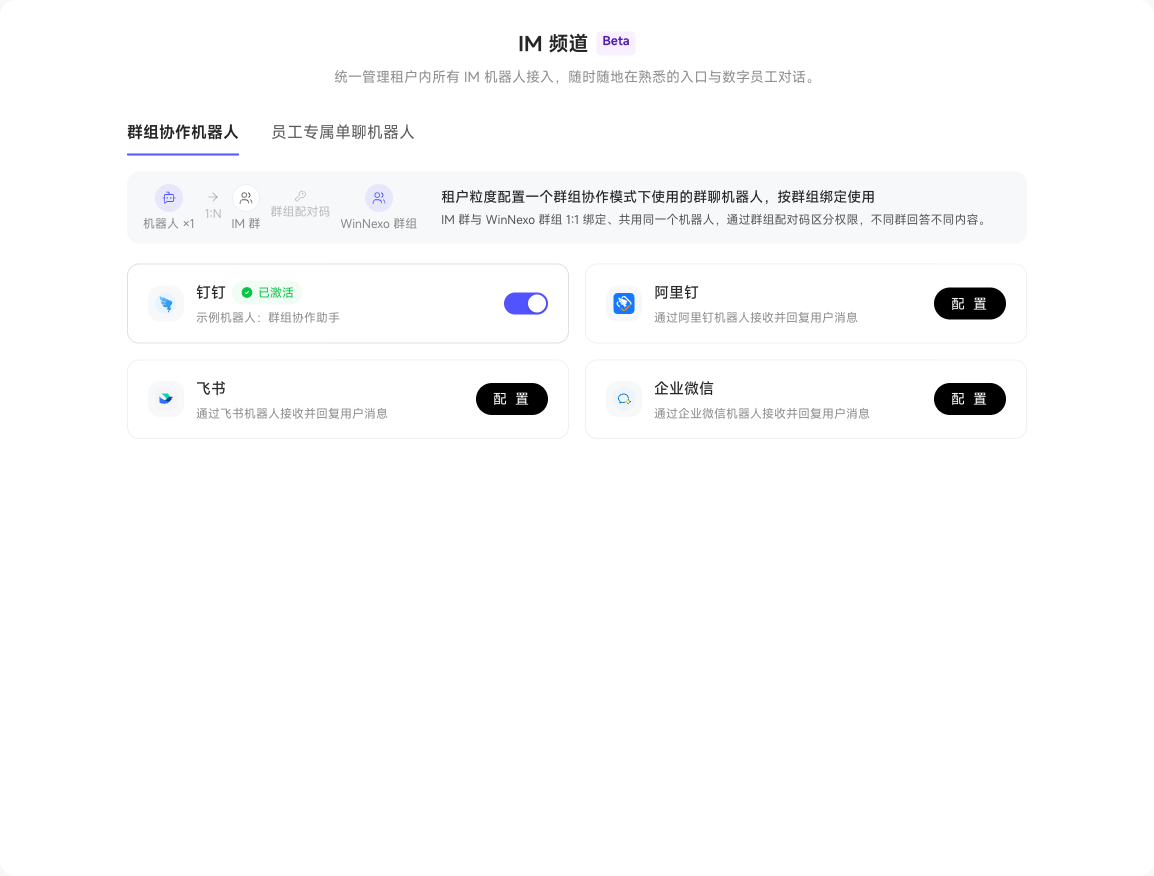
"IM Channels" provides three tabs: "Notification Bots", "Collaboration Space Bots", and "Position-Specific Direct-Message Bots", for personal work notifications, space group chats, and position direct messages respectively. See IM Capability Comparison for channel capabilities and limitations.
Notification Bots
Configure DingTalk, Ali DingTalk, Feishu, or WeCom in "Notification Bots". Members must also bind their IM accounts under "Personal Settings → Notification Bot Pairing".
Receive and Handle Personal Work Notifications
After pairing, members can receive their To-Dos and @ mentions from work items they are authorized to view in IM. Use bot cards or reply commands supported by the channel to process To-Dos; results synchronize to the system's To-Dos.
Notification bot pairing is for personal notifications. Space group chats require separate group bot pairing.
Collaboration space bots
Configure one group bot per channel for Collaboration mode. DingTalk, Ali DingTalk, Feishu, and WeCom are supported. One bot serves multiple groups. IM groups bind 1:1 to WinNexo spaces, with space pairing codes distinguishing permissions so different groups receive answers within their own scope.
Unconfigured channel cards show "Configure". Open it, follow the setup guide to create a bot app on the IM platform, and enter its credentials, such as DingTalk Client ID and Client Secret. After saving, the card shows "Activated", the bot name, and an enable switch.
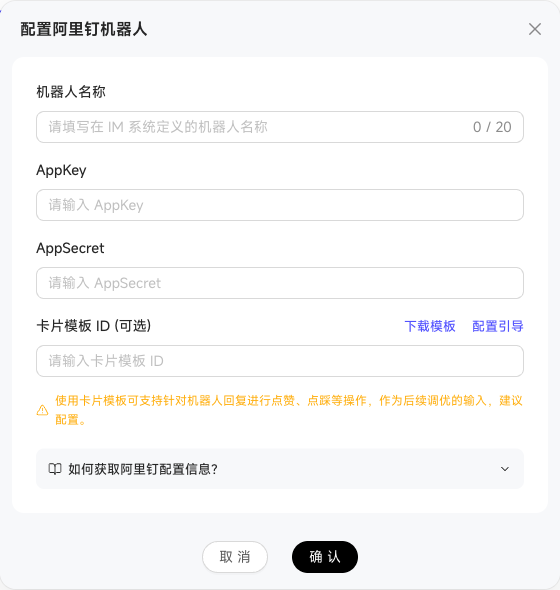
Saved credentials are read-only by default. To replace them, click "Unbind and Replace" and confirm. Linked spaces or users are automatically unbound and must pair again.
The WeCom dialog adds Deployment Type below "Bot Name", with "Standard WeCom" selected by default or "Dedicated WeCom" available. Dedicated WeCom adds two settings:
| Setting | Instructions |
|---|---|
| WebSocket URL | Required, such as wss://wecom.example.com/ws. Obtain it from the intelligent bot's Configuration Details page |
| Server CA Certificate (PEM) | Optional for certificates issued by public CAs; required for self-signed certificates. Upload a certificate file or paste its contents |
Certificate uploads support .pem, .crt, .cer, .der, .p7b, .p7c, and .cert files, up to 256 KB each.
This bot does not support conversations immediately after configuration. Generate a pairing code in the space's IM Channel settings and bind the group first. Members can then @ the bot, whose answer permissions match the linked space.
Position-specific direct-message bots
This tab lists positions with at least one bound channel bot and shows binding status by channel. Configuration remains on the position page. Each position has a dedicated direct-message bot. User pairing codes distinguish permissions; conversations stay in direct messages and cannot switch positions.
The table shows Position, DingTalk, Ali DingTalk, Feishu, WeCom, Paired Users, and Actions. Channels show Enabled with a bot name, or Not Configured. Paired Users lists counts by channel. "Go to Configuration" opens the position's channel settings; "Go to Position Management" at the top opens the position list. Both require the corresponding view or management permission.