
Add Knowledge Sources
Choose a Knowledge Source
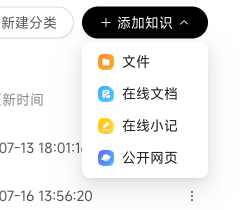
In an enterprise Knowledge Base you can manage, add these six source types from Enterprise Knowledge Base in the user interface or Knowledge Base in the Admin Console:
| Source | Suitable Materials |
|---|---|
| Meeting Recordings | Live recordings, local recordings, and Feishu, DingTalk, or AliDing meeting records. |
| Local Files | Local files or folders containing documents, spreadsheets, images, and other materials. |
| Online Documents | AliDing, DingTalk, or Feishu online documents. |
| Chat History | AliDing, DingTalk, Feishu, or WeCom chat history. |
| Online Notes | Text such as FAQs, glossaries, and process instructions. |
| Public Webpages | Body text from publicly accessible webpages. |
Before collecting chat history, complete the app authorization or collector configuration required by the selected channel.
Each knowledge item has its own Parsing Status:
| Status | Meaning |
|---|---|
| Waiting | Uploaded and queued for parsing |
| Processing | Chunking and vectorizing |
| Success | Ready for Digital Worker retrieval |
| Failed | Parsing failed; click Continue Parsing to retry |
Filter the list by parsing status to find failed items or those still queued.
View WeCom Chat Knowledge
Open collected WeCom chat knowledge to see Summary, Messages, Chat Files, and Chat Images. Messages displays image, voice, video, file, and mini program messages. Once a complete voice transcript is available, it appears after the corresponding message. For playback, downloads, and consolidated browsing, see View WeCom Multimedia.
External Knowledge Bases: Dataphin
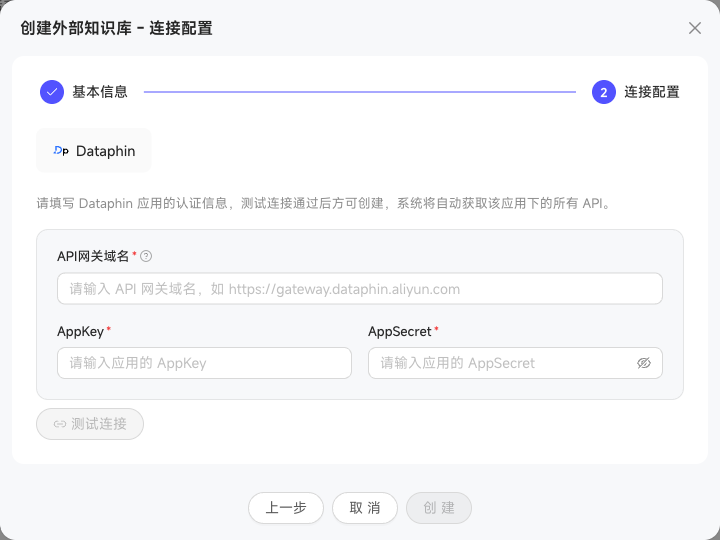
You can also create an External Knowledge Base connected directly to Dataphin. Retrieval calls Dataphin's knowledge service in real time without moving files into WinNexo. First enter Basic Information (name and description), then Connection Configuration (Dataphin AppKey, AppSecret, and API address). The resulting external Knowledge Base can be associated with Digital Worker roles for retrieval in chats.
WinNexo Help Docs: Built-in Knowledge Base
WinNexo Help Docs is a system Knowledge Base fixed at the top of the list. It contains official usage documentation for Digital Workers to retrieve when answering questions. Maintained by the system and marked Official, it is read-only: you cannot add knowledge, create categories, edit, or delete. Only documents that failed parsing can be retried.
In standalone deployments, this Knowledge Base initially remains an uninitialized placeholder. An administrator must initialize it before documents are parsed. Initialization applies per tenant and consumes no Credit. Other deployment environments are ready to use without manual initialization.