
Configure Row-Level Permissions
How it works
Three pages manage different permission dimensions:
| Page | Purpose |
|---|---|
| User Property Management | Maintains user attributes such as region, employee ID, department, and level, which serve as inputs to row-level permissions |
| Row-Level Permission Management | Defines the data, rules, and authorized users to control which rows are visible |
| Column-Level Permission Management | Controls which property values are visible; see Column-Level Permissions |
Row-level rules are automatically injected into SQL or query conditions when a position queries data. Users do not see this, but unauthorized queries are silently blocked.
Row-level permissions: inject rules into queries
The management page lists one rule per row:
| Field | Meaning |
|---|---|
| Permission name | Business name, such as "Sales access customers by region" |
| Controlled object type | The data type governed by the rule, such as Customer |
| Source graph | The semantic graph containing the object |
| Operation time | Last modification time |
| Creator | Who created the rule |
Click Add to open the rule editor.
Rule editor: four parts of a rule
Enter a permission name and description, select the source graph and controlled object type, and optionally select related object types and Analysis Views.
Each rule grants specified people access to rows that meet a condition. Combine multiple rules using intersections or unions.
What happens when a user matches no rule and is not in the authorized user list?
Choose "No Permissions" (the safest default) or "Access to All Rows" (open access for everyone).
Changes take effect immediately and apply automatically whenever any position queries this object.
Two authorization methods
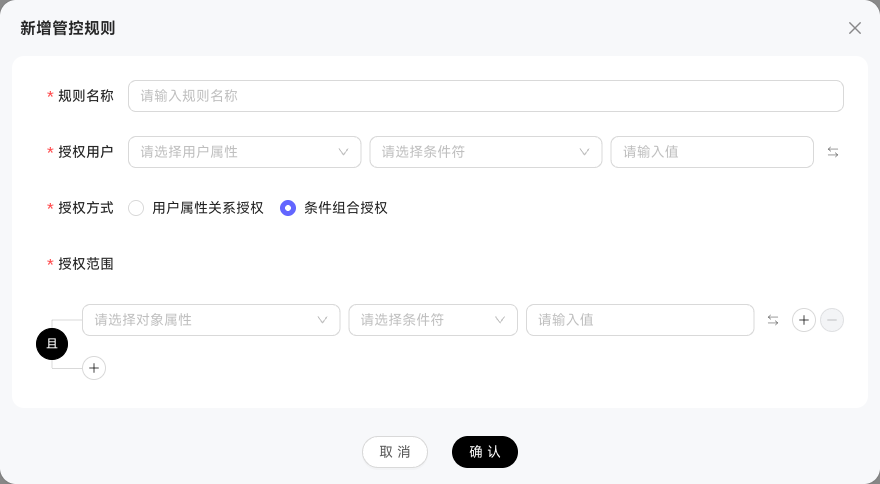
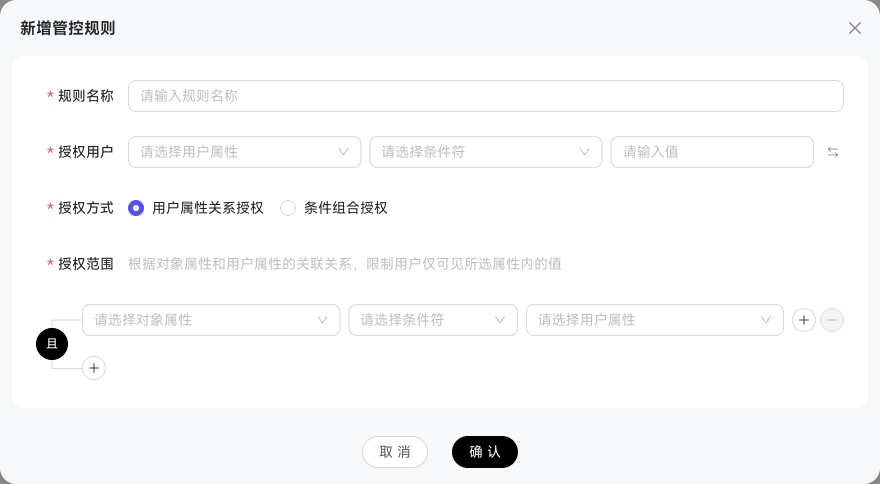
The authorization method is the core of each rule:
| Method | Configuration | When to use it |
|---|---|---|
| Combined-condition authorization | Filter by object properties, such as 客户.区域 = '华南', and authorize specific users or groups | Static rules with fixed recipients |
| User-property relationship authorization | Relate object properties to user properties, such as 客户.归属销售 = 用户.工号 | Dynamic rules that filter by user identity |
The latter lets one rule serve all users, with each user's data scope determined by their properties.
Condition operators
Row-level permissions support 12 condition operators:
=  ≠  in  not in  like  not like
>  ≥  <  ≤  is null  not null
Enter values directly, separate multiple values with commas, switch to a dropdown of object property enumeration values, or use bulk editing to paste multiple values, up to 10,000 characters.
Field type validation
When linking object and user properties, the system checks that types match, such as text to text or number to number. Incompatible options are disabled with "Field types do not match; selection unavailable."